
Your needs, this model
Does it fit your priorities?
Will the RC21-0111 fit my 15-inch laptop?
Razer says this stand supports laptops up to 15 inches, but the FAQ does not list compatible chassis dimensions or exact computer models. Treat the diagonal as a screening limit, not a guarantee: compare your laptop's width, depth, feet, case and vent locations with the exact offer and ask the seller for the model suffix if it is available.
Explore this need in the finder →Does the plain Razer Laptop Stand add USB ports or Chroma lighting?
No. Razer's RC21-0111 FAQ explicitly says it has no USB extension or hub and no Chroma lighting. Do not confuse it with RC21-01110, which has three USB 3.0 ports and a Chroma light bar, or RC21-0168, the separate USB-C/HDMI/Chroma V2 model.
Explore this need in the finder →Can I adjust its height or angle after placing the laptop?
The manufacturer describes an 18-degree inclination, not an adjustable range or positions. The reviewed sources do not establish a height-adjustment mechanism, so this is not a documented match for an essential height adjustment. Check the screen and keyboard positions with the exact laptop and desk before deciding whether a fixed incline works for your setup.
Explore this need in the finder →The Razer Laptop Stand RC21-0111 is the plain, fixed-incline stand—not the similarly named Razer Laptop Stand Chroma or Chroma V2. Razer’s support article lists an aluminum build, an 18-degree inclination, Black and Mercury White options, and support for laptops up to 15 inches. It also explicitly distinguishes this model by the absence of Chroma lighting and a USB hub. The simple feature set is its point; the sparse fit documentation is its main drawback.
A fixed 18-degree platform, not an adjustable riser
Razer documents one 18-degree incline, not a height range or a set of selectable positions. The official image shows a rigid raised platform and support base rather than the two-joint construction of Razer’s newer Adjustable Laptop Stand. Treat RC21-0111 as a fixed-angle desktop support: if you need to change display height or angle for different users, chairs or desk tasks, its published specification does not establish that ability. The angle figure is not a promise of a particular screen height; laptop thickness, base shape and where the chassis rests all affect the final display position.
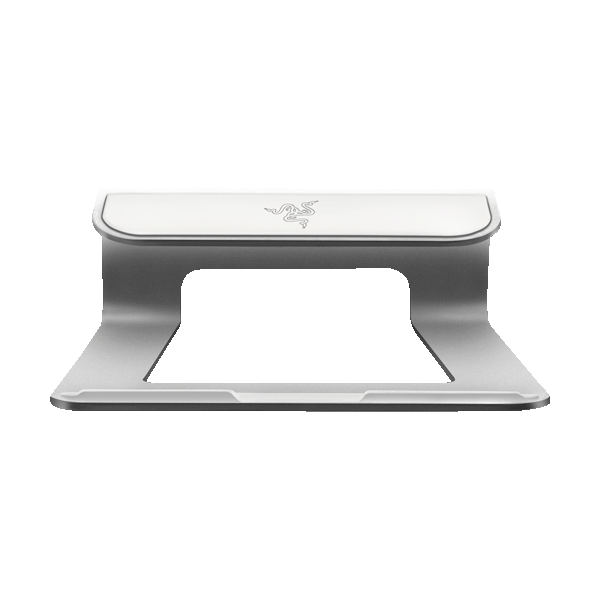
The documented material is aluminum, and the support page identifies Black and Mercury White finishes. I found no manufacturer-listed dimensions, weight, load rating or chassis width/depth envelope for this model. That means its exact desk footprint and the laptop’s contact points need checking against the specific item and computer, rather than estimating from the product photograph.
“Up to 15 inches” is a useful limit, not a fit chart
The Razer FAQ says the stand supports laptops up to 15 inches, but it does not list compatible computer models or show how the platform relates to chassis length, depth, feet, case edges or ventilation openings. Screen diagonal alone cannot answer those questions. Before ordering, identify the exact laptop model and compare its base with the exact stand; if the seller cannot provide the right part number or a clear offer photo, treat compatibility as unresolved. The public Razer FAQ names the product model but does not map Black and Mercury White to U.S. retail suffixes.
There is one official product image in this review, and it depicts Mercury White. It confirms the product’s visual identity but cannot establish that a Black offer has identical packaging, part suffix or condition. The European conformity declaration from 2020 lists regional R3M1 series codes, but those are not evidence of the U.S. retail codes; I have not copied them into this U.S.-market record.
Choose it only if the plain design is enough
RC21-0111 has no USB extension or hub and no Chroma lighting, according to Razer’s own support answers. Those are explicit differences from the original Laptop Stand Chroma RC21-01110, whose three USB 3.0 ports and light bar add a connection-and-lighting package, and from the earlier Chroma V2 RC21-0168, which has a USB-C-connected hub, HDMI and underglow. The newer Adjustable Laptop Stand is another distinct design, with articulated height and tilt joints. Similar names are not evidence that these models share a configuration or fit envelope.
For a laptop already used with its own charger and peripherals, the plain model avoids paying attention to a hub that the manufacturer says it does not have. But if those added connections or lighting matter, the neighboring Razer models solve different tasks; compare their model codes rather than relying on a general “Razer stand” description. I found no support for using RC21-0111 on a lap, folding it for travel, swiveling its base, or adjusting its height. Where the documentation does not establish a capability, this comparison does not treat it as a match.
Current documentation is not current stock
Razer’s U.S. support finder still lists RC21-0111 separately from the two Chroma model codes and the Adjustable Laptop Stand. Its FAQ was updated in February 2026, so the identity and stated features remain traceable. However, the current U.S. Laptop Accessories shop snapshot contains 22 products and does not list this model. I classify it as an earlier-model reference rather than claiming it is currently sold; that limited shop observation does not prove that every U.S. seller has no remaining, used or open-box units. No price, stock or seller condition is established here.
Before considering an offer, confirm the RC21-0111 model code, the finish, the exact U.S. variant suffix if the seller provides one, and the actual package and return terms. Then compare the laptop’s underside with the stand’s contact area and confirm that a fixed 18-degree angle suits your seated setup. This is a manufacturer-documentation assessment, not a hands-on fit check or a claim of personal use, ownership, testing or measured ergonomic benefit.
Who should keep it on the shortlist
The plain RC21-0111 is relevant if you are comparing a specific earlier Razer stand, want a fixed 18-degree aluminum platform, and do not require a documented hub, Chroma lighting, height adjustment, travel fold or swivel. Its up-to-15-inch statement helps screen an offer, but does not replace an exact chassis check. If you want adjustability or additional connections, compare the distinct Razer models above; if the exact model suffix and laptop fit cannot be established, do not let the brand name stand in for that evidence.
Key specifications
Key details at a glance
| Main material | Aluminum |
|---|---|
| Height-adjustable | No |
| Supported placement | desk |
Use the exact model’s instructions for operating limits, supplied equipment and version differences.
Sources for this review
Sources for this assessment
Compare the setup, not just the silhouette
Use the finder to compare reviewed stands against the way you work and the features you actually need.