
Your needs, this model
Does it fit your priorities?
Can the Chroma V2 replace a general-purpose USB-C dock?
It combines a USB-C host connection with one downstream USB-C data/video port, two USB-A data ports and HDMI 2.0, but the manufacturer's compatibility list is limited to named Razer Blade and Book models. The USB-C video path is specified as DisplayPort 1.4 Alt Mode, and the support FAQ gives separate single- and dual-display limits. Confirm that the exact laptop supports the required host mode and that the hub's port mix covers your peripherals; the stand is not documented as a universal dock.
Explore this need in the finder →Does a 17-inch label prove that my laptop will fit the Chroma V2?
No. Razer's support page names 13-, 15- and 17-inch Blade examples, then lists five specific compatible Razer Blade/Book families. It does not establish fit for every laptop sharing those screen diagonals. Compare the exact model and chassis dimensions with the stand and verify that the USB-C connection and video mode are supported before treating the model as a fit.
Explore this need in the finder →Will the Chroma V2 raise the laptop to a height I can adjust, or fold for travel?
Razer specifies a fixed 18-degree incline and gives product dimensions, but no height-adjustment mechanism or folded-for-travel configuration. Its listed 71.2 mm height is a stand dimension, not an adjustable screen-lift range. If height adjustment or a documented folding form is essential, compare a model whose maker lists that mechanism rather than inferring it from the raised platform.
Explore this need in the finder →The Razer Laptop Stand Chroma V2 is a fixed 18-degree laptop platform with a USB-C-connected hub and Chroma underglow, not an adjustable riser or a generic stand that happens to have a USB port. Razer introduced it in the United States in 2021. The current US stands collection now presents other stand models, while the Chroma V2 remains in Razer's support index; treat it as an earlier model and do not mistake an active support page for a current stock promise.
One angle, with desk connectivity built in
Razer specifies a stamped-aluminum frame inclined at 18 degrees. The support material does not describe a height slider, adjustable hinge or alternative angle. Its published 71.2 mm height is an overall product dimension, not a stand-lift range or a promise about where a particular screen will sit. The design fits a stable desk arrangement where the fixed display position is acceptable; if the user, chair or desk changes, the stand has no documented mechanism to follow.
The official support image shows the V2 platform from the side, including its Chroma underglow, but it does not demonstrate an individual laptop fit. Razer lists the stand at 243 by 212 by 71.2 mm and 592 g. Those figures help with footprint planning, but they do not establish working clearance for every desk, cable bend or laptop base. The support page separately names computer models; screen size alone is not a substitute for that list.
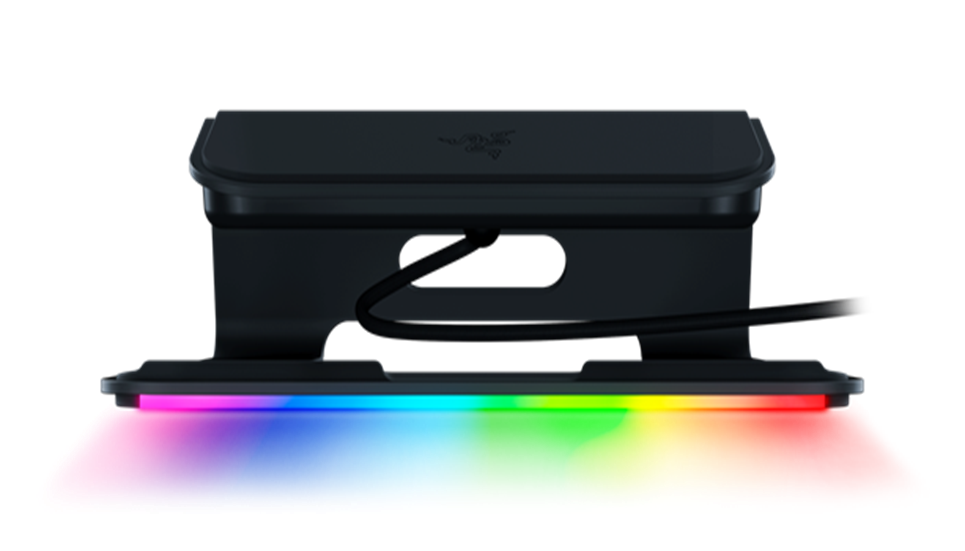
Compatibility is a specific list, not a 17-inch universal fit
Razer's support FAQ says the stand supports 13-, 15- and 17-inch Razer Blade laptops and names five families: Blade Stealth 13, Razer Book 13, Blade 15 Advanced, Blade 15 Base and Blade Pro 17. That is more actionable than a broad screen diagonal, but it still calls for an exact-model check. A device with the same screen size can have different width, depth, feet, case, ports or vents; the reviewed material does not make every such chassis interchangeable.
The host connection is USB-C. Razer identifies the stand's USB-C data/video connection as 5 Gbps with DisplayPort 1.4 Alternate Mode. That wording matters: a physically matching USB-C socket does not alone prove that a laptop supplies the required video signal. Confirm the exact computer's USB-C display capability and use case before counting on an external display. The support page lists single-display modes through USB-C and HDMI, and separate lower refresh rates for dual displays; plan around the precise monitor combination rather than reading “HDMI 2.0” as an unlimited output claim.
Useful ports, with a power ceiling to understand
The V2's integrated layout combines a USB-C host connection, a downstream USB-C data/video port, two USB-A data ports and an HDMI 2.0 output. The support FAQ also describes a USB-C power-delivery input, which carries no data or video. Razer's device layout separates that power inlet from the peripheral ports, and its FAQ says that only the USB-C port on the left when facing the laptop accepts power delivery. Check cable routing and the exact package before planning a cleaner desk; the reviewed sources do not establish that a power adapter is included.
Passthrough figures are input-dependent. Razer states that a 100-watt adapter can provide up to 80 watts to the laptop, while a 65-watt adapter provides up to 46 watts. The support FAQ warns that a lower-wattage adapter may affect performance or may charge slowly or not at all while the computer is running, and recommends the adapter that came with the laptop. That advice should not be simplified to “the stand charges any laptop at 100 watts.” Confirm the laptop's own USB-C power-delivery support and required adapter wattage.
How it differs from Razer's other laptop stands
Razer's product names are easy to confuse. The earlier RC21-0111 support record describes a plain aluminum Laptop Stand with no hub or Chroma; RC21-01110 is the separate Laptop Stand Chroma with a three-port USB 3.0 hub; and RC21-0233x is the newer Adjustable Laptop Stand with articulated joints. The V2 is its own RC21-0168 model: it adds USB-C display and power paths, HDMI and Chroma underglow, but retains a fixed angle. These are materially different configurations, not finishes of one universal stand.
Choose the V2 only when its named system compatibility and connected-desk feature mix solve a real need. If screen height must change, compare a stand with a documented adjustment range. If the goal is a simple fixed platform, the extra hub, cable and lighting are not automatically an advantage. No reviewed evidence establishes folding for travel, lap use or a swivel base, so do not infer those functions from the stand's portability claims or appearance.
What the sources leave open
Razer's 2021 announcement establishes a US launch and the product's intended single-cable hub arrangement; its current support FAQ supplies the dimensions, weight, port specifications, display modes, compatibility names and power figures. The Razer US stands hub does not list the V2 among its current four cards, but this does not prove that every seller has no remaining inventory. Live stock, current pricing, condition and exact retail package are not established here. An older offer may also differ in cable, box or warranty terms.
Before buying, confirm the exact RC21-0168 identity, your laptop's entry in Razer's compatibility list, the required USB-C video mode, the monitor configuration, and the adapter and package contents. Ask the seller to identify whether the product is Chroma V2 rather than the original Chroma RC21-01110. This assessment is based on manufacturer documentation and archived product information; it does not claim a physical setup, port test, measurement, ownership or personal use.
Who should consider it
The Chroma V2 is relevant to an earlier-model shortlist for someone with one of the documented Blade or Book systems who wants a fixed desk elevation plus its particular USB-C/HDMI hub arrangement and RGB underglow. It is not the right evidence-backed answer to a mandatory height adjustment, generic 13–17-inch fit, a promise of full-power charging, or travel folding. Compare the exact computer, display needs and power adapter first, then verify the offer's model code and included equipment.
Key specifications
Key details at a glance
| Main material | Stamped aluminum |
|---|---|
| Height-adjustable | No |
| Supported placement | desk |
Use the exact model’s instructions for operating limits, supplied equipment and version differences.
Sources for this review
Sources for this assessment
Compare the setup, not just the silhouette
Use the finder to compare reviewed stands against the way you work and the features you actually need.