
Your needs, this model
Does it fit your priorities?
Does the Razer Adjustable Laptop Stand let me choose a useful screen height?
Razer describes two height-and-tilt articulation points and specifies 50.8–279.4 mm in its product specification block, while the same page's FAQ gives 48–352 mm. Those ranges conflict, so they are not a reliable promise of a particular screen position. Check the current manual or ask Razer to resolve the discrepancy if your desk depends on a specific lift; also remember that a laptop's own thickness affects screen height.
Explore this need in the finder →Can I pack this stand for travel?
Razer says the stand folds for storage and travel, but lists its weight as 1.1 kg / 2.43 lb. Its product-page FAQ describes a 500 × 210 mm footprint while the specifications list 280 × 253 × 46 mm. A foldable frame is documented; its folded bag fit is not established by those conflicting dimensions, and a carrying sleeve is not listed as included.
Explore this need in the finder →Does its adjustable top swivel for sharing a screen?
The stand's two articulation points change height and device tilt; Razer does not document a rotating base. Its static desk base therefore does not meet a requirement for an essential swivel. The support FAQ also says this model has no USB hub or Chroma lighting, despite those features appearing on separate Razer stand products.
Explore this need in the finder →The Razer Adjustable Laptop Stand is an open-laptop desk riser with two articulated joints, rather than the company's fixed-angle Laptop Stand Chroma designs. Its height and tilt can be changed, and its frame folds for storage. Razer lists Black and Mercury as finish choices. That mix makes it a plausible option for a desk that gets rearranged or packed away, but the manufacturer's published dimensions need careful handling before deciding whether it fits a particular laptop or bag.
Two finish SKUs, one adjustable stand
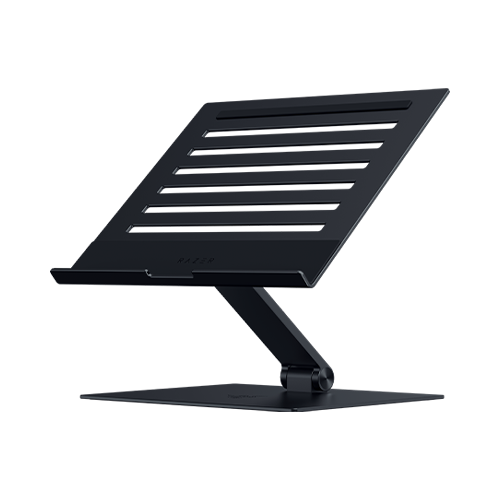
The US product record identifies Black as RC21-02330100-R3U1 and Mercury as RC21-02330200-R3U1. The colors are separate retail choices, not separate mechanisms: Razer describes both finishes as the same anodized-aluminum stand with the same adjustment points, vented top plate and non-slip device pads. The black product image appears with this review; the Mercury image below is the same model in its alternate finish. Neither picture establishes a device fit limit or a measured load rating.
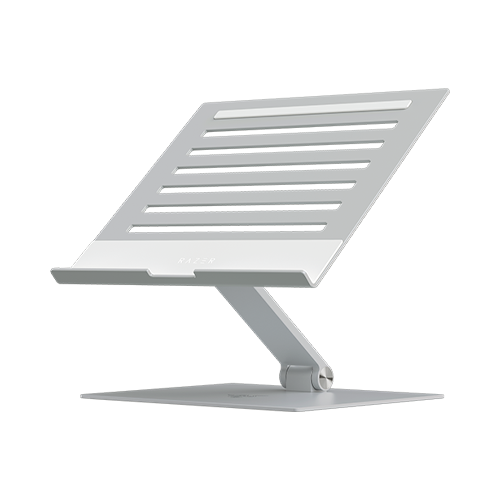
The top has cutouts, and Razer presents them as a way to leave airflow under the computer. That is a design description, not evidence of a particular temperature drop with any laptop. If heat is the reason for shopping, this passive stand should not be confused with Razer's separately named active Laptop Cooling Pad.
Adjustability helps only if the range is clear
Razer's product material describes two articulation points and includes a 5 mm hex key for setting hinge tension. Its technical specification block gives 50.8–279.4 mm of height adjustment, an arm angle of 0–70 degrees and device tilt of 90–180 degrees. Those are meaningful choices compared with a fixed-height frame: the platform can be raised or tilted to suit a different chair, desk or viewing direction. Razer also says to tighten or loosen the hinge tension using the tool, so this is not a one-touch quick-release stand. The maker's guidance should be followed when adjusting a loaded stand.
There is a material conflict on the same official product page. Its FAQ says the stand can adjust from 1.88 inches (48 mm) to 13.8 inches (352 mm), rather than 2–11 inches (50.8–279.4 mm). The page's two footprint descriptions also disagree: the FAQ says 19.7 by 8.27 inches (500 by 210 mm), while the specification data says 11 by 9.97 by 1.81 inches (280 by 253 by 46 mm). The measurement labels do not reconcile those values. I keep both sets visible instead of selecting a favorable one; anyone with a narrow desk or a specific target height should verify the current manual or ask the manufacturer before ordering.
Check the laptop, not just the screen-size label
Razer states support for laptops and other devices up to 18 inches and lists a maximum supported device weight of 6.80 pounds (3.08 kg). Both conditions matter, and a diagonal screen measurement alone does not prove that a chassis fits the stand's contact area. The published page does not provide a laptop-by-laptop footprint chart, a case-fit diagram or contact-point measurements that settle every model. Compare your computer's width, depth, feet, vents and case with the exact current product illustration and setup guidance; if the stand will carry a large or unusually heavy device, do not exceed the stated limit.
The stand is listed at 1.1 kg (2.43 pounds). That is a substantial carry weight for an item described as portable, even before adding the laptop, charger and other work gear. Razer says it folds down for storage and travel, but its conflicting size data do not establish how it packs when folded, and the reviewed product information does not list a travel sleeve. A foldable mechanism is a useful transport feature; it does not by itself guarantee a convenient bag fit.
What it does not do
This is a desk stand. The reviewed Razer sources describe an open notebook raised on its platform, not a product intended for a lap or a closed vertical-laptop arrangement. The hinges change elevation and tilt, but there is no documented turntable or swivel base. Turning the whole stand by hand is not the same as an integrated swivel mechanism for screen sharing. Razer's support entry also says that this exact Adjustable Laptop Stand has no USB hub and no Chroma lighting; those features belong to other Razer products and should not be assumed from the brand name.
The distinction is useful when comparing the wider Razer family. The fixed-angle Laptop Stand, Laptop Stand Chroma and Chroma V2 have separate model codes and different electronics; the Adjustable model's SKUs and capabilities should not be merged with them. This assessment covers only the Black and Mercury finish choices for RC21-0233. It does not treat their dimensions as resolved, claim a hands-on fit, or infer stability, comfort, cooling performance or durability beyond what the manufacturer publishes.
Who should shortlist it
Consider it if you want an open-laptop desk stand that can change height and tilt, folds between work sessions and is compatible with a device that meets both Razer's size and weight claims. It is less convincing when exact deployed height or desk footprint is a hard constraint, because the manufacturer's page contradicts itself on both measurements. It is also not the most obviously convenient travel pick at 2.43 pounds, and it does not meet lap-use or swivel-base requirements.
Before choosing the Black or Mercury listing, verify the exact RC21 SKU, confirm your laptop's contact footprint and load, and ask for the current manual's controlling dimensions if those will determine fit. Allow room for a separate keyboard if raising the laptop makes its built-in keys uncomfortable for long typing sessions. No measured ergonomic benefit or cooling result is established here; the assessment is based on the current US product information and support guidance rather than personal use.
Key specifications
Key details at a glance
| Main material | Anodized aluminum |
|---|---|
| Height-adjustable | Yes |
| Folds for storage | Yes |
| Swivel base | No |
| Supported placement | desk |
Use the exact model’s instructions for operating limits, supplied equipment and version differences.
Sources for this review
Sources for this assessment
Compare the setup, not just the silhouette
Use the finder to compare reviewed stands against the way you work and the features you actually need.