
Your needs, this model
Does it fit your priorities?
Will this stand fit a 16-inch or 17-inch laptop?
Do not rely on screen diagonal alone. The current Razer product page describes use from 13-inch through 17-inch laptops, while Razer's RC21-01110 support FAQ says up to 15 inches and the English guide says the stand is designed for Blade and Blade Stealth and may fit other 15-inch laptops. Those statements do not establish a safe fit for every 16- or 17-inch chassis. Confirm the exact model and its contact footprint with Razer before ordering.
Explore this need in the finder →Can I raise or re-angle the screen after setup?
The Chroma stand is described with a fixed 18-degree inclination; the reviewed product and support materials do not describe a height or tilt mechanism. Choose it for that fixed geometry, not if adjustable height is essential. Compare the laptop's own thickness and the final screen position with your chair, desk and external-keyboard arrangement.
Explore this need in the finder →Does the stand add USB ports and Chroma lighting?
Yes. Razer describes a three-port USB 3.0 hub and Chroma lighting for RC21-01110. The sources reviewed here do not settle the upstream host cable, power requirements, included cable/adapter or the hub's compatibility with each non-Razer computer, so check the exact package and host connection before relying on those ports.
Explore this need in the finder →The Razer Laptop Stand Chroma is the fixed-angle member of Razer's laptop-stand group, not the later Chroma V2 and not the folding Adjustable Laptop Stand. Its US support record identifies it as model RC21-01110. Razer's current US stands page links to the product, but a live page is not proof of present stock, price or a particular seller's package.
A fixed 18-degree desk position
Razer describes an aluminum frame with an 18-degree inclination, and the support FAQ identifies that angle as fixed. This is a simpler proposition than the company's Adjustable Laptop Stand: the platform does not document a height mechanism, a changing tilt range or a set of selectable positions. The screen is held at one basic angle, so its final height depends partly on the notebook's own thickness and where its feet meet the stand. If a changing desk, chair or user makes height adjustment essential, this is not a substitute for a model whose adjustment mechanism and range are published.
A fixed stand can make sense for a stable setup where the laptop will stay open, particularly if the built-in keyboard remains comfortable at the resulting position or a separate keyboard is already part of the desk. Razer's materials do not give a measured screen-rise height or the stand's footprint, so a screen diagonal and the stated angle are not enough to predict where the display will land. Leave room for a keyboard and pointing device if raising the display makes laptop typing awkward, and compare the complete setup rather than treating a stand as an ergonomic outcome by itself.
Compatibility claims conflict at the important edge
The current product page describes a span from 13-inch notebooks to 17-inch systems. Razer's support FAQ for RC21-01110 instead says the stand supports laptops up to 15 inches. Its English master guide says it is designed for Razer Blade and Razer Blade Stealth, with possible fit for other 15-inch laptops. These statements are not a single consistent compatibility chart: the support material does not confirm the product page's 16- and 17-inch edge, and screen size alone cannot account for a wide chassis, feet, vents or a protective case.
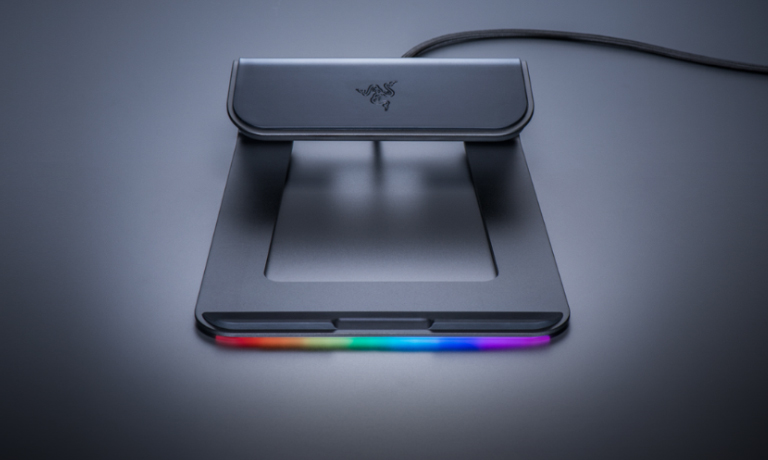
For a Blade or Blade Stealth, the manufacturer's device-family description is the most specific fit guidance in the reviewed material, but even that is not a substitute for checking the exact model and contact points. For another 15-inch or larger notebook, ask Razer to clarify compatibility for that chassis before treating the broad product-page statement as decisive. The official image below shows the stand without a laptop; it identifies the Chroma design, not a tested fit.
Ports and lighting are real features, but check the connection
The Chroma model adds two conspicuous features that the plain Razer Laptop Stand and the Adjustable Laptop Stand do not share: Razer specifies three USB 3.0 ports and Chroma lighting. The page presents the hub as a way to connect peripherals through the stand; the guide and support page also identify Chroma. That is useful if a fixed laptop platform with those extras is the desired desk arrangement, rather than an ordinary riser alone.
The reviewed primary material does not settle the upstream cable, whether a power adapter is included, which cable standard connects to the host computer, or how the hub behaves with every non-Razer system. Nor does a USB 3.0 label establish that a particular set of connected devices will work with every host. Before buying, verify the exact model code, required host port, cable and package contents against the current seller listing and the computer you intend to use. Do not assume this older model has the connections or lighting behavior of the later Chroma V2.
What the documentation does not resolve
The source set does not give a stand weight, footprint, maximum supported load, detailed laptop-width chart or measured height lift. It does not document folding for travel, use on a lap, or a swivel base. A product-page image does not establish any of those functions. If the stand must fold into a particular bag, support a heavy notebook, turn the screen toward another person or sit on a soft surface, require an exact manufacturer instruction for that use instead of inferring it from the product name.
Razer's US product page and support article establish a distinct model family, but they do not supply verified live inventory or current pricing. The support listing separates RC21-01110 from the plain RC21-0111, Chroma V2 RC21-0168 and Adjustable Laptop Stand RC21-0233x. Confirm that an offer actually names RC21-01110 and check the listing's finish, cable/adapter contents, seller and return terms; this assessment does not identify a retailer offer or promise stock.
Who should consider it
Shortlist the Laptop Stand Chroma if you want an open-laptop desk arrangement with a fixed 18-degree angle, a three-port USB 3.0 hub and Razer Chroma lighting, and your computer is specifically confirmed to fit. It is a poor match when adjustable height is essential, when you need a verified folded form or lap arrangement, or when a particular 16- or 17-inch chassis must fit without first reconciling Razer's size claims. The model is a documented feature combination, not a universal fit promise; compare the exact computer, host connection and included accessories before making a purchase decision.
Key specifications
Key details at a glance
| Main material | Aluminum |
|---|---|
| Height-adjustable | No |
| Supported placement | desk |
Use the exact model’s instructions for operating limits, supplied equipment and version differences.
Sources for this review
Sources for this assessment
Compare the setup, not just the silhouette
Use the finder to compare reviewed stands against the way you work and the features you actually need.