
Your needs, this model
Does it fit your priorities?
Is the mBar fixed or does it fold for packing?
Rain Design's mBar FAQ calls it a fixed-size stand and distinguishes it from the folding mBar pro and mBar pro+. Its current product options list Silver stand SKU 10080 and Space Gray stand SKU 10081. Two separately named silicon-pad options (19080 and 19081) are replacement accessories, not stands.
Explore this need in the finder →Can I change the mBar's height after I set the laptop on it?
The mBar product page describes a fixed stand that elevates a laptop by 3 inches; no height-adjustment control or range is listed. That elevation is a manufacturer specification, not a personalized screen-rise measurement. If height adjustment is essential, the current reviewed library documents that capability on the separate iLevel model, not mBar.
Explore this need in the finder →Does Rain Design give an exact laptop fit chart for the mBar?
No dimensioned device chart or maximum load is provided on the reviewed page. Rain Design says it fits most laptops, but that does not settle whether a particular chassis, case, foot arrangement or vent pattern sits securely. Compare the laptop base with the 8.8-by-10.4-inch stand footprint and confirm the exact fit if its size is unusual.
Explore this need in the finder →The Rain Design mBar is the simplest member of the maker's three-stand mBar family: a fixed aluminum frame that props an open laptop above a desk. Its appeal is its sparse shape and a listed 3-inch elevation, not an adjustment mechanism. That difference matters because mBar looks related to the folding mBar pro and taller mBar pro+, but the manufacturer's FAQ describes the original mBar as fixed-size and reserves folding for the Pro models. This assessment is based on the manufacturer page, its current option data and the exact finish photographs; it does not claim a hands-on fit or stability test.
A fixed frame, not a miniature adjustable riser
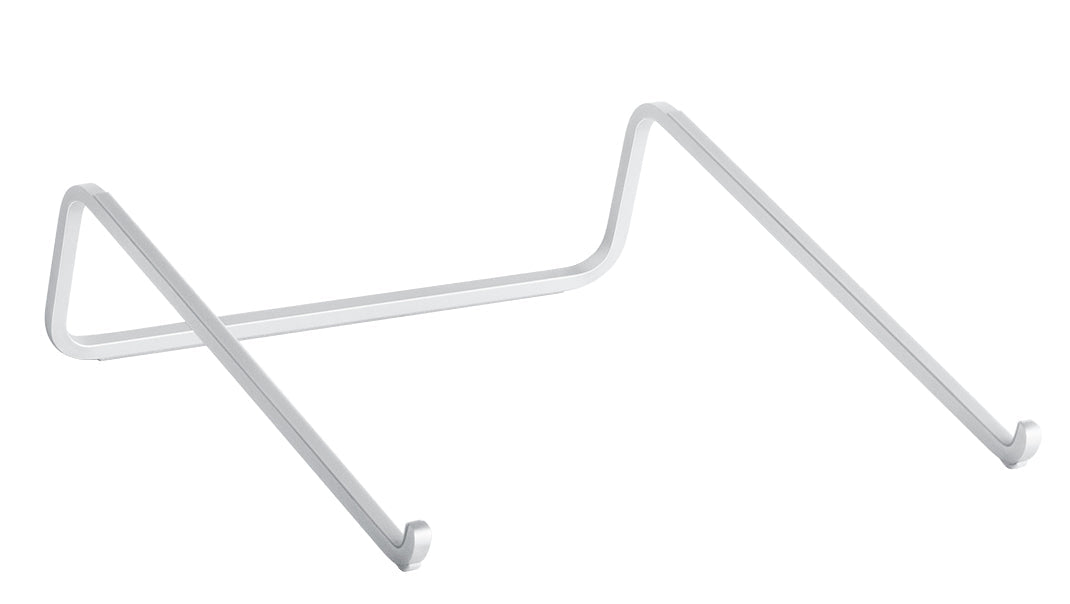
Rain Design describes mBar as an anodized-aluminum stand that raises a laptop by 3 inches. The published dimensions are 8.8 inches wide, 3 inches high and 10.4 inches deep. The product page presents a single, shaped support frame rather than a hinge, slider or set of height positions. Its 3-inch elevation should therefore be read as the maker's specification for this fixed design, not a height range or a promise that every laptop screen will sit exactly 3 inches above the desk.
The open rails hold the notebook above the tabletop, leaving open air around much of the underside. Rain Design says this design increases airflow for better cooling, but no temperature comparison or independent test of a particular laptop workload is provided in the reviewed material. Air around a stand is not a thermal guarantee: laptop vents, fans, load and room conditions still determine how a machine behaves.
The model choice is about folding and elevation
The family distinction is unusually useful here. The original mBar is fixed-size; the mBar pro folds and is listed at the same 3-inch elevation. The mBar pro+ also folds but is listed at 5.5 inches. If the stand will remain at a desk, mBar avoids the folding format and preserves a compact open-frame silhouette. If packing matters, the pro and pro+ have a documented folded form and a listed carrying sleeve; if a higher fixed lift matters, compare the pro+ dimensions before choosing it. None of these three product pages documents a slider that changes height after setup.
For a different desk need, the reviewed iLevel uses a front slider for height and viewing-angle adjustment, while the mStand360 uses a rotating base for screen sharing. Neither capability should be inferred from the mBar name or its raised shape. The standard mStand is another fixed desk riser, but it uses a broad platform rather than mBar's narrow rails.
Check the laptop contact points, not only the screen diagonal
Rain Design says mBar fits most laptops, but the current page does not provide a complete chassis fit chart, a maximum supported load, or detailed measurements for the notebook's contact points. A screen-size label alone does not establish base width, depth, foot location, case thickness or clearance for an intake vent. Compare your laptop's underside and its feet with the support rails, and seek an exact compatibility answer if the machine is unusually large, heavy, unusually thin or protected by a bulky case. Do not treat the broad “most” claim as universal compatibility.
The mBar offers a minimal raised surface rather than a full platform. Its maker page does not state that a keyboard is stored beneath it or that a keyboard is included. If your typing routine depends on using a separate keyboard, sketch the desk layout around the notebook's full front edge, keyboard and pointing device instead of assuming that a visually open frame solves every space issue. The stand is documented for a desk arrangement; the product information reviewed here does not establish lap use.
Keep the exact finish and package straight
The current product options identify Silver stand SKU 10080 and Space Gray stand SKU 10081. The same option data names separate Silver and Space Gray replacement silicon-pad accessories, SKUs 19080 and 19081. Those pads are not alternative stands and should not be mistaken for a complete product when checking a listing. The official finish images show the bare mBar frame in each color; the Silver card image is a standalone product view rather than a staged laptop-use photograph.
One specification deserves a deliberate pause: the page lists a weight of 0.22 pound (100 grams), but the product variant data contains a raw weight of 1588 without a unit. That value cannot be reconciled with the stated pair from the available evidence, so this assessment does not use a confirmed weight in comparisons. The same caution applies to price and stock: those can change, and the page's commerce text is not a durable buying fact.
Who should keep mBar on the shortlist?
mBar makes sense when the intended arrangement is an open laptop on a desk, the fixed elevation is acceptable and a folding mechanism is not required. Its maker-listed dimensions are useful for a first paper fit check, while its narrow support form puts more emphasis on verifying the laptop's actual feet, case and vents. Choose the folding mBar pro if travel is essential, the taller pro+ if its higher fixed lift suits the setup, or iLevel when post-setup height adjustment is the essential feature. The final decision still depends on the exact laptop, its contact points and the desk space around the complete workstation.
Key specifications
Key details at a glance
| Stand width | 8.8 in |
|---|---|
| Overall stand height | 3 in |
| Manufacturer-listed height range | Fixed 3-inch laptop elevation; not an adjustable range |
| Stand depth | 10.4 in |
| Main material | anodized aluminum |
| Height-adjustable | No |
| Folds for storage | No |
| Swivel base | No |
| Supported placement | desk |
Use the exact model’s instructions for operating limits, supplied equipment and version differences.
Sources for this review
Sources for this assessment
Compare the setup, not just the silhouette
Use the finder to compare reviewed stands against the way you work and the features you actually need.