
Your needs, this model
Does it fit your priorities?
Does the iLevel lift the back of my laptop by exactly 5.4 to 7.9 inches?
Rain Design's Specs section lists a height of 5.4–7.9 inches, and the product description says the slider changes screen height. The page does not define the range as a measurement from the desk to the laptop's rear edge, so do not treat it as a guaranteed screen-lift figure. Compare the labeled stand height with your own screen-position target and laptop depth.
Explore this need in the finder →Is the current iLevel the same model as iLevel2?
Rain Design's FAQ says its current model is the second-generation iLevel2 and that it also names it simply iLevel. The current page's stand options are Silver SKU 12031, Space Gray SKU 12032 and Black SKU 12034; this assessment covers that current generation, not an older first-generation offer that may use the iLevel name.
Explore this need in the finder →Can the iLevel replace a separate keyboard, and will every laptop fit?
The manufacturer says there is space to stash a keyboard beneath the platform; it does not say a keyboard is included. Its FAQ claims compatibility with all notebooks, but provides no exact footprint, case-clearance or load chart here. Check the laptop's base, feet, vents and case against the 10.1-by-8.8-inch stand footprint, and plan your keyboard position separately.
Explore this need in the finder →The name needs a small clarification before comparing this stand with other Rain Design products. Its current US-facing product page is titled iLevel, while its FAQ says the current version is the second-generation iLevel2 and that the company also calls it simply iLevel. A 2014 Rain Design release describes iLevel2 as an upgrade to the earlier iLevel. I treat the present finish options as one current-generation product, not as separate iLevel and iLevel2 models. If a listing says only “iLevel,” check its exact generation and finish before assuming it matches this assessment.
A slider matters when a fixed screen position does not
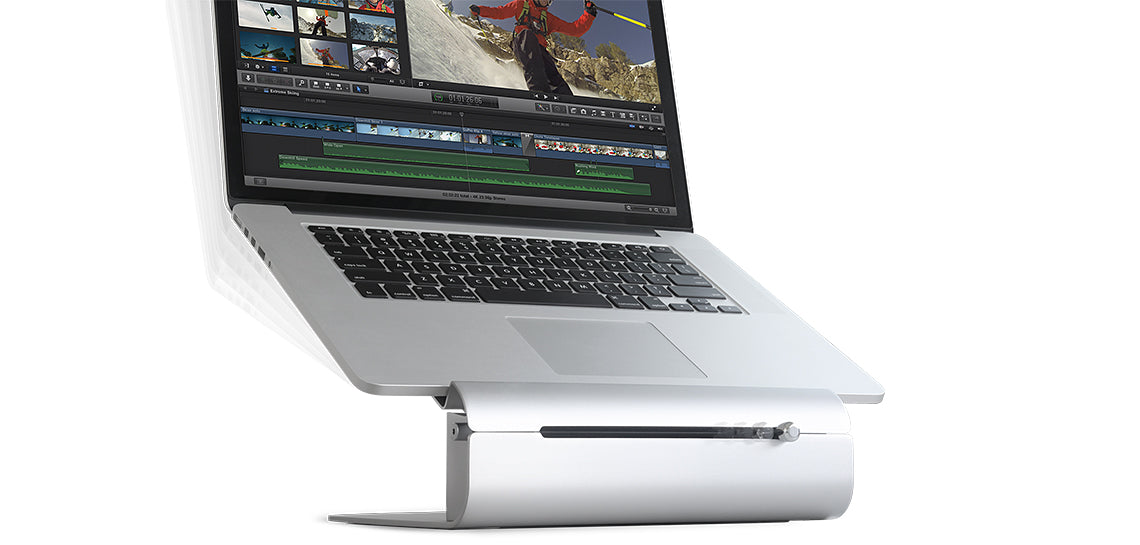
The defining feature is a sliding control at the front of the stand. Rain Design says it moves the notebook screen up or down, and describes the mechanism as angle-adjustable. That gives the iLevel a different job from the company's fixed-height mStand: it is meant to be repositioned after setup, rather than asking one static platform to suit each posture. The change is made at the stand, so this is more useful for someone who alternates between sitting positions or shares a desk than for someone who wants a permanently fixed riser and will rarely move it. The product page lists a 5.4-to-7.9-inch height range, but labels it only “Height.” It does not say exactly where that dimension is measured, nor promise that the rear of every laptop will rise that distance. The laptop's own depth and how it sits on the platform affect the screen position. Treat the published range as a stand specification, not a personal ergonomic result: note the height you want the top of your screen to reach, then compare it with your seated posture and the laptop you actually use. A stand cannot make an unsuitable chair, desk or viewing distance disappear.Check the footprint and the whole desk arrangement
Rain Design lists a 10.1-inch width and 8.8-inch depth. Reserve that footprint, then add room for the open display and for your hands, mouse and other desk items. The page says the design leaves space to stash a keyboard underneath; that is a storage/useful-space feature, not a bundled keyboard or proof that every keyboard will slide neatly below it. If you intend to type on a separate keyboard, check both its clearance under the stand and its distance from the laptop screen. If you normally type on the built-in keyboard, consider whether changing the laptop's angle and height will still leave your hands comfortable. The manufacturer claims the aluminum base acts as a heat sink and says the tilted form improves airflow around the notebook. Those are design explanations, not measured results for a particular laptop, workload or room. This review does not claim that the stand will lower any specific computer's temperature. The page also does not provide a maximum supported laptop weight or a detailed fit chart for width, depth, underside feet, cases, vents or ports. Its FAQ's broad statement that iLevel works with all notebooks is not a substitute for checking a large, unusually shaped or cased machine against the platform and its support points.What changes—and what does not—against nearby stands
The iLevel's differentiator is adjustable height and viewing angle. The mStand and mStand360 share the brand's desktop-riser idea, but their listed platform height is fixed; mStand360 adds a turning base instead. That swivel is for changing which way an open screen faces, not for raising it. A foldable travel stand such as Rain Design's mBar Pro serves another priority: packing down, rather than a larger desktop mechanism that remains set up. Choose among them by identifying the movement you need—screen-position adjustment, screen rotation or portability—rather than assuming “adjustable” means all three. The current listing's variant data names three finish-only stand options: Silver SKU 12031, Space Gray SKU 12032 and Black SKU 12034. The same page lists separate replacement silicon pads in matching colors (19030, 19030-SG and 19030-BLK); those are accessories, not alternate stands. Official photos for all three stand SKUs were checked. They do not establish that color changes the fit or mechanism.Useful fit, with a weight discrepancy to verify
The iLevel makes most sense for a desk user who values frequent height/angle changes and has room for a 10.1-by-8.8-inch base. It is less compelling when the desk needs to pack away, the laptop must be held vertically with its lid closed, or a precise stand weight is essential. The specification section lists 3.5 pounds (1.6 kg), but the page's embedded commerce variants show a raw weight value of 4082 without a unit. These do not agree, so no single weight is treated as verified here. Before choosing a finish or offer, check the exact second-generation model, laptop footprint and case, usable desk depth, screen target and any separate keyboard plan. Confirm whether an offer is the stand or a replacement-pad accessory, and inspect the exact package, seller, current availability and return terms. The manufacturer page's current stock display and variant metadata are not used here as a promise of availability. This is a documentation-based assessment from Rain Design's product, catalogue and press material; no ownership, hands-on fitting, stability, comfort, durability or thermal test is claimed.Key specifications
Key details at a glance
| Stand width | 10.1 in |
|---|---|
| Manufacturer-listed height range | 5.4–7.9 inches |
| Stand depth | 8.8 in |
| Main material | anodized aluminum |
| Height-adjustable | Yes |
| Space for a keyboard underneath | Yes |
| Supported placement | desk |
Use the exact model’s instructions for operating limits, supplied equipment and version differences.
Sources for this review
Sources for this assessment
Compare the setup, not just the silhouette
Use the finder to compare reviewed stands against the way you work and the features you actually need.