
Your needs, this model
Does it fit your priorities?
Does the mStand360 let me turn an open laptop toward someone else?
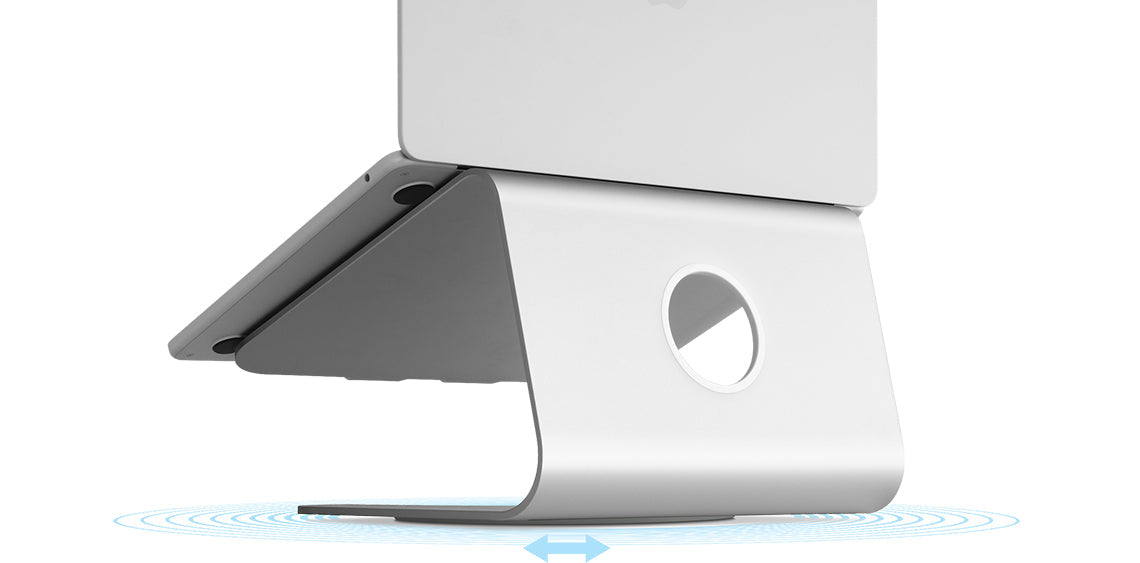
Yes. Rain Design describes a concealed base with a full 360-degree swivel for sharing the screen. That is the mechanism difference from the standard mStand, and the manufacturer says the two base designs cannot be converted into one another.
Explore this need in the finder →Can I change the screen height or tilt as well as rotate the mStand360?
The product page documents rotation at the base, not height or tilt adjustment. Rain Design describes a one-piece aluminum platform with a fixed tilt; the swivel should not be treated as a substitute for an adjustable riser.
Explore this need in the finder →What laptop fit is actually documented for mStand360?
Rain Design specifically says a 16-inch MacBook Pro sits securely, claims fit for all MacBooks and compatibility with most other notebooks. It does not provide a complete footprint, case-thickness or maximum-load chart for non-Apple machines, so check the exact chassis and its support feet rather than relying on a universal fit assumption.
This is a documentation-based assessment of the current Rain Design mStand360, not a hands-on test. The important distinction is easy to miss in a similar-looking product family: the 360 model rotates the whole laptop platform at its base, while the standard mStand does not.
A desktop riser built for sharing a screen
Rain Design describes the mStand360 as a single-piece aluminum notebook workstation with a concealed, low-profile swivel base. The manufacturer says that base turns a full 360 degrees so one person can direct the display toward a colleague or another person without lifting the laptop off its supports. This is a specific use case, not a general promise that the stand adapts to every posture. The documented arrangement is an open laptop on a desk; the product material reviewed here does not establish lap use.
The practical upside is simple: a shared screen can be turned toward someone across the desk and back again. That movement is different from changing screen height, changing the platform's tilt, folding the stand or rotating a monitor arm. Rain Design documents only base rotation as adjustable. The stand's tilted aluminum platform itself remains a fixed shape, so a buyer seeking a different viewing height or a compact travel package should not treat “360” as meaning all-axis adjustment.
The details that stay fixed
The listed footprint is 10 inches wide by 7.5 inches deep, and total stand height is 5.9 inches. Those dimensions mirror the standard mStand's platform, while the added swivel mechanism distinguishes the 360. The overall height is not a measured screen-rise number: the laptop's own thickness, feet and contact position determine where its display lands. Check the resulting viewing position on your desk rather than reading 5.9 inches as a guaranteed ergonomic lift.
Rain Design lists the mStand360 at 3.6 pounds (1.63 kg), a pair that is consistent when rounded. The listing identifies six finish choices—silver, gold, space gray, black, midnight and starlight. These are color variants, not six different swivel mechanisms. The page also presents mStand360 silicone pads as a separate option; confirm that any listing you consider is for the complete stand rather than the pad accessory alone.
Make room for rotation, not just the base
The manufacturer lists a cable outlet and a space to stash a keyboard below the platform. A separate keyboard is not stated to be included, and the opening is not evidence that cables pass through the swivel's center. If your laptop stays connected to power, a display cable or peripherals while you turn it, leave enough slack for the screen to move without tugging on a plug or dragging equipment across the desk. The product page does not specify a cable-routing method or how much turning clearance a particular setup needs.
Leave the full 10-by-7.5-inch base footprint available and make sure the laptop can turn without hitting a wall, monitor, lamp or neighboring device. A swivel helps when a second person needs to see the screen; it does not create more desk area or replace a second display for side-by-side work. For solo use, the feature may add little value compared with the non-swiveling model.
Compatibility claims are useful, but not a fit chart
Rain Design says the mStand360 fits all MacBooks and is compatible with most notebooks. Its FAQ specifically confirms that a 16-inch MacBook Pro sits securely. Those are manufacturer claims, not an independent test of every generation, case or aftermarket foot layout. No maximum laptop load or precise depth limit for other notebooks is stated in the material reviewed. If the machine has a thick case, an unusually deep chassis or bottom vents where the supports land, confirm the exact fit before relying on “most notebooks.”
Rubber padding is described as separating the notebook from the aluminum. Rain Design also says the aluminum acts as a heat sink and that its tilt improves airflow. Those are design statements; this review has no temperature comparison for a particular computer or workload. Check that the stand leaves your laptop's own air intakes and exhaust paths unobstructed, and do not select it on the expectation of a specific cooling result.
mStand or mStand360?
Choose the mStand360 when its screen-sharing motion will be used often enough to justify the different base. If you want the same kind of raised, fixed desktop arrangement without rotation, compare the standard mStand instead. Rain Design says the base construction differs and the two cannot be converted into each other later, so an add-on does not turn one model into the other. Both leave space for a separate keyboard and use the same general fixed-platform idea, but only the 360 page documents the concealed bearing base.
The mStand360 is therefore a narrow, understandable fit: a stationary desk, an open notebook, a need to turn its screen and room to rotate it without pulling connected cables. It is not the choice to make when the essential requirement is a height-adjustable, fold-flat, lap-supported or individually verified fit for an unusual laptop. No personal ownership, rotation-force, typing, thermal or durability test is claimed here; the assessment is grounded in the manufacturer's listed dimensions, construction, compatibility statements and the exact-model image.
Key specifications
Key details at a glance
| Stand width | 10 in |
|---|---|
| Overall stand height | 5.9 in |
| Stand depth | 7.5 in |
| Stand weight | 3.6 lb |
| Main material | aluminum |
| Height-adjustable | No |
| Folds for storage | No |
| Swivel base | Yes |
| Space for a keyboard underneath | Yes |
| Cable outlet | Yes |
| Supported placement | desk |
Use the exact model’s instructions for operating limits, supplied equipment and version differences.
Sources for this review
Sources for this assessment
Compare the setup, not just the silhouette
Use the finder to compare reviewed stands against the way you work and the features you actually need.