
Your needs, this model
Does it fit your priorities?
Is the mStand documented for desk use or lap use?
Rain Design presents it as a desktop workstation stand. The reviewed page does not establish lap use, so a lap-use requirement should rule it out rather than be assumed.
Explore this need in the finder →Does the mStand let you change its height or tilt after setup?
The current product page describes a one-piece aluminum frame and a fixed sloped platform, with no height or tilt adjustment control documented. Its overall listed stand height is 5.9 inches; that is not the same thing as the amount by which every laptop screen rises.
Explore this need in the finder →Does the mStand swivel so you can turn the screen toward someone?
No swivel mechanism is listed for this model. Rain Design sells mStand360 as the separate version with a concealed 360-degree swivel base; their FAQ says the two bases cannot be converted into one another.
Explore this need in the finder →This is a document-based assessment of the current Rain Design mStand listing, not a hands-on test. The useful question is not whether its aluminum profile looks tidy; it is whether a fixed riser fits the laptop, desk and working habits you actually have.
A fixed riser for a settled desk
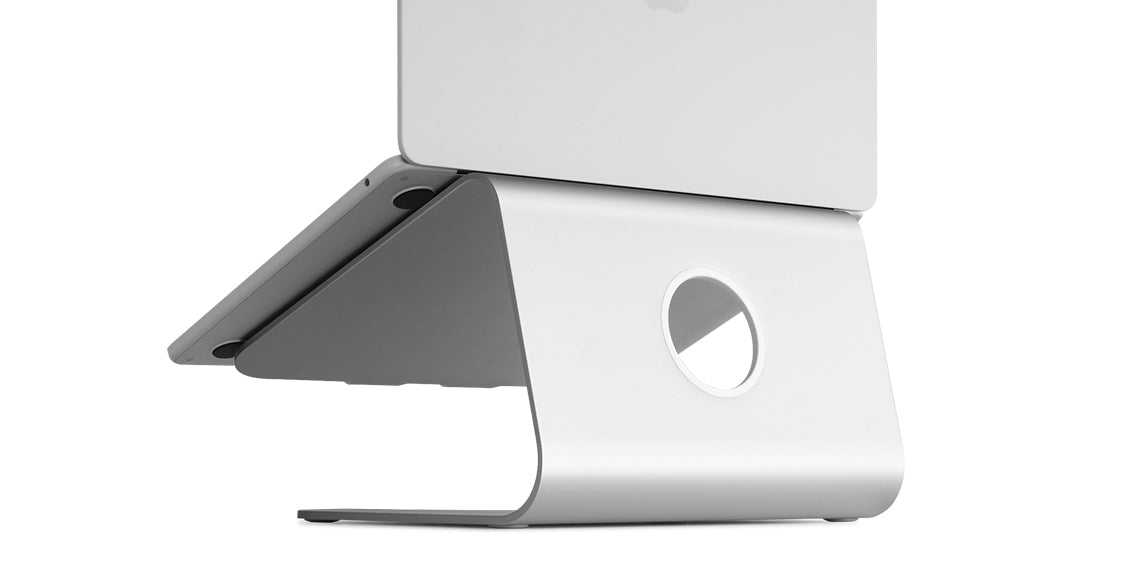
The mStand is a single-piece aluminum frame with a sloped surface for an open notebook. Rain Design lists the stand as 10 inches wide, 5.9 inches high and 7.5 inches deep. Its current page shows six finishes: silver, gold, space gray, black, midnight and starlight. Those colors are finish variations, not separate mechanisms. The manufacturer says it fits all MacBooks and most other notebooks, and specifically confirms that a 16-inch MacBook Pro sits securely. “Most notebooks” is not a precise fit chart, though. For a different laptop, check the case footprint, underside feet and where the front edge will sit before assuming that the general compatibility statement covers your machine.
The frame does not have a documented height or angle adjustment, folding joint or swivel base. Its fixed geometry can suit a desk that stays arranged one way; it is a poor match when several people need different screen heights or when the stand must pack flat. The 5.9-inch figure is the stand’s overall listed height, not a guaranteed 5.9-inch rise at the screen. Laptop thickness, feet and the point of contact all affect the finished screen position, so compare the height at your actual viewing point rather than treating the specification as an ergonomic outcome.
Think of it as part of a two-piece workstation
Rain Design leaves space below the platform for a keyboard and routes cables through an opening in the stand. That makes the mStand most legible as a way to lift the display while bringing separate input devices back to the desk surface. It is still possible to interact with the laptop itself, but using its built-in keyboard from a raised, sloped position may not be the arrangement you want for a long work session. Check whether a separate keyboard and pointing device fit in the remaining desk area, and whether their cables can reach without crossing a walkway or pulling on a connector.
The broad base is listed at 10 by 7.5 inches, so leave room for that footprint and for the laptop to sit securely above it. A small desk may also need space for the keyboard that can be stowed below the stand when it is not in use. Storing a keyboard underneath is not the same as including one; this is a stand, not a dock or workstation bundle.
Cooling language needs a careful reading
The manufacturer says the aluminum acts as a heat sink and that the tilt improves airflow around the notebook. Those are design claims, not a measured temperature result for every laptop or workload. Airflow can depend on a computer’s intake and exhaust locations, how much of its underside touches the supports, and what the room is doing. The product page provides no comparative thermal test in the material reviewed here, so the mStand should not be chosen on the promise of a particular temperature reduction. It does provide an open, tilted arrangement rather than enclosing the whole computer.
Do not confuse it with mStand360
Rain Design’s catalogue places the mStand and mStand360 in the same family, but the manufacturer explicitly distinguishes their bases. The mStand360 adds a concealed swivel base intended to turn the laptop for sharing its screen. The standard mStand does not gain that function by adding an accessory later: Rain Design says their base constructions are different and cannot be converted. Choose the 360 version only if rotation is useful enough to justify a different model; the name similarity is not evidence that both versions have the same mechanism.
What remains uncertain
The product page lists the weight as “3 pounds (1.46 kg).” Those numbers do not convert exactly: 1.46 kg is about 3.22 pounds. Because the source itself is inconsistent, this assessment leaves weight out of the comparison facts rather than choosing one number as authoritative. The material reviewed also does not state a maximum supported laptop load or give a precise non-Apple laptop depth limit. Buyers with a heavy workstation notebook, an unusually deep chassis or a thick protective case should get an exact fit answer from Rain Design before relying on the general “most notebooks” statement.
The practical case for the mStand is therefore specific: a fixed desktop platform, an open laptop, some cable routing and room to put a separate keyboard beneath the laptop. If you need adjustability, portability, lap support or screen rotation, those are not small details to infer from the family name. Treat them as requirements and select a model whose own documentation confirms them. Product dimensions and compatibility claims above come from the linked manufacturer pages; no personal ownership, typing, stability, cooling or durability test is claimed here.
Key specifications
Key details at a glance
| Stand width | 10 in |
|---|---|
| Overall stand height | 5.9 in |
| Stand depth | 7.5 in |
| Main material | aluminum |
| Height-adjustable | No |
| Folds for storage | No |
| Swivel base | No |
| Space for a keyboard underneath | Yes |
| Cable outlet | Yes |
| Supported placement | desk |
Use the exact model’s instructions for operating limits, supplied equipment and version differences.
Sources for this review
Sources for this assessment
Compare the setup, not just the silhouette
Use the finder to compare reviewed stands against the way you work and the features you actually need.