
Your needs, this model
Does it fit your priorities?
What does the 50 lb figure establish?
Mobile Pixels lists 50 lb as the maximum load. It is a manufacturer-stated ceiling, not a laptop footprint or monitor-base fit chart and not an independent stability test. Compare the exact device and any base that will rest on the shelf, and stay within the stated limit.
Explore this need in the finder →Does this shelf satisfy essential height adjustment?
The product page gives one dimension statement and describes the riser as a raised platform, but no selectable height positions or adjustment range. The reviewed page does not establish it for a desk-plus-height requirement.
Explore this need in the finder →What should I check about its eight-port hub?
The headline says eight ports, while the detailed list names three USB-A ports, Ethernet, mini HDMI, USB-C data and PD—seven connector entries. The page mentions an included two-in-one USB cable but does not reconcile the count or fully define the host/power setup. Verify the exact connection map and adapter needs for your laptop and peripherals.
Explore this need in the finder →Does the Laptop/Monitor Riser swivel or fold for travel?
The exact U.S. product page documents desk use and a shelf but gives no swivel-base or folded-travel mode. Do not infer either feature from the product's hub or its size statement; use the exact desk-plus-swivel or travel condition only for models with those functions documented.
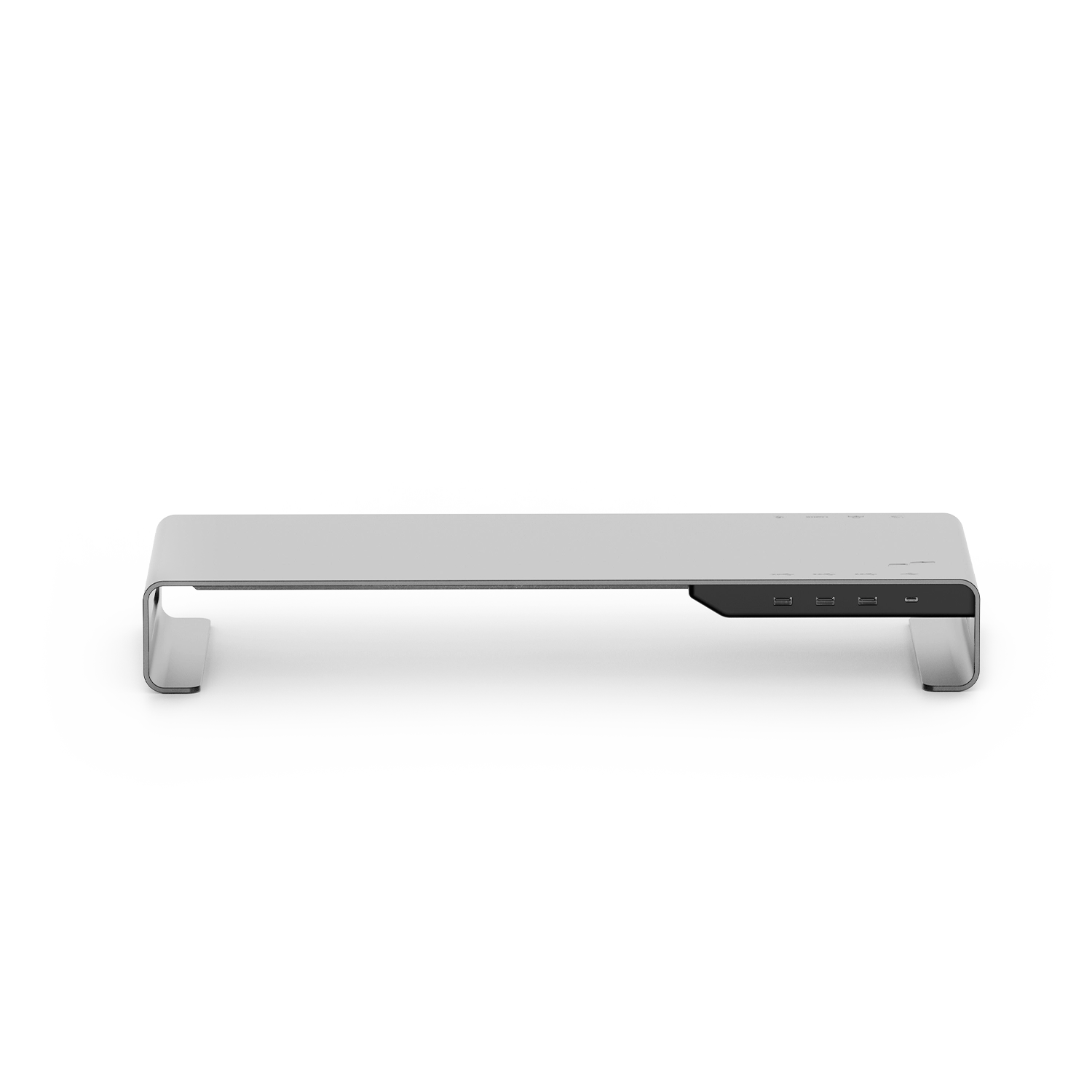
Explore this need in the finder →The Mobile Pixels Laptop/Monitor Riser (114-1002P01) is a desk shelf that combines a raised platform with a built-in hub. Unlike an adjustable laptop arm, it presents a single platform for a laptop or monitor and adds several wired connections at the front. The published specification gives overall dimensions of 23.2 × 9 × 3.2 inches and a maximum load of 50 lb, but does not label the dimension axes or explain whether the load figure has been independently tested. Measure the device base and the work area directly; neither a broad product name nor a capacity figure proves that a particular computer or monitor stand base will fit.
A fixed shelf with two jobs
The manufacturer describes an aluminum desktop riser for a laptop or monitor, with open space underneath for desk items. That makes its central tradeoff clear: it can lift one device while also consolidating connections, but the published page does not give multiple shelf heights, an adjustment span, a swivel mechanism or a folding/travel mode. No lap use is documented either. If changing screen height after setup is essential, the hub and platform should not be mistaken for a height-adjustment feature; look for a model whose exact documentation gives an adjustable mechanism.
The size line reads 23.2 × 9 × 3.2 inches without axis labels. It is safest to treat that as an overall three-dimension statement and measure a real desk and device against the product’s physical edges, rather than assume the first figure is confirmed usable width or the last is confirmed screen rise. A laptop’s feet, vents and case can change how it rests. A monitor base also needs its own footprint and cable clearance. The page says the riser can carry up to 50 lb, but that is the manufacturer’s rated maximum, not independent proof of stability on every desk, a laptop-specific compatibility range, or a safe combined load for extra accessories.
Read the hub specification carefully
The page headline advertises eight hub ports, while its detailed connectivity list names seven connectors: three USB-A 3.0 ports, one Gigabit Ethernet port, one mini HDMI port rated for 4K/60Hz, one USB-C data port listed at 5V/1A, and one PD port rated up to 100W. The maker also mentions an included two-in-one USB cable. The product material does not explain how the headline total is counted or identify the exact role of every connector in the supplied cable, so do not assume that there are eight available downstream data ports. Confirm the port map, host connection and power arrangement for the precise use you have in mind.
Likewise, “up to 100W” is a published ceiling for the PD connection, not a guarantee that a connected laptop will receive that rate. Actual charging depends on the host, cable, power supply and device negotiation; the product page does not establish that a power adapter is included. The HDMI entry is a mini HDMI connector with a stated 4K/60Hz specification, but compatibility with a particular source, cable and display should be checked. The Ethernet claim is Gigabit RJ45, and the USB-C data port is listed separately from PD. Keep those functions distinct when planning a desk setup rather than counting every socket as interchangeable.
Configuration limits and model identity
The official product page lists one current reference SKU, 114-1002P01, in a space-gray finish. The in-box list includes one riser, one USB cable and one user guide. Its linked guide asset resolves to a placeholder image rather than usable setup instructions, so it does not settle the host-cable role or add further setup details. A Lenovo U.S. retailer page separately names a “Mobile Pixels Laptop/Monitor Riser Stand” under retail item 78362460. That title is a useful related retailer observation, but no formal Lenovo-to-manufacturer SKU or package cross-reference was found; this assessment does not treat the retailer code as a confirmed identical package or transfer retailer-specific imagery to the manufacturer model.
The pictured official product image shows the silver-gray shelf and front connectors without a laptop or monitor. It is an exact-model product photograph, not a demonstration of device fit, usable shelf area, working height or port performance. The maker’s maximum-load statement and connector table are evidence about published specifications, not test results for wobble, heat, charging throughput or video output.
Who should compare it
This riser suits a shopper whose desk layout can use a long raised shelf and whose exact laptop or monitor footprint is compatible after measurement. The hub may reduce the need for separate desk-side adapters, but buyers should first map the required host ports and cable routing. A small desk, need for a packable stand, a requirement for lap use, or a mandatory height-changing mechanism points elsewhere. The vertical Mobile Pixels holder (114-1001P01) uses an adjustable 16–40 mm slot for upright storage, rather than this broad shelf; compare the Vertical Laptop Stand assessment if that is the actual job. Both products belong to the desk-supported set, but their desk arrangements are not interchangeable; use the desk-only finder for the same condition.
Before ordering, verify the exact SKU, confirm that the computer’s feet fit completely on the shelf, compare the overall 23.2 × 9 × 3.2-inch statement with the available desk area, and keep the 50 lb rating within the manufacturer’s stated maximum. Ask the seller or maker for the hub’s upstream connection and power needs, whether the supplied cable is sufficient, and whether an adapter is required for the 100W PD function. Confirm whether the HDMI and Ethernet ports suit the specific computer and peripherals. If a monitor is used, check its base footprint rather than relying on screen size.
This review is based on manufacturer product information and a separately inspected retailer title; it is not a hands-on test of load, stability, port speed, charging, display signal or laptop fit. The page’s eight-port headline, seven-item connector list, unlabelled dimensions and unavailable usable guide are all kept visible as limitations rather than reconciled through guesswork.
Key specifications
Key details at a glance
| Supported placement | desk |
|---|
Use the exact model’s instructions for operating limits, supplied equipment and version differences.
Sources for this review
Sources for this assessment
- Laptop/Monitor Riser 114-1002P01, Mobile Pixels U.S. product page
- Official Shopify product data for Mobile Pixels 114-1002P01
- Laptop Accessories collection, Mobile Pixels U.S.
- Mobile Pixels Laptop/Monitor Riser Stand, Lenovo U.S. retail item 78362460
- User-guide image embedded on the Mobile Pixels Laptop/Monitor Riser product page

Compare the setup, not just the silhouette
Use the finder to compare reviewed stands against the way you work and the features you actually need.