
Your needs, this model
Does it fit your priorities?
Does the Lenovo 2-in-1 Laptop Stand change height as well as angle?
Lenovo describes ten tilt positions from 0 to 54 degrees (the technical sheet states a ±3-degree tolerance). That is a choice of support angle, not a separately documented stand-height range or guaranteed display rise. Its product page does not describe a lift column or selectable vertical platform. If you require height adjustment, compare a model with an explicitly documented height mechanism instead.
Explore this need in the finder →Can the Lenovo 2-in-1 stand fold for travel?
Lenovo describes a fold-flat form and a carrying handle, and the U.S. store page lists the model for desk and portable use. The manufacturer data sheet lists product dimensions of 11.44 × 10.45 × 0.59 inches and package dimensions of 12 × 11.22 × 1.37 inches; it does not explicitly say the product dimensions are the folded envelope or include a protective sleeve. Check the actual folded form against your bag and confirm which part number is on the offer.
Explore this need in the finder →Does Lenovo's up-to-15-inch claim guarantee that my laptop fits?
No. The U.S. listing gives a 15-inch screen-diagonal claim, while the datasheet's strict laptop-weight statement is under 5 kg; neither is a chassis width/depth fit chart. The datasheet lists a 290.6 × 265.6 mm stand footprint. Compare your laptop base, rubber feet, vents and any case with the exact stand and verify whether the package is GXF0X02619 or 4XF1A19885.
Explore this need in the finder →The Lenovo 2-in-1 Laptop Stand is for a desk user who wants to choose a laptop tilt angle, add a small phone support, and fold the stand flat when the session is over. Its most important distinction is what it does not document: the ten settings are tilt positions, not an independent stand-height adjustment range. If your main goal is raising the screen to a selected vertical height, the Lenovo name alone does not make this the right kind of riser.
The decision this stand actually changes
Lenovo describes ten laptop angles from 0 to 54 degrees, and a separate phone rest with six positions. That can matter when a user wants to change the laptop's resting pitch or keep a phone on the same desktop platform. It does not establish that the screen reaches eye level, that a particular keyboard angle is comfortable, or that every laptop has room to open at every setting. No stand-height or screen-rise range is supplied for a specific computer.
This is also a different job from Lenovo's previously reviewed Portable Metal Laptop Stand GXF0X02618, whose U.S. page describes a single 18-degree angle and 3.5-inch lift. The 2-in-1 model offers multiple tilt positions; neither description should be stretched into a guaranteed vertical screen position for all notebook sizes.
What the manufacturer specifies
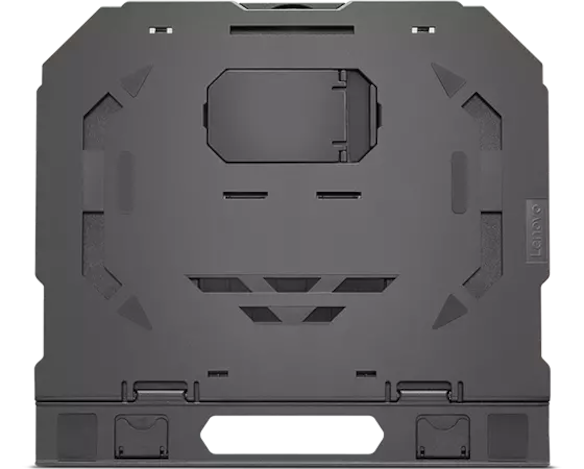
The Lenovo U.S. product rendering identifies the stand as GXF0X02619 and states ten adjustment levels from 0 to 54 degrees, up to 15-inch laptop support, a fold-flat form, an integrated cellphone stand, rubber pads and ventilation openings. Lenovo's technical sheet for its 2-in-1 Laptop Stand lists part number 4XF1A19885, plastic-and-rubber construction, ten tilt angles, six phone positions and a supported laptop weight strictly under 5 kilograms. It also gives the tilt span as 0 to 54 degrees with a ±3-degree tolerance.
The two codes are not silently collapsed here. Lenovo's U.S. product page uses GXF0X02619; the 2024 data sheet and a separate U.S. retail card use 4XF1A19885. Those records repeat the same model name and feature set, but the documents do not give a formal cross-reference or explain whether packaging differs. Check the code on the exact offer and box rather than assuming that every listing with a familiar title is the same configuration.
Angle is not a height column
The 0-to-54-degree range describes how the support surface tilts. Lenovo does not publish a separate stand-height range, lift adjustment, or a screen-rise chart for this model. A change in tilt can alter the location of the screen edge, but that is not the same as a height-adjustable platform. The published numbers do not tell you where your display will sit once your laptop's footprint, hinge position and viewing angle are included.
For this reason, the stand belongs in a basic at-a-desk shortlist and in a folding travel search, but it does not meet this site's essential-height-adjustment rule. A requirement for an adjustable stand height calls for a model whose mechanism and usable range are documented as height adjustment. The open-laptop riser guide separates fixed elevation, tilt and height-changing designs.
Measure the laptop and the room it will occupy
The data sheet lists product dimensions of 290.6 × 265.6 × 15.1 millimeters, or 11.44 × 10.45 × 0.59 inches, and says supported laptop weight is under 5 kilograms. Lenovo's U.S. page gives an up-to-15-inch diagonal claim. That is not a complete fit chart: it does not identify the base-width and depth limits, case clearance, foot locations or a list of supported computer models. Measure the bottom of your notebook with its case installed if you plan to leave that case on, then compare the contact areas and vent openings against the actual stand and instructions.
The footprint is close to a letter-size sheet of paper, so it needs meaningful desk depth as well as width. Consider where a separate keyboard and mouse will sit, whether the laptop's display can open without hitting another screen, and whether the stand blocks any intake or exhaust paths. Lenovo's ventilation language describes openings in the stand; it is not a measured cooling result or a promise that a particular notebook will run cooler.
Portable, but not a pocket-size promise
Lenovo says the stand folds flat and includes a handle, making packing a documented use. The datasheet lists a starting product weight of 522 grams and a starting packed weight of 660 grams; its product dimensions and shipping-package dimensions are separate records. It does not clearly label the product-dimension group as the folded envelope, and its listed shipment group names the stand, warranty card, user guide and box rather than a protective sleeve. Check the folded shape and bag clearance before relying on the portable label.
Who should keep comparing
This stand is a sensible candidate when a desk surface, multiple laptop tilt positions, phone support and a fold-flat form are the actual priorities. It is not documented for lap use, a swiveling base, an independently adjustable height or an exact laptop/case fit. The manufacturer sheet lists one year of warranty, but the research here does not establish a current offer, price, stock status, seller, or return policy. Confirm the code, package, fit and terms in the exact listing before deciding.
Key specifications
Key details at a glance
| Main material | Plastic and rubber |
|---|---|
| Height-adjustable | No |
| Folds for storage | Yes |
| Supported placement | desk |
Use the exact model’s instructions for operating limits, supplied equipment and version differences.
Sources for this review
Sources for this assessment

Compare the setup, not just the silhouette
Use the finder to compare reviewed stands against the way you work and the features you actually need.