
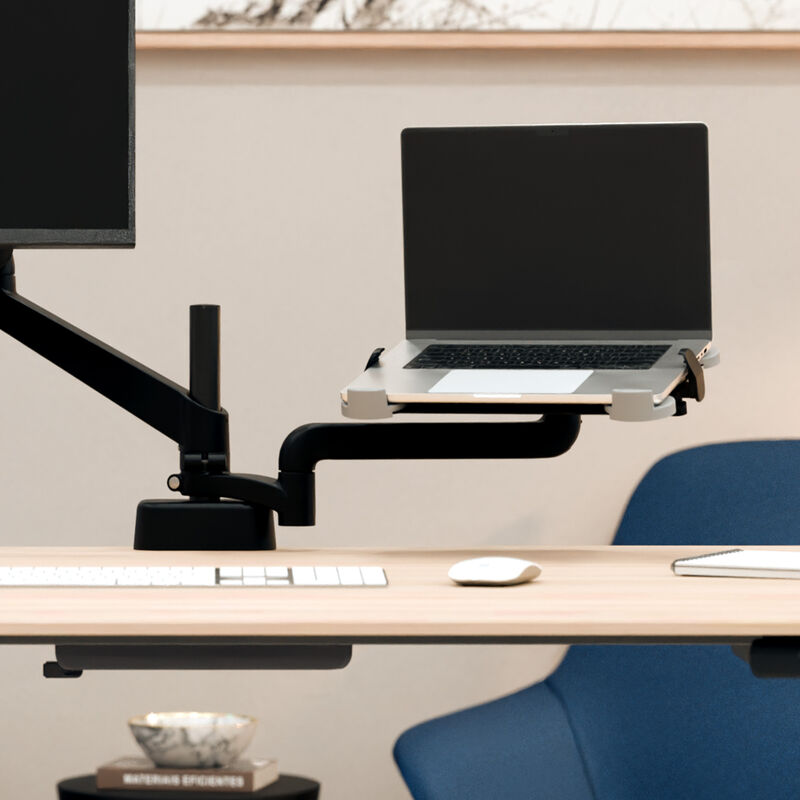
Your needs, this model
Does it fit your priorities?
Can I use the holder on an ordinary desk without a Vari arm?
No. Vari's product page says SKU 403309 attaches directly to an existing Vari monitor-arm post and is compatible with the Single or Dual Monitor Arm Series 2. The holder page lists the tray as a separate accessory, not a self-supporting stand. Confirm the exact arm generation and package before purchase.
Explore this need in the finder →Does this stand adjust and swivel?
The 403309 page describes a fully adjustable design and 360-degree rotation, and the product sheet lists a 30-degree tray tilt and a 90-degree or 360-degree arm pivot depending on the angle-stop arrangement. Those movements rely on the compatible Series 2 arm, sold separately; the holder itself has no independent height range or freestanding swivel base.
Explore this need in the finder →What laptop size and weight should I check?
Vari lists an 11-pound capacity and a recommended maximum screen diagonal of 15.5 inches, while its drawing labels a 12.25 x 9.5-inch tray and an 11.5–15.75-inch side-clamp span. The product page gives 11 lb (5 kg), but the sheet prints 11 lb alongside 15 kg; use the 11-pound ceiling and verify the actual laptop base, feet, case and clamp contact points.
Explore this need in the finder →The Vari Laptop Holder for Series 2 Monitor Arms (SKU 403309) is a desk-mounted laptop tray, not a freestanding riser. It attaches to Vari’s Series 2 monitor-arm post, where the arm can reposition the computer beside a display. Vari publishes an 11-pound laptop limit, a 15.5-inch diagonal recommendation and a 360-degree arm pivot, but none of those claims makes it a universal laptop fit or a stand with its own tabletop base.
Buy the holder only for a compatible arm
The first check is whether the workspace already has a Vari Single Monitor Arm Series 2 or Dual Monitor Arm Series 2. The 403309 product page describes the holder as part of that modular system and says it attaches to the existing post. The holder itself does not include a desk clamp, post or monitor arm, so it cannot be placed on an ordinary desk by itself. Confirm the exact Series 2 arm and its package contents before considering the tray; the compatibility statement does not establish fit on Vari’s older or other-brand arms.
The installation sheet depicts a short fixed arm, an extension arm and the laptop tray mounted to the arm post. It instructs the installer to loosen the knobs on the tray’s side clamps, move them inward or outward to fit the laptop’s width, position the clamps where they should contact the device, and retighten them. That adjustment is a useful part of the fit check, but it does not substitute for measuring the laptop or confirm that a case, unusual chassis edge, port, hinge or vent can sit safely inside the clamps.
Positioning comes from the arm system
Vari describes the holder as fully adjustable and says it can raise and reposition the laptop. The 2026 Series 2 arm instructions show how the arm assembly is attached to the post and adjusted; the 403309 specification gives an arm pivot range of 90 or 360 degrees and a tray tilt of 30 degrees. The product page separately describes 360-degree rotation. These are positioning movements through an arm system—not a height-adjustable base built into the laptop tray—and Vari does not provide a numerical screen-lift span for this holder.
The distinction matters if the essential need is a stand that adjusts while sitting directly on the desk. This tray depends on an already purchased Series 2 arm, and its fixed arm, extension and spring-arm joints determine where the laptop can be placed. Its arm pivot can rotate the supported computer around the post, but that is not a freestanding swivel base beneath the laptop platform. It is also not a travel stand: the documentation describes assembly on the arm, not a folded or packed configuration.
Check the limits—and a specification conflict
The product page gives a maximum of 11 pounds (5 kilograms) and a maximum recommended laptop diagonal of 15.5 inches. Use the 11-pound figure as a ceiling, not as a guarantee that every lighter computer fits. The spec sheet repeats “11 lb” but pairs it with “15 kg,” which is inconsistent with the product page’s 5-kilogram conversion; do not use the conflicting kilogram value to increase the load limit. A screen diagonal is likewise only a screening boundary, not a chassis compatibility chart.
The drawing labels the tray as 12.25 by 9.5 inches and shows an 11.5-to-15.75-inch clamp span. Treat the latter as the illustrated adjustable span between the side clamps, then compare the laptop’s base and contact points against the actual tray, stops and pad locations. The spec sheet and page describe cable management as a benefit, but do not give a clearance allowance for plugs, power cords or a laptop’s cooling vents. Keep attached accessories and the computer within the stated weight limit.
A separate route from Vari’s desktop risers
VariDesk Laptop Stand 403285 is a standalone fold-flat product with an independent height mechanism and a stated 2.25-to-12.5-inch stand-height range. TechTrack Laptop Stand 403212 is a rail-mounted accessory for one specified Vari desk and rotates at that track. The 403309 holder is a third arrangement: a tray added to a Series 2 monitor arm. Those products are not interchangeable finishes or versions of one stand. Choose based on the hardware already in the workspace rather than assuming that a Vari-branded holder fits any Vari desk or arm.
Verdict: useful only as part of a Series 2 setup
For an existing compatible arm owner who wants a laptop next to a monitor and needs to reclaim desktop area, 403309 adds an adjustable cradle with an evidenced width range and arm-based repositioning. For someone starting with a bare desk, its added arm requirement is decisive: the holder alone supplies no stand base, and the price of the complete setup cannot be inferred from this assessment. Before purchase, confirm the arm generation, tray and clamp dimensions, laptop weight and footprint, vent and cable clearance, and the exact parts in the seller’s package.
This source-based assessment uses Vari’s U.S. product page, 403309 specification sheet and Series 2 arm instructions. No physical installation, laptop fitting, load, movement or cooling test was performed for this article; it does not claim hands-on experience. Check the current seller offer, package, return terms and availability before ordering.
Key specifications
Key details at a glance
| Stand weight | 5.2 lb |
|---|---|
| Height-adjustable | Yes |
| Folds for storage | No |
| Swivel base | Yes |
| Supported placement | desk |
Use the exact model’s instructions for operating limits, supplied equipment and version differences.
Sources for this review
Sources for this assessment
Compare the setup, not just the silhouette
Use the finder to compare reviewed stands against the way you work and the features you actually need.