
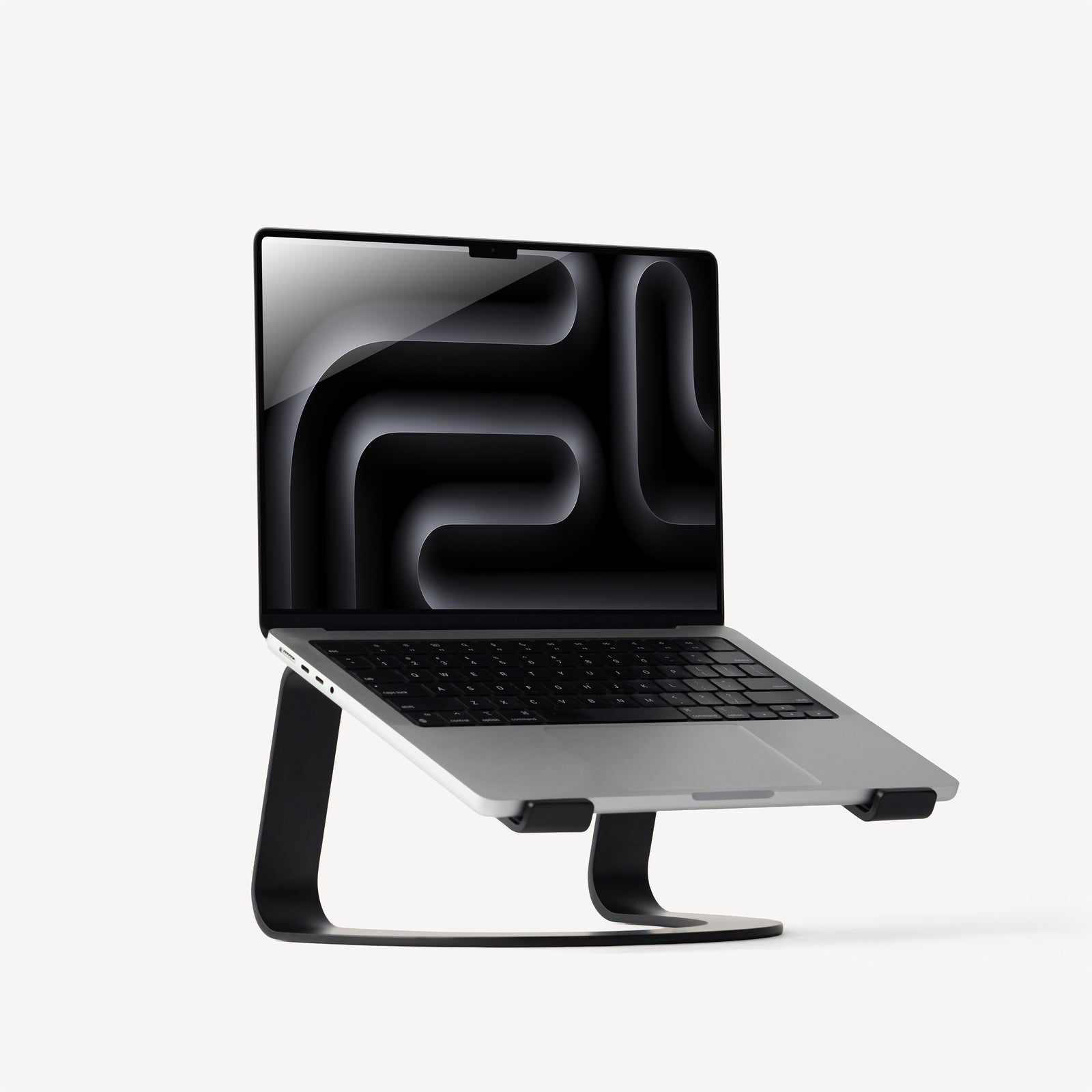
Your needs, this model
Does it fit your priorities?
How much does the Curve raise my laptop screen?
Twelve South lists a fixed 6.5-inch screen rise. That is a single working elevation, not a 6.5-inch adjustment range; compare the resulting display and built-in keyboard positions with your own desk before choosing a fixed riser.
Explore this need in the finder →Can I adjust the Curve or fold it into a travel bag?
The current Curve page describes a one-piece dual-arm design with a fixed screen rise, while the separate Curve Flex model is the one documented to adjust and fold. The Curve is not a travel-folding substitute for Flex; also, no lap-support mode is documented.
Explore this need in the finder →Will the Curve support my particular laptop?
Twelve South states a 7-pound load claim, but the reviewed page does not give a complete chassis-width, depth, case or foot-clearance chart. Check the laptop's actual resting footprint and weight against the exact stand before relying on screen size or appearance alone.
Explore this need in the finder →Twelve South's current Curve is a fixed, open-laptop desk riser built around an aluminum dual-arm frame. The useful distinction is right in the product's advertised geometry: it raises the laptop screen by 6.5 inches, but it does not offer a height range or folding adjustment. That makes Curve a narrower proposition than its name may suggest if you are comparing it with the more articulated Curve Flex.
A set elevation, not an adjustable desk system
The maker describes Curve as an aluminum stand with a one-piece dual-arm construction and says it supports a 7-pound load while leaving 70% of its base open. The screen lift is 6.5 inches. These are manufacturer claims, not results from a hands-on stability or thermal test. The open space beneath the laptop can matter to cable routing and air movement, but it is not proof that a particular computer will run cooler.
Because the rise is fixed, first consider where the display and built-in keyboard will land together. An open riser moves both parts of the laptop: if the screen height suits your eyes, the attached keys may still be too high for long typing sessions. A separate keyboard and pointing device can let you position inputs independently; Twelve South depicts Curve in that kind of desktop arrangement. If you want to keep typing on the laptop itself or share the stand among people with different seating positions, an adjustable mechanism may be more important than a clean fixed frame.
Curve's simple form has no documented hinge, swivel base, or travel-folding mode. The current product option data records one listing SKU, 12-1708, with the selected black finish. Do not confuse the fixed Curve with Curve Flex: the latter is a separate folding model with height and keyboard-angle adjustment.
Check the laptop and desk as a pair
Twelve South states that Curve sustains a 7-pound load, but the current page does not provide a complete device-width, depth, case, foot, or vent-clearance chart. Nor does it publish a useful stand-width and depth table on the page reviewed here. That gap matters more than a broad display-size label. Measure the area of your laptop that will actually rest on the supports, including any protective shell, and compare that with the maker's mounting instructions before choosing it for an unlisted computer.
The manufacturer's page also says that the frame leaves much of its base open and is shaped so a laptop can be opened with one hand. Those descriptions tell you how the design is intended to work; they do not certify that every chassis, hinge, or desk surface behaves the same way. We have not physically mounted a laptop on this stand, measured its fit, tested a typing load, or run a temperature comparison, so the purchase decision should remain tied to the stated dimensions and support conditions rather than presumed experience.
A 6.5-inch screen rise can be a useful starting point for a fixed desk, but it is not a personalized ergonomic prescription. Compare the final screen position with your chair and desk, and account for the new position of the laptop keyboard. If the riser makes laptop typing awkward, budget desk area for a separate keyboard and mouse as well as the stand and notebook.
How Curve differs from nearby formats
For a desk where one fixed height is acceptable, Curve's one-piece frame is the important contrast with Twelve South Curve Flex, which folds for transport and adjusts both the screen position and keyboard angle. Curve Flex is also the more explicit fit specification: its page gives a minimum laptop width and a 7-pound load limit, whereas the fixed Curve page's fit detail is less complete. That does not mean Flex automatically fits every case or laptop geometry; it means its published boundary is easier to check.
Other fixed laptop risers can take a different approach. A broad platform may support more of the laptop's base, while a stand with a shelf can leave space underneath for a keyboard. Rain Design mStand360 adds a rotating base, and iLevel adjusts height, so neither function should be assumed from Curve's aluminum shape. If changing the angle after setup is essential, compare the actual mechanism and adjustment instructions rather than treating a 6.5-inch rise as equivalent to adjustability.
Who should consider it—and what to verify
Curve is worth examining when your laptop will stay open at a desk, the fixed 6.5-inch rise suits your working arrangement, and the computer's load and support points match the official product instructions. It is a poor fit for a buyer who needs a stand to fold into a bag, adjust during use, swivel for screen sharing, or support the laptop on a lap; those uses are not documented for this model.
Before selecting an offer, confirm that it is the fixed Curve rather than Curve Flex, then check the laptop's actual weight, base footprint, feet, vents, and case against Twelve South's current guidance. Leave room for the keyboard and pointing device you intend to use. The manufacturer's numeric load statement and fixed elevation are useful constraints, not a substitute for the missing exact-model fit chart or a physical check of an unlisted notebook.
Key specifications
Key details at a glance
| Main material | Aluminum |
|---|---|
| Height-adjustable | No |
| Folds for storage | No |
| Swivel base | No |
| Supported placement | desk |
Use the exact model’s instructions for operating limits, supplied equipment and version differences.
Sources for this review
Sources for this assessment
Compare the setup, not just the silhouette
Use the finder to compare reviewed stands against the way you work and the features you actually need.