
Your needs, this model
Does it fit your priorities?
Is PA235U a regular laptop riser or a monitor stand with a laptop shelf?
Targus calls it a Universal Monitor Stand and describes a slide-out tray for a laptop or docking station beneath the monitor platform. It can support a desk arrangement with a laptop in that lower tray, but it is not an angled open-laptop riser, and the page does not specify whether the laptop lid is open or closed. Check the tray layout against your own setup.
Explore this need in the finder →Does the 100-pound limit tell me what laptop the tray can hold?
No. Targus states that the monitor stand supports an external monitor up to 100 pounds; it does not provide a laptop-tray load limit or laptop footprint chart. Do not apply the monitor rating to the laptop shelf. Check the exact laptop base and seek a tray load limit if device weight is a hard constraint.
Explore this need in the finder →Does PA235U provide height adjustment for my laptop?
Targus offers two monitor-platform positions that create 3.75- or 5.75-inch clearance for a laptop and dock underneath. The source does not say that the laptop tray itself moves up, provide a screen-rise range for a laptop, or call the laptop support height-adjustable. Treat the two monitor clearances as setup options, not a verified adjustable laptop height.
Explore this need in the finder →The Targus Universal Monitor Stand PA235U is best read as a monitor riser that incorporates a pull-out laptop and docking-station tray. That combination can suit a desk with a separate screen and a computer that needs a lower parking or working surface. It is not the same kind of product as an open-laptop platform that raises the computer's display: the Targus page describes support for an external monitor on top and a laptop or dock below. It does not state whether the laptop is intended to remain open or closed in the tray.
Two levels of support in one desk fixture
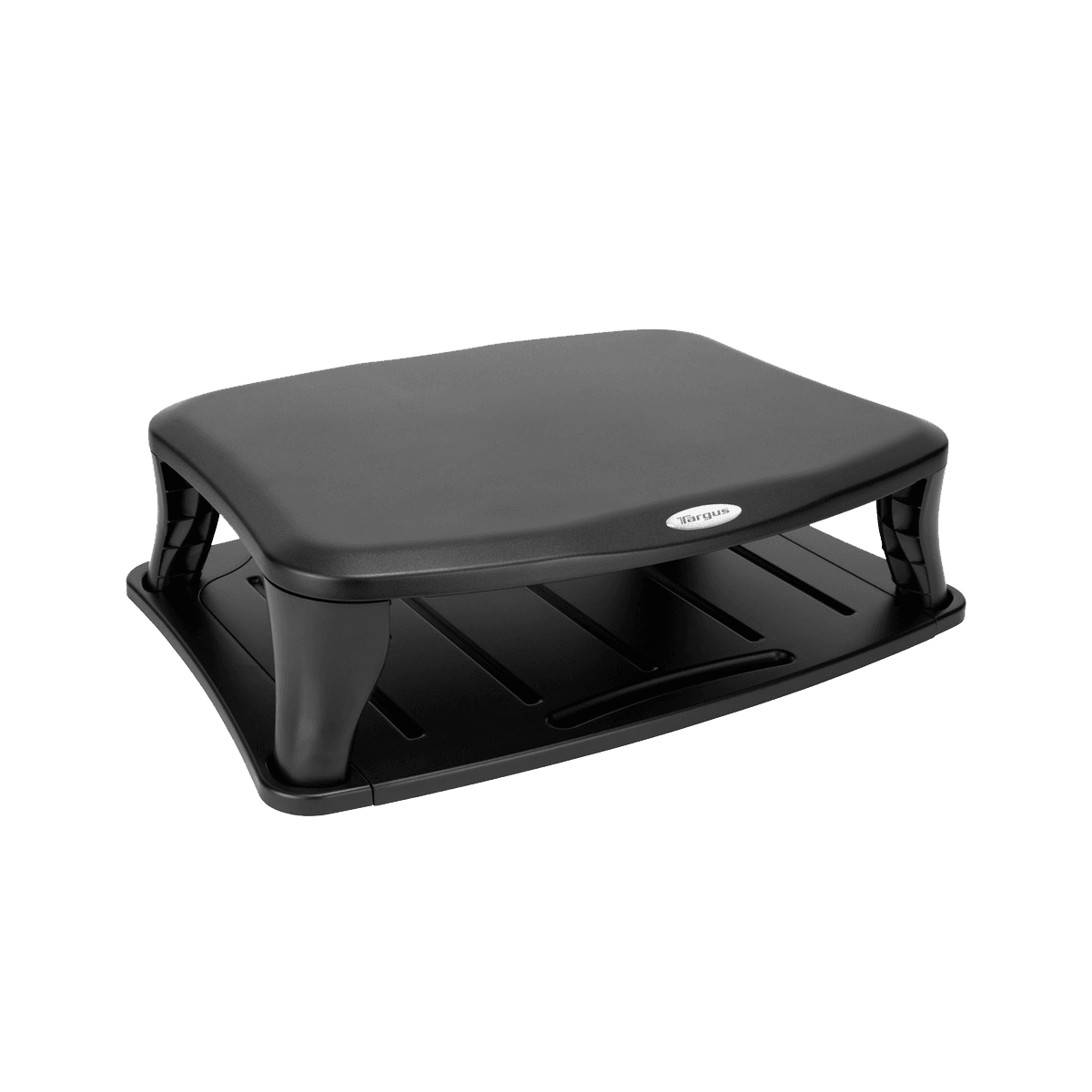
Targus identifies the model as PA235U and calls it a Universal Monitor Stand. The page describes a slide-out tray for a laptop or docking device, access to the computer's peripherals and two height positions for the upper platform. Its product summary says those positions leave either 3.75 or 5.75 inches of clearance for a laptop and docking solution beneath the monitor. The laptop tray is part of the monitor stand; it is not a separate arm, powered dock or detachable accessory.
For a desk setup, this layout may be useful when a monitor should sit above a laptop or dock rather than sharing the same surface side by side. Pulling out the lower tray is described as a way to place or access the computer, but the page does not provide a laptop-specific use diagram or say whether the screen should be open. Before treating it as a replacement for a laptop riser, check that your intended screen arrangement, keyboard access and cable connections work with the lower tray and monitor above it.
Do not transfer the monitor rating to the laptop tray
The product page says the stand supports an external monitor weighing up to 100 pounds. That is explicitly a monitor figure. Targus does not give a separate maximum for the laptop tray, a tray surface measurement, or a laptop size/weight chart. The overall dimensions are listed as 19.8 × 14.0 × 5.54 inches (width, height and depth), but they are not the usable bounds of the sliding shelf. A computer can be within the overall width of the object and still fail to fit the tray, clear its edges or leave room for its cables.
Likewise, the 3.75- and 5.75-inch values describe clearance below the raised monitor platform. They are not a low-to-high adjustment range for the laptop itself, and they do not establish the screen position of an open computer on the tray. If you need an adjustable laptop height, choose a product whose support for the laptop moves and whose height range is documented. PA235U does not pass that question on the evidence reviewed here.
Desk use only; verify the actual arrangement
This is a broad assembled desktop platform, listed at 4.42 pounds, with a slide-out shelf and two selectable platform positions. The model page describes desk-space management and a place to position a laptop/docking device under an external display. It does not document a folding travel configuration, a cushioned lap surface or a swivel base. Those are unknown or unsupported roles, not features to infer from the fact that the tray moves outward.
The exact official image shows the black platform and lower rails without either a monitor or laptop. It confirms the stand's visible form but cannot show the tray's fit with a real computer, demonstrate how far the shelf travels, or establish a load limit for the laptop. The page lists a one-year limited warranty and UPC 092636109172; verify exact model and seller terms for a particular offer. No hands-on assembly, laptop-fit or loading test is claimed here.
When it belongs on the shortlist
PA235U is worth comparing when your aim is a raised external-monitor platform with a pull-out place for a laptop or dock underneath, and you can confirm the lower-tray geometry for your device. It is a poor substitute for a portable laptop stand, an adjustable laptop screen riser or a tray with a documented computer load limit. Measure the laptop base and clearances, verify the preferred monitor height, confirm the laptop's lid/access arrangement and obtain a separate laptop-tray load figure if weight is critical. Keep the 100-pound monitor limit, the laptop-storage feature and the two monitor-platform clearances as separate claims.
Key specifications
Key details at a glance
| Supported placement | desk |
|---|
Use the exact model’s instructions for operating limits, supplied equipment and version differences.
Sources for this review
Sources for this assessment

Compare the setup, not just the silhouette
Use the finder to compare reviewed stands against the way you work and the features you actually need.