
Your needs, this model
Does it fit your priorities?
What should I check before using the integrated dock with my laptop?
AWU100005GL joins a laptop stand to an HDMI/USB/Ethernet dock, but the ports do not make every host compatible. Targus says video over HDMI requires a host USB-C port with DisplayPort Alternate Mode, and its USB-C power pass-through requires a compatible PD 3.0 host. The adapter is separate. Check the laptop's port capabilities, operating-system display limits and the power adapter before relying on a particular monitor or charging setup.
Explore this need in the finder →Does the fold claim tell me whether the dock stand fits my travel bag?
Targus calls the stand foldable to 2.5 × 10 inches and lists a separate 10.06 × 2.44 × 0.81-inch dimension set without identifying its axes or saying that the set is the folded envelope. The listed stand weight is 0.66 pound. Compare the exact folded object with your bag rather than treating the two figures as a complete pack-size chart.
Explore this need in the finder →Do five positions tell me how high the laptop screen will sit?
Targus describes five selectable height positions but does not give a minimum-to-maximum lift or a screen-rise table. The final display position depends on your laptop, so the position count establishes adjustability but not a precise height outcome.
Explore this need in the finder →Can I rotate the stand toward another person for screen sharing?
The product page documents folding and five height positions but does not document a rotating base. If swiveling is essential, use a model whose exact source states that the stand rotates; do not treat selectable height or angle as proof of base rotation.
Explore this need in the finder →The Targus Portable Laptop Stand + Integrated Dock AWU100005GL combines a foldable laptop platform with a wired desk dock. Its appeal is not a unique stand mechanism: Targus describes five working positions and a foldable frame, as it does for the related AWU100205GL hub stand. The difference is the attached port mix. AWU100005GL adds a single HDMI output, Ethernet and a USB-C data port, alongside two USB-A ports and USB-C power pass-through. That package can simplify a desk with a compatible host, but it also makes port compatibility a key part of the fit decision.
A stand and dock in the same object
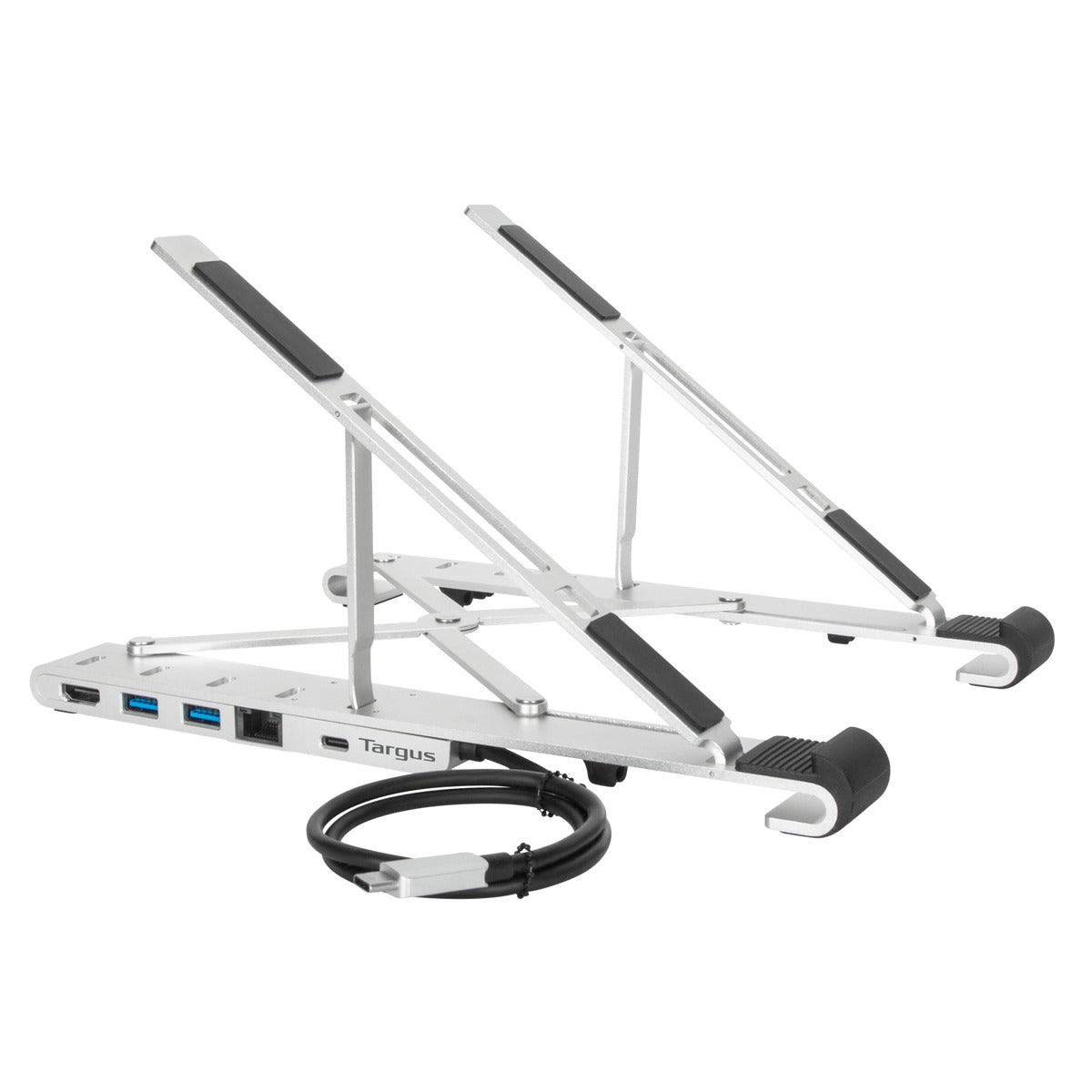
Targus identifies AWU100005GL on its U.S. product page as a Portable Laptop Stand + Integrated Dock. The stand is described as lightweight aluminum, folding for transport and offering five height positions. Targus lists support for most laptops from 10 to 15.6 inches diagonally. This is a maker size statement, not a model-by-model compatibility list: the page does not supply a maximum laptop-base width or depth, contact-pad map, case allowance, vent clearance or a supported laptop-weight limit.
The integrated dock is the more distinctive part of the package. Targus lists one HDMI port for a single 4K UHD display at up to 30 Hz, two USB-A data ports and one USB-C data port at up to 5 Gbps, one Gigabit Ethernet port and a separate USB-C Power Delivery pass-through connection. A wired keyboard, external storage, network cable and a single display can all be considered in the same desk plan, but the listed port count alone does not confirm that a particular computer can use every feature at once.
Check the host before counting on video or power
The host connection is USB-C, and Targus says the HDMI video path needs USB-C DisplayPort Alternate Mode. The page lists Thunderbolt 3 compatibility and describes different display behavior across Windows, Chromebook, iPadOS and macOS. Its specifications separately describe a single supported monitor. Treat the one HDMI connection as the practical starting point and verify the exact computer, operating system and desired screen arrangement against the manufacturer’s compatibility details rather than assuming that every USB-C port sends display video.
Power is another separate check. Targus advertises up to 100 watts of PD 3.0 pass-through with Fast Role Swap, but says a compatible PD 3.0 host is required and that the power adapter is not included. The 100-watt figure is a maximum maker claim, not a tested laptop charging result. Check the laptop’s input requirement and the adapter you plan to use; without that, the power path cannot be judged from the dock alone.
Compared with the Targus AWU100205GL, the dock edition swaps some USB-A capacity for a wider set of connections. AWU100205GL is the better-known hub-style sibling with four USB-A ports, including one fast-charging port, and USB-C power pass-through. AWU100005GL has two USB-A ports, one USB-C data port, HDMI and Ethernet. The shared folding support and five-position description do not make the two model codes or port packages interchangeable.
Five positions do not specify a rise range
Targus says the open laptop can be placed at five different height positions. The product page also describes those positions as angles in one feature block, while its overview calls them height positions. This supports a selectable, adjustable stand, but no minimum and maximum elevation, position-by-position measurement or screen-top range is published. If you need a precise display height, compare the actual laptop and stand on your desk or ask for the missing dimensions instead of treating “five positions” as a measured lift.
The page gives product dimensions of 10.06 × 2.44 × 0.81 inches and a stand mass of 0.66 pound. Targus separately describes the folded stand as 2.5 × 10 inches, without labeling those dimensions or explicitly mapping the three-number specification to its folded form. These statements establish that the product folds and provide two useful maker references, but they do not resolve packed thickness or bag clearance. Measure the folded stand itself against the space you have.
Use the device-size claim carefully
The 10–15.6-inch diagonal range is a broad starting point, not a chassis chart. A large display can sit on a narrow base and a smaller display can have a deep base; feet, a protective case and bottom vents also change the contact geometry. Before choosing the dock stand, compare the laptop’s actual base and feet with its two support rails and check that vents are not blocked. The exact-model product image shows the stand and the integrated dock without a laptop, so it cannot settle a device-fit question.
Targus uses airflow and heat-dissipation language for the open design. That is the manufacturer’s description, not an independent temperature measurement. This assessment does not claim to have tested stability, charging, display output, network speed, heat, typing comfort or durability. Nor does the page document a rotating base or direct lap support; the reviewed use is an open laptop on a desk, with the product folded only for transport.
Who should compare this version
AWU100005GL merits comparison when you want a portable five-position support and an HDMI/Ethernet/USB dock in one piece, and the host has the ports and display capabilities the dock requires. It is less compelling if the laptop needs a model-specific fit guarantee, an exact display-height range, a known packed envelope, an included power adapter, more than two USB-A connections or a documented swivel base. Confirm the exact AWU100005GL code, the laptop footprint, host USB-C video and PD features, operating-system display behavior, desired external connections and adapter before deciding that the combination suits your setup.
Key specifications
Key details at a glance
| Height-adjustable | Yes |
|---|---|
| Folds for storage | Yes |
| Supported placement | desk |
Use the exact model’s instructions for operating limits, supplied equipment and version differences.
Sources for this review
Sources for this assessment

Compare the setup, not just the silhouette
Use the finder to compare reviewed stands against the way you work and the features you actually need.