
Your needs, this model
Does it fit your priorities?
Does the AWE26US fit a laptop with a 15.4-inch screen?
Targus lists the stand as suitable for laptops up to 15.4 inches, but screen diagonal is not a platform-footprint chart. The Targus brochure gives neither usable platform dimensions nor a maximum weight. Check your laptop's base, feet, case and underside openings against the exact stand.
Explore this need in the finder →Can AWE26US change its height after setup?
Office Depot's exact-item specifications say adjustable height: No. The Targus brochure describes a comfortable viewing position but supplies no height mechanism or positions. Do not choose this fixed-profile desk scenario if changing laptop height is essential.
Explore this need in the finder →Will the open frame keep my laptop cooler?
Targus says the open design improves air circulation. That is a design claim, not a measured temperature result for your particular laptop or workload. Keep vents unobstructed and do not interpret the stand's 1.8 lb weight as a supported-load figure.
Explore this need in the finder →The Targus AWE26US is an earlier open-frame desk stand listed in the company's U.S. catalog as the Modern Ergonomic Laptop Stand. Targus states that it is suited to laptops up to a 15.4-inch screen diagonal and weighs 1.8 pounds. The brochure describes the open design as a way to encourage air circulation; it does not publish a measured cooling result, usable platform dimensions or a load rating. A separate exact-item retailer page calls it an Ergonomic M-Stand and provides a few additional specifications.
A fixed-profile support with a screen-size ceiling
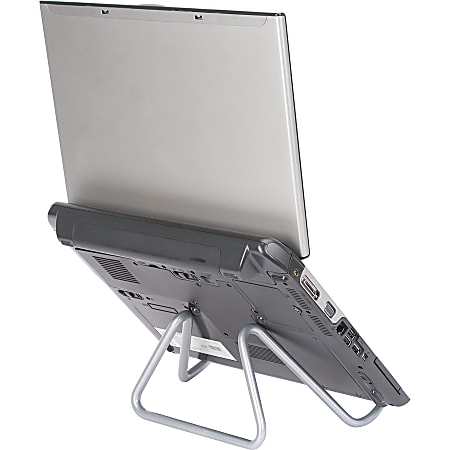
Office Depot's exact AWE26US listing marks adjustable height as unavailable. That aligns with treating this model as a fixed desk platform rather than an adjustable riser. Targus gives no height positions or lift range, so the maker's phrase about placing a laptop at a comfortable viewing height should not be read as an ability to change the height after setup. If a height change is essential, use a stand with a documented mechanism instead.
The 15.4-inch figure is a maximum screen diagonal, not the size of the contact surface. Targus publishes neither the actual laptop support area nor a fit chart for individual computers. Office Depot lists overall dimensions of 7 inches high by 10.75 inches wide by 8.25 inches deep; those are dimensions of the item as a whole, not verified usable platform width or depth. Measure the laptop base, feet, case and vent openings against the exact object rather than extrapolating from a diagonal.
Open construction, with limited performance evidence
Targus presents the open frame as an airflow-friendly design. That describes the layout but does not establish how much cooler a given laptop will run, or whether its fans and vents remain unobstructed. The 1.8-pound value is the stand's mass, not the amount of laptop weight it can support. The reviewed pages provide no load limit and no device-specific stability results.
The image on this page comes from Office Depot's exact-item listing, which identifies model AWE26US. It shows a laptop resting on the stand but does not verify compatibility with that computer or with another chassis. The official Targus brochure confirms the product code and its screen-diagonal claim; its catalog image does not supply a detailed product fit illustration.
When this older model is worth comparing
AWE26US may be relevant if you want an earlier open-frame laptop support for a desk, have a computer below Targus's 15.4-inch maximum, and do not require a height change after setup. The evidence does not establish folding for travel, a swivel base or direct lap use, so those should not be assumed. Its airy frame may be a practical feature, but the manufacturer's airflow rationale is not a thermal test or a promise of improved battery life.
Verify the exact item and seller terms
The U.S. brochures confirm this historical stand's name and category; the Office Depot page calls the exact item an Ergonomic M-Stand and lists retailer item #314599, with manufacturer #S6482411. That second number is a retailer record and is not treated as a Targus SKU crosswalk. No current U.S. product offer or price is established here. Before considering an old or used listing, match the AWE26US code, check the actual support surface and inspect the stand's condition and return terms. No direct fit, stability or cooling test is claimed.
Key specifications
Key details at a glance
| Height-adjustable | No |
|---|---|
| Supported placement | desk |
Use the exact model’s instructions for operating limits, supplied equipment and version differences.
Sources for this review
Sources for this assessment
Compare the setup, not just the silhouette
Use the finder to compare reviewed stands against the way you work and the features you actually need.