
Your needs, this model
Does it fit your priorities?
How much can the ADJ-LAPTOP-RISER raise the laptop?
StarTech lists a 1.3-inch minimum and 4.7-inch maximum stand height (33.2–120 mm). That is the stand’s stated height range, not a guaranteed screen rise for every laptop: screen location also depends on the chassis depth and hinge. StarTech says to remove the laptop before adjusting the stand.
Explore this need in the finder →Can I carry the ADJ-LAPTOP-RISER between work locations?
StarTech describes the stand as folding and gives a collapsed size of 10.6 × 8.8 × 1.9 inches in its narrative; the dimensions table instead lists 10.6 × 8.9 × 2.0 inches. Its product weight is listed as 714 g and the included package is the stand and adjustment tool. Measure your own bag space and do not assume a sleeve is included.
Explore this need in the finder →Can the laptop stay on the ADJ-LAPTOP-RISER while I change its height?
No. The manufacturer specifically instructs users to remove the laptop before adjustments to either height or tilt. Set the stand first, then place the laptop; the included tool is used to adjust joint tension. The maker also warns against exceeding its recommended height because the riser could tip backward.
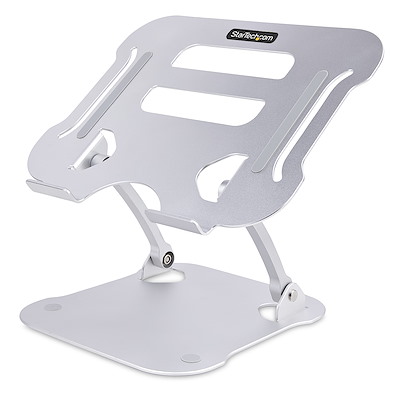
Explore this need in the finder →The StarTech.com ADJ-LAPTOP-RISER is best understood as a folding desktop platform with real vertical adjustment, not simply a fixed-angle shelf. StarTech lists a 1.3-inch minimum and 4.7-inch maximum stand height and says tilt can be changed as well. That range makes it a more adaptable desk option than a fixed riser, while its folded shape and 714-gram listed mass keep it plausible for occasional transport. The evidence is manufacturer documentation, not a hands-on stability or posture test.
Height and tilt move together at the support arms
The stand uses two tensioned arms between a low base and a vented upper platform. StarTech says the user can adjust both height and tilt, with the platform rising from 1.3 to 4.7 inches above the desk. The manufacturer does not publish a table of exact angle positions or state where the screen edge will land at each height. A laptop's depth and hinge placement will change the final display position, so treat those values as the stand's range rather than a guaranteed screen rise.
The included adjustment tool changes joint tension. StarTech specifically directs users to remove the laptop before adjusting height or tilt. That instruction matters: this is not a supported loaded adjustment mechanism. The source also warns that exceeding the recommended maximum height can tip the stand backward. Set the arms before placing the computer and recheck the contact points after each change rather than attempting to manipulate the joints under a loaded platform.
Platform, footprint and device-fit limits
The frame is silver anodized aluminum with a vented top, rubber contact pads, non-slip feet and raised front flanges. The sheet describes a 10.6 × 8.9-inch upper surface and a 7.8 × 8.4-inch base. That gives a useful first estimate for desk space, but it is not a list of compatible laptop models. The 10-kilogram load claim describes a maximum weight, not a promise that the feet of every computer will land securely or clear the front lip. Check the base width, depth, rubber-foot positions, case edges and ventilation openings on the laptop you intend to use.
StarTech's product-dimensions table gives an overall 10.6 × 8.9 × 2.0-inch dimension group, while the narrative describes the collapsed riser as 10.6 × 8.8 × 1.9 inches. The small but real discrepancy means neither set should be treated as a measured guarantee for a close-fitting sleeve. The exact folded form is worth checking against a bag before relying on the stand as a daily commuter accessory.
Portable, but not an on-device adjustment stand
The product sheet says it folds, weighs 714 grams and ships assembled with an adjustment tool. There is no laptop-specific travel sleeve listed in the package. Those details favor moving it between desks over leaving it permanently installed, but the broad base and platform still occupy more room than a narrow bar-style riser. Consider whether the workspace will usually use the stand at one height or whether the fold-flat form will actually be used often enough to justify carrying it.
Where the maker language stops
StarTech describes airflow openings and says the elevated surface promotes passive cooling. Open space can allow air to move under a laptop, but the listing is not a temperature test for a particular machine. The 22-pound/10-kilogram capacity is likewise a manufacturer claim, not an independent stability rating. This review does not claim to have used or measured the stand. Its strongest evidence-backed advantages are the selectable height and tilt, adjustable joint tension and a foldable all-aluminum construction; its meaningful cautions are unloaded adjustment, an explicit tipping warning and no exact chassis-fit chart.
Who should compare it
Keep the ADJ-LAPTOP-RISER in view if a desk setup needs more than one fixed elevation and the stand may also travel between work locations. Compare it against lighter stands that adjust angle only, and against desktop risers that change height but do not fold. Before ordering, verify the exact model code, your laptop's support footprint, the desired screen position, the folded dimensions and whether a protective pouch is included. A 4.7-inch maximum is a stand measurement—not a guarantee of eye-level viewing for every user.
Key specifications
Key details at a glance
| Main material | Anodized aluminum |
|---|---|
| Height-adjustable | Yes |
| Folds for storage | Yes |
| Swivel base | No |
| Supported placement | desk |
Use the exact model’s instructions for operating limits, supplied equipment and version differences.
Sources for this review
Sources for this assessment
Compare the setup, not just the silhouette
Use the finder to compare reviewed stands against the way you work and the features you actually need.