
Your needs, this model
Does it fit your priorities?
Can I change the LS18 height while my laptop is on it?
No. Nulaxy's safety reminder says to remove the laptop or tablet before changing height or angle. Set the stand first, check the device rests within the support area, and then place it back; the product page does not quantify adjustment force or provide a loaded adjustment procedure.
Explore this need in the finder →Does the LS18's rotating base also change its height?
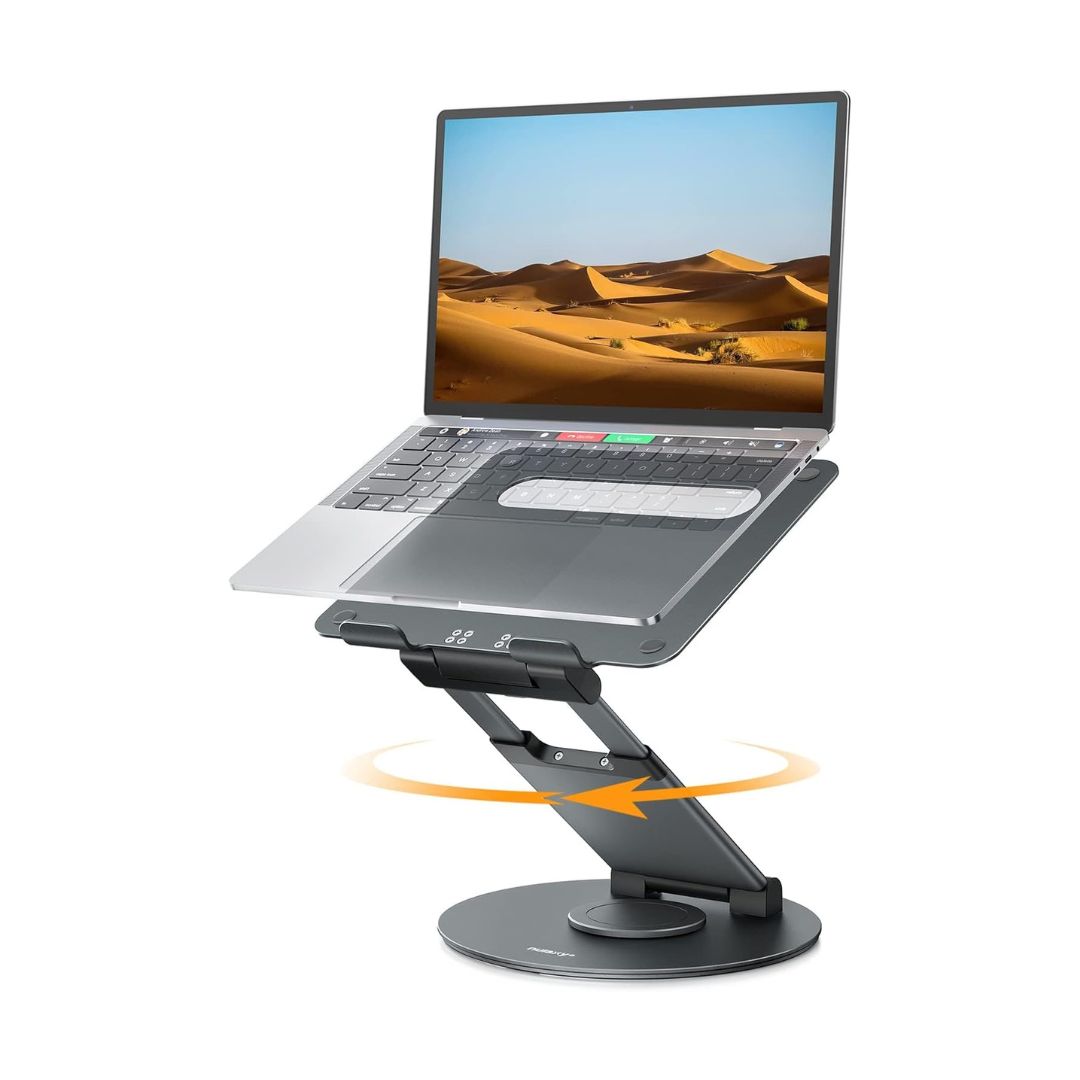
They are separate movements: the stand has telescopic height positioning, tilt adjustment and a 360-degree rotating base. The page lists height up to 20 inches, but rotation does not establish a particular screen height or make the setup suitable for every desk clearance.
Explore this need in the finder →Is the LS18 suited to typing on the built-in keyboard?
Nulaxy recommends an external keyboard and mouse because typing or drawing on an elevated laptop may wobble. The height claim is not an independent stability test, so plan separate input devices if the stand is used at its taller settings, and check whether the base can rotate without catching nearby cables or objects.
Explore this need in the finder →The Nulaxy LS18 combines three movements that are easy to confuse: a telescopic height adjustment, a tilt-adjustable platform and a 360-degree rotating base. Nulaxy lists a maximum stand height of 20 inches, laptops from 10 to 17 inches and a device load up to 22 lb. Its page also gives a practical safety instruction: remove the laptop or tablet before changing height or tilt. This review uses the current manufacturer product page and category listing; it does not report hands-on use or testing.
Rotation is the distinguishing feature
The rotating base is different from angling a platform on a hinge. A swivel lets the supported computer turn toward someone beside or across the desk; height and tilt adjustments change the screen's position relative to the base. If screen sharing is the reason to shop, the base rotation is the feature that makes the LS18 distinct from the Nulaxy C1 and C5, which are described as adjustable but do not list a swiveling base.
The official product page says 360-degree rotation and depicts the round base with a turning graphic. It does not give a full footprint, the amount of surrounding clearance needed to complete a turn, or the route that cables should follow while rotating. A free-turning stand can still be awkward if the desk is crowded or a plugged-in laptop cable catches. Measure the available area and plan cable slack before relying on rotation in a call or collaborative setup.
Height claims are not a screen-rise guarantee
Nulaxy lists height adjustment up to 20 inches and adjustable tilt. The page does not provide a minimum height or a chart of settings. Its maximum describes stand height, not how far every laptop display will rise above the desktop. Laptop thickness, hinge angle and placement on the support plate all affect the final view. If the display must clear a shelf or align with a monitor, compare that obstruction with the exact support dimensions rather than treating “up to 20 inches” as the screen's position.
The manufacturer says the LS18 fits laptops, notebooks and tablets up to 17 inches and states a device load up to 22 lb (10 kg); its exact page does not specify a lower diagonal boundary. It describes the stand as fully foldable but gives no exact computer footprint chart, packed dimensions or stand mass. Those claims are useful boundaries for initial screening, not proof that every laptop up to that diagonal will sit properly on the support area. Confirm the device's actual width and depth, case, feet, bottom vents and stop-edge contact before considering a close fit.
Follow the setup caution
The LS18 page says to take the laptop or tablet off the stand before adjusting height or angle. That matters because the stand combines moving joints with a device-support platform. Set its height and tilt without the computer in place, then return the laptop only after the support is settled; the manufacturer page does not provide a loaded adjustment procedure. Nulaxy also recommends an external keyboard and mouse because typing or drawing on the elevated computer may cause wobble. These are product-page warnings, not independent test observations.
As with any high riser, the laptop's built-in keys and trackpad move upward with the display. The external-input recommendation makes particular sense if the LS18 will stay tall for long typing periods. There is no published position-by-position stability measurement, so do not infer that a 22 lb rating alone answers whether a particular computer will feel steady while typing.
Compare it with the C5 and fixed C3
The C5 lists a numeric 1.18–21-inch stand-height range and tilt adjustment, and also carries a warning about typing wobble at some settings; it does not document base rotation. The LS18 instead claims a maximum height up to 20 inches and a 360-degree base, with a clear device-removal instruction before adjustment. The C3 is a fixed seven-inch riser that comes apart into three pieces and has a source conflict between 15.6- and 16-inch maximum-size wording. Those differences are more useful than choosing among the models by their similar “laptop stand” names.
The LS18 is therefore a plausible candidate when both a raised working position and screen-sharing rotation are essential. It is not a laptop dock, a powered hub or a documented lap support. The page gives no charging, port, or cable-management features, and a rotation graphic is not evidence that cables remain clear in every arrangement.
What the sources do not establish
The current LS18 listing does not state exact deployed footprint, packed size, stand mass, a minimum height, hinge-position count, or a laptop-by-laptop compatibility chart. No independent stability, load, rotation-clearance or fit test was performed for this review. The product page indicates a current manufacturer reference; it does not verify retail stock, seller identity, price, warranty terms for a specific offer, or included packaging. Confirm the exact LS18 model, package, return policy and device fit before choosing it, and leave enough desk and cable clearance to use the swivel safely.
Key specifications
Key details at a glance
| Height-adjustable | Yes |
|---|---|
| Folds for storage | Yes |
| Swivel base | Yes |
| Supported placement | desk |
Use the exact model’s instructions for operating limits, supplied equipment and version differences.
Sources for this review
Sources for this assessment
Compare the setup, not just the silhouette
Use the finder to compare reviewed stands against the way you work and the features you actually need.