
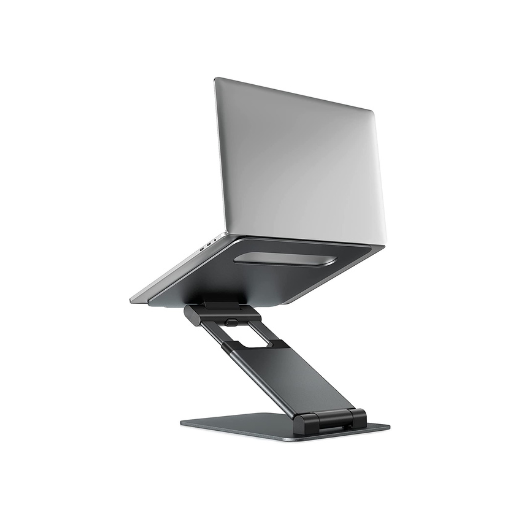
Your needs, this model
Does it fit your priorities?
What is the C5's actual height range?
The manufacturer lists an overall stand-height range from 1.18 to 21 inches and says the angle also adjusts. That is not the same as screen lift: the notebook's thickness and the exact support position affect the display height above the desk.
Explore this need in the finder →Can I type on the laptop keyboard at every C5 setting?
Nulaxy cautions that some combinations of height and tilt may wobble when using the built-in keyboard and recommends a separate keyboard and mouse. No independent stability test or position-by-position result is available here, so plan an external-input layout if the laptop will be elevated for long typing sessions.
Explore this need in the finder →Will the C5 fit in a travel bag?
The product page describes a foldable, compact form, but does not publish folded length, width or thickness, a carry-bag inclusion, or a measured packing mass beyond its 1.25 kg product weight. Compare the folded stand with your bag and treat that weight as the full stand's stated mass, not a packed-kit measurement.
Explore this need in the finder →The Nulaxy C5 Height Adjustable Laptop Stand is the clearest height-range model among the Nulaxy desk stands reviewed here. Its manufacturer lists a 1.18–21-inch overall stand-height range, tilt adjustment, a folding form, a 22 lb device-load ceiling and laptop sizes from 10 to 17 inches. One caution is unusually relevant to day-to-day use: Nulaxy says some combinations of height and tilt may wobble when typing on the laptop's own keyboard and recommends separate input devices. This is a source-led assessment, not a hands-on test.
Understand what 1.18–21 inches measures
The published number is the stand's height range, not a promise that every laptop screen rises by that amount above the desk. The laptop body sits on the upper plate, and its thickness, rear-foot position, hinge design and viewing angle affect where the screen lands. That distinction matters at both ends of the range: a lower support position may still put the keyboard higher than expected, while a tall setting may place the screen well above a nearby shelf or external display. Measure the intended desk clearance and decide where a separate keyboard can sit before making the stand's maximum height the goal.
The page describes two pivot joints and tilt adjustment as part of the stand's positioning system. Its general range does not specify a list of stable angles or which of those settings feels suitable for typing. Nulaxy's own note cautions that not all height and angle combinations are stable enough for built-in-keyboard use and recommends a Bluetooth keyboard and mouse. That limitation should be read alongside the adjustment benefit rather than left to a small-print afterthought.
Fit, load, and packing checks
Nulaxy lists laptops from 10 to 17 inches and a maximum device load of 22 lb (10 kg). It also gives the stand itself as 1.25 kg and describes the frame as foldable. Those numbers help compare the C5 with smaller fixed desktop risers, but the page does not provide folded length, width or thickness, or a complete laptop chassis chart. It says the frame folds compactly, not exactly how much bag space the folded unit takes. If portability matters, check the physical package dimensions instead of assuming “foldable” means pocket-size.
A device falling inside a diagonal or load range may still have an awkward contact fit. Compare the base width and depth, foot placement, vents and any protective case with the support plate and stop points. The manufacturer page identifies desk use and calls the stand portable, but does not document use on a lap. A load limit should not be interpreted as a warranty that the laptop will not rock at every height, especially given the maker's explicit typing warning.
The C5 versus other adjustable stands
The C1 is another folding Nulaxy option with dual adjustable shafts, but the reviewed C1 page gives no numeric height range. The C5's 1.18–21-inch statement makes the adjustment envelope easier to compare on paper, while its typing warning makes keyboard placement a higher-priority check. The LS18 has a separate telescoping mechanism and 360-degree rotating base; Nulaxy says to remove the laptop before changing its height or tilt. The C5 page does not publish that specific loaded-adjustment instruction, so check any package manual for the correct handling procedure rather than borrowing one model's directions for another.
If rotation is essential for sharing a screen, the C5's height/tilt pivots are not a substitute for the LS18 rotating base. If you only want a static raised screen, the simpler C3 avoids the C5's articulated assembly but has one fixed elevation and is not described as a fold-flat travel stand. Compare the actual mechanism to the movement you require; the Nulaxy names alone do not make their options interchangeable.
Who should consider it
The C5 is most relevant to a desk user who needs substantial height choice, has room for a separate keyboard and pointer, and is willing to check the folded package before carrying it. It is less convincing for someone who expects to type directly on the raised laptop at any setting, needs a particular quantified screen rise, or relies on an exact model-specific chassis-fit chart. The page does not list a rotating base, a lap arrangement, a measured footprint, or folded dimensions. Nulaxy's current listing establishes a product reference, not a promise that a particular seller has the same item, package, price, or availability.
No physical measurement, load test, repeated hinge adjustment, laptop-fit check, or typing trial was performed for this review. The stated range, mass and load ceiling remain manufacturer claims. Before ordering, verify that the exact offer is the C5 rather than the C1 or LS18, compare the real laptop and desk clearances, and plan for the maker's separate-input recommendation.
Key specifications
Key details at a glance
| Height-adjustable | Yes |
|---|---|
| Folds for storage | Yes |
| Supported placement | desk |
Use the exact model’s instructions for operating limits, supplied equipment and version differences.
Sources for this review
Sources for this assessment
Compare the setup, not just the silhouette
Use the finder to compare reviewed stands against the way you work and the features you actually need.