
Your needs, this model
Does it fit your priorities?
How high can the C1 raise my screen?
Nulaxy describes dual adjustable shafts but publishes no minimum-to-maximum stand height or numbered settings for this C1 page. Laptop thickness changes where the screen lands, so compare the actual target height with your keyboard position instead of treating an adjustment label as a measured screen-rise range.
Explore this need in the finder →Is the C1 suitable for packing?
The manufacturer calls the dual-folding design flat and portable, so the C1 is in the documented travel-folding set. The product page does not state the folded length, folded thickness, stand mass or whether a carry bag is included; check those if your bag has a tight space or weight limit.
Explore this need in the finder →What does the 44 lb rating establish?
Nulaxy lists support up to 44 lb and a 10–17-inch laptop range, but neither number confirms contact with every laptop's feet, vents or case. Treat these as manufacturer limits, compare the chassis footprint and seek exact model fit guidance if the laptop is near a stated boundary.
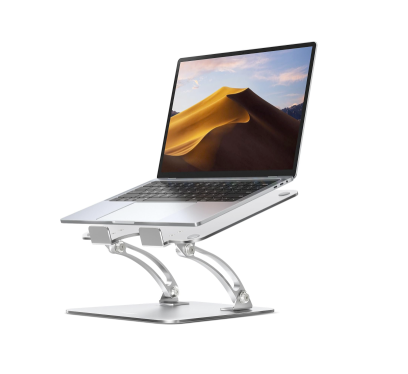
Explore this need in the finder →The Nulaxy C1 Ergonomic Adjustable Laptop Stand uses two support rods to raise and reposition an open laptop on a desk. Nulaxy presents it as adjustable and fold-flat, and lists laptops from 10 to 17 inches with a 44 lb stated load limit. Those are maker specifications, not a chassis-fit chart or an independent stability test; this review is based on the current product page and catalog listing, not use of the stand.
What the C1's adjustment does—and does not—tell you
The C1 is visually distinct from Nulaxy's static C3: paired support arms create a raised laptop platform, and the page says the dual shafts adjust to position the notebook. It calls the model foldable and describes a form that collapses flat. These are meaningful capabilities if you want to change the display position between work sessions or take a stand apart from a fixed desktop setup.
However, the C1 page does not publish numbered stops, a minimum-to-maximum stand-height range, specific angle increments, or dimensions for any setting. “Adjustable” confirms a mechanism, but does not tell a buyer how far the screen can move in their setup. A thick laptop, its own hinge angle, and where its rear edge sits all affect the final display position. Decide what sightline you need and compare that target with the product geometry rather than assuming the C1 reaches it because another product in the family has a numerical range.
Compatibility claims need a second check
Nulaxy lists a 10–17-inch diagonal range and says the stand can support devices up to 44 lb. The product page also describes an aluminum-alloy frame, ventilation openings, and silicone pads. These details make the intended laptop use clear, but the page does not show a full compatibility matrix or state limits for laptop-base width, depth, feet, case shape, or vent placement. A screen diagonal is not a substitute for comparing the computer's underside to the actual contact areas. Likewise, the load ceiling is a manufacturer claim, not evidence that every allowed laptop geometry is equally stable.
The opening copy emphasizes a dual-rod mechanism and makes a broad typing-stability claim. That language is not accompanied by a method or position-by-position result. The C1 is elevated hardware: the built-in keyboard and trackpad rise with the display. If your routine involves long typing blocks, consider desk space for a separate keyboard and pointer even if you do not need the stand to reach its highest setting.
Travel claims are useful but incomplete
The C1 is called foldable and portable, with a dual-fold arrangement that can collapse flat. That supports a travel use case in the way a fixed riser does not. The product page does not give the folded length, width, thickness, mass, or whether a carry bag is included. Those missing numbers matter when a bag compartment is narrow or every pound counts. The online listing also has a separate Canadian C1 page; this review addresses the unqualified US-facing C1 listing, not the Canadian offer. Do not transfer the regional listing's package or seller conditions to a US listing by name alone.
Choosing between C1, C5, and LS18
The C1 suits a shopper who values a dual-support adjustable stand and a documented folding form but can accept that its page leaves the height and angle envelope unspecified. The C5 also adjusts and folds, and publishes 1.18–21 inches of overall stand height; unlike the C1 page, it warns that some height/angle positions may wobble during built-in-keyboard typing and recommends an external keyboard and mouse. The LS18 adds a 360-degree base rotation and a maximum stand height claim, plus a specific instruction to remove the computer before height or tilt changes. Each has different practical limits, so do not apply the C5's range or LS18's swivel to the C1.
Open questions before ordering
The reviewed C1 page does not establish an exact laptop fit, a numeric adjustment range, folded dimensions, a carry case, or a maximum stand height above the desk. It does not document lap use or a rotating base. If a particular laptop is unusually heavy, has an unusual bottom profile, or must clear a specific external display, verify those details against the exact C1 package rather than relying on a broad diagonal label. The manufacturer's model page is evidence that the C1 remains a current product reference; it does not certify live stock, offer price, or seller terms. No hands-on fit check, typed-keyboard test, load test, or measurement was performed for this review.
Key specifications
Key details at a glance
| Height-adjustable | Yes |
|---|---|
| Folds for storage | Yes |
| Supported placement | desk |
Use the exact model’s instructions for operating limits, supplied equipment and version differences.
Sources for this review
Sources for this assessment
Compare the setup, not just the silhouette
Use the finder to compare reviewed stands against the way you work and the features you actually need.