
Your needs, this model
Does it fit your priorities?
Does the K2 fold for travel?
Yes. Nexstand lists folded dimensions and a nylon sleeve. The sleeve and full packed kit are not dimensioned, so compare the stand with your bag and check the exact package contents.
Explore this need in the finder →Does the K2 change height?
The stand-only page lists eight positions and a 14–29 cm range; its bundle page lists 14–30 cm. Confirm the current specification if that 1 cm difference matters to you.
Explore this need in the finder →What laptop fit limits are stated for the K2?
Nexstand lists 10–17 inches, a front edge under 2 cm / 0.8 in, a 25 × 22 cm platform and a 9 kg limit. Measure the actual device contact area and case before relying on those claims.
Explore this need in the finder →The Nexstand K2 is a folding, position-adjustable laptop support with more explicit fit limits than the K1 or K7 pages: Nexstand lists eight height positions, laptops from 10 to 17 inches, a front edge thinner than 2 cm (0.8 in), and a 9 kg (20 lb) load limit. Its stated stand weight is 234 g (0.52 lb), and the page includes a sleeve plus small spacers for ultra-thin computers. These are manufacturer specifications, not findings from a use test. The model’s useful distinction is its blend of folding portability and an unusually clear thickness check, with a few details still requiring direct verification.
How K2 differs from K1 and K7
The exact Nexstand page identifies the K2 Portable and Adjustable Laptop Stand and lists SKU NSK2B12. Its frame is described as fiberglass-reinforced nylon. Nexstand gives it eight positions and a support-height span of 14–29 cm (5.5–11.8 in) on the stand-only route. Its stated 9 kg capacity is one kilogram above the K1’s 8 kg claim; its stated mass is 84 g above the K1’s 150 g. The difference is modest in a bag but worth knowing if your selection depends on lowest published weight or a manufacturer load ceiling.
The K7 is the lighter-looking middle ground only in one sense: its page states a mass of 205 g, but its rise is fixed at 14 cm. Unlike the K2, K7 does not list height adjustment. Thus, the K2’s eight positions—not the generic word “portable”—are the decision point for someone who needs a setup that can be changed after placement. This review does not infer that the tallest position suits every eye line or that the mechanism is faster or more stable than another stand.
Translate the fit claims into measurements
Nexstand’s product page says the K2 fits 10–17-inch laptops and calls for a front edge below 2 cm / 0.8 in. It lists a 25 × 22 cm (9.84 × 8.66 in) pitched support area and a maximum load of 9 kg / 20 lb. The edge condition is particularly important: a computer may fall inside a diagonal range yet have a thick front lip that does not clear the stand. Nexstand supplies spacers for very thin laptops, but that accessory does not erase the need to check body geometry.
Before buying, measure the laptop’s front-edge thickness at the location that will meet the stand, plus its width, depth, feet, and any case. Compare the underside contact points with the support rails and the 25 × 22 cm pitched area. The diagonal and load figures are manufacturer claims, not a complete compatibility map; the page does not show every laptop model or explain whether a case is included in the thickness limit. If your laptop has a nonstandard wedge or a deep body, confirm it with the current instructions instead of treating “10–17 inches” as a universal fit promise.
Folds for travel, but check the packed shape
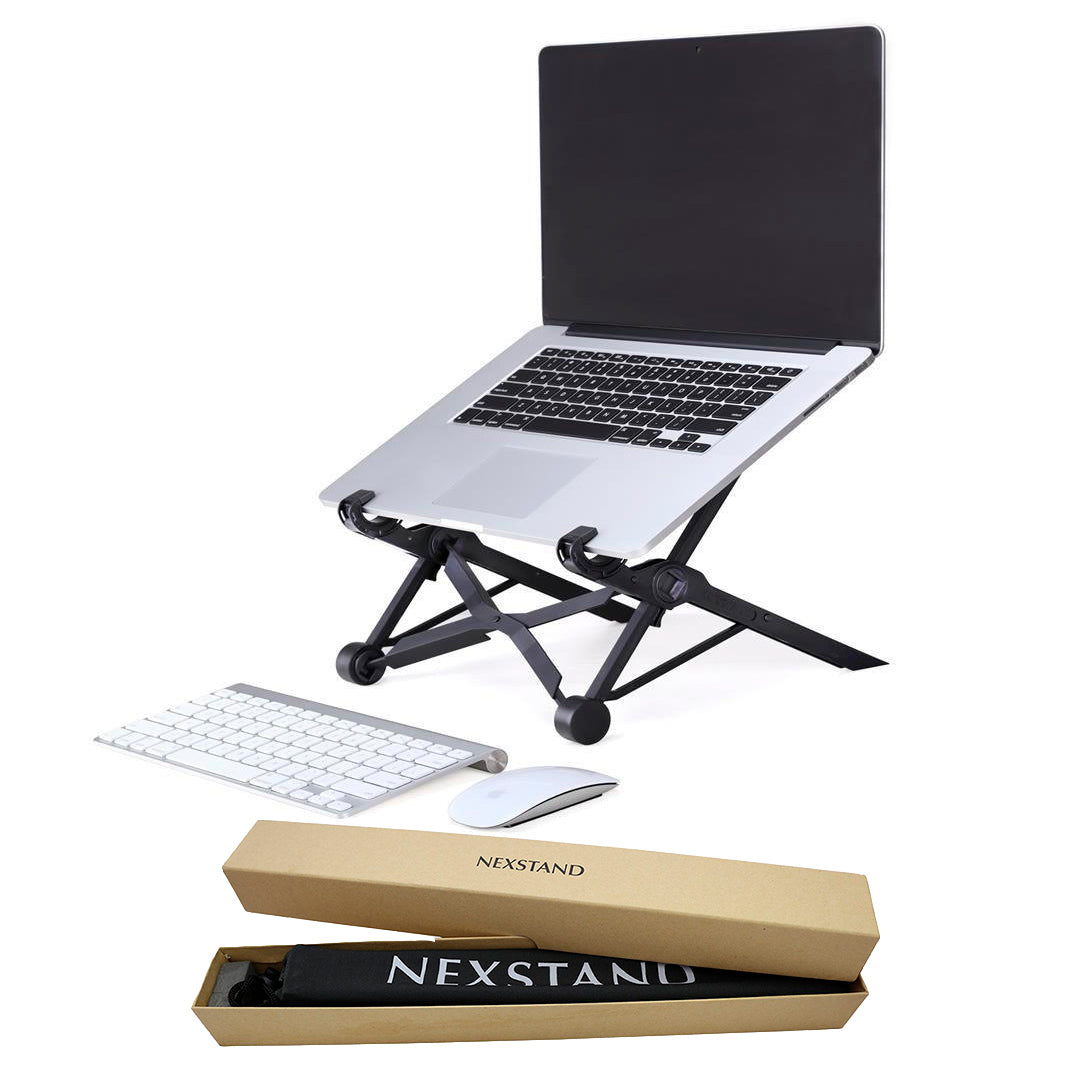
The K2 folds into a listed 36 × 3.8 × 3.8 cm (14 × 1.5 × 1.5 in) envelope and includes a nylon sleeve. Its stand-only weight is listed as 234 g (0.52 lb). The product page also describes rubberized contact feet and ventilation openings. A sleeve and fold-flat profile can make a stand easier to carry, but the page does not give the sleeve’s dimensions, the combined packed weight, or the clearance needed to open it. Compare the folded length with the compartment or bag opening you actually use.
The manufacturer describes the K2 as a desk stand and documents folding; it does not document lap support or a swivel base. It can be a travel match under the site’s definition—folding for packing—without being endorsed for unstable café tables, lap use, or turning a laptop toward another person. Those are different needs, and the evidence should not be stretched to answer them.
Eight positions, with a small source discrepancy
The stand-only page says 14–29 cm, while the separate K2 Remote Work Kit page reports 14–30 cm for the K2 stand. Both pages describe the eight-position model and list the same nominal folded size, platform footprint, capacity, and stand mass. The one-centimetre difference is preserved as a source inconsistency rather than averaged or resolved by guesswork. The pages also do not state a height for every setting, so the headline span cannot predict the screen’s exact final position.
If you require a precise rise, check the current K2 instructions or ask the seller for the relevant position measurement before purchase. Set your existing laptop and external keyboard where you can use them, estimate the desired screen position, and compare the documented range cautiously. An elevated screen can make a separate keyboard useful, but that is a layout consideration—not a claim that the K2 includes one.
Availability and package checks
On the dated manufacturer page, a visible sold-out label conflicted with structured offer data that carried another stock state. This review makes no present-tense availability or price claim from that mismatch. Confirm the exact SKU, package, and seller stock when you are ready to buy. If the K2 arrives through a third-party listing, check whether the sleeve and ultra-thin spacers are included rather than assuming every offer mirrors the manufacturer box list.
Bottom line
Among the three Nexstand supports covered here, the K2 is the strongest evidence-based choice when adjustable rise, folding, a 10-inch compatibility floor, and a stated 20-pound capacity all matter. It is heavier than K1, lighter than neither by a meaningful test, and more adaptable than fixed-rise K7 on paper. The fit caveat is real: verify that your laptop’s front edge is under 2 cm, its body contacts the supports correctly, and the rise works for your workstation. Treat the 14–29/30 cm wording as a discrepancy, and do not read the listing as a tested guarantee.
Nexstand K2 official product information · Plan an external-keyboard layout
Key specifications
Key details at a glance
| Main material | Fiberglass-reinforced nylon (manufacturer description). |
|---|---|
| Height-adjustable | Yes |
| Folds for storage | Yes |
| Supported placement | desk |
Use the exact model’s instructions for operating limits, supplied equipment and version differences.
Sources for this review
Sources for this assessment
Compare the setup, not just the silhouette
Use the finder to compare reviewed stands against the way you work and the features you actually need.