
Your needs, this model
Does it fit your priorities?
Will Rise work with bottom vents or fans?
Native Union says it is not recommended for laptops with bottom ventilation slots or fans; for other 13–16-inch laptops it specifies an underside without those openings. Confirm your exact laptop generation and vent layout before attaching anything; broad screen-size compatibility does not resolve that condition.
Explore this need in the finder →Is the attached support removable or height adjustable?
The page describes an always-on adhesive stand with an origami folding form, not a detachable desk riser or height-adjustment range. The maker says the sticky gel attaches it to the laptop but does not explain a safe removal-and-transfer procedure here, so ask Native Union before planning to move it between computers.
Explore this need in the finder →Can I take the laptop and stand through several work locations?
The manufacturer describes the support as portable, foldable and 2.5 mm thick, so it stays with the laptop rather than adding a separate support to your bag. It lists up to 3 kg and a 20-degree maximum viewing angle, but page copy conflicts on weight; check the exact underside, case clearance and adhesive care first.
Explore this need in the finder →Native Union Rise is an adhesive laptop stand designed to travel with the laptop rather than as a separate piece in a bag. The support folds into an always-on profile under the computer and the maker lists a maximum viewing angle of 20 degrees, a 3 kg load limit and 13–16-inch compatibility. The main screening question is the laptop underside: Native Union says other 13–16-inch laptops need to have no ventilation slots underneath and warns against use with bottom fans or vents. This assessment is based on the current manufacturer page and its product data, not hands-on installation or cooling tests.
Attachment is the defining difference
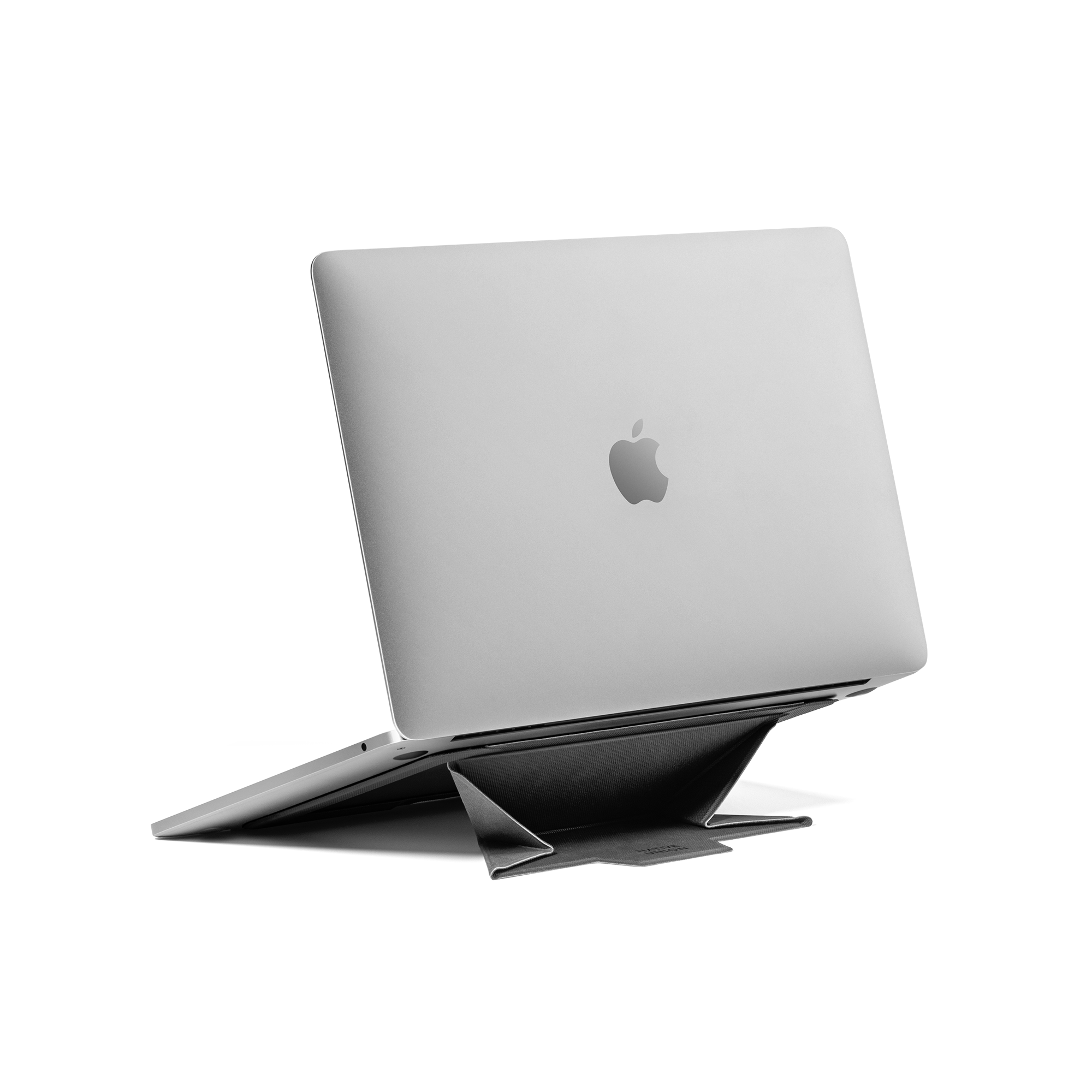
Rise uses adhesive sticky gel on the laptop underside. That removes one setup step at a new desk because the support stays with the device, and its origami-style panels fold away when not propping the laptop. The maker calls it portable and always-on, and lists a 2.5 mm thickness. But this is not a freestanding stand to place under any machine: the laptop’s bottom surface, vent pattern, foot layout and case configuration determine whether the attachment is appropriate.
The compatibility block names 13–16-inch MacBooks and other 13–16-inch laptops without underside ventilation slots. A nearby warning says not to use it on laptops with ventilation slots or fans on the bottom. Do not assume that a similar diagonal means a similar underside. Check the exact model generation and the position of every vent. If the bottom fan or vent is in the contact area, or you cannot establish where the adhesive sits relative to airflow openings, ask Native Union before attaching the stand.
A small fixed support, not adjustable desk height
Native Union describes the stand as folding and says it can raise the display to a maximum 20-degree viewing angle. The source page does not document a height-adjustment range, a swivel base or a separate angle adjustment mechanism, so the safe reading is a fixed design angle with folding panels—not a stand that can be raised in stages to match different desks. If you need an adjustable work position, compare the Desk Laptop Stand models or another model with a documented height mechanism.
The page lists dimensions of 6.69 by 9.25 by 0.10 inches (170 by 235 by 2.5 mm) and a load ceiling of 3 kg. Those dimensions describe the stand, not a guaranteed laptop footprint. The product page does not map exact devices to model years or show a laptop-bottom clearance diagram. The manufacturer also states that its design helps prevent overheating; this assessment does not treat that claim as a measured cooling result. A passive support may alter airflow paths, but a photo and a maker description cannot establish thermal results for a particular laptop.
Weight and adhesive questions need care
The product specification block says 0.25 lb / 0.12 kg, while descriptive copy elsewhere says 0.11 kg. Those values conflict, so no single weight is presented here as settled. In either case, the primary travel appeal is that the stand stays with the laptop rather than needing a second item packed separately. The user still needs to consider whether a protective sleeve, laptop feet or case will interfere with the folded support.
The reviewed page says the product attaches with sticky gel but does not explain a safe removal, cleaning, reuse or transfer procedure. If you expect to move it to a replacement laptop, confirm the manufacturer's instructions before purchase. Do not assume the adhesive can be peeled and reapplied without residue or lost grip. The exact SKU is RISE-STAND-BLK-NP; the product-data page returns one default variant rather than several documented color configurations.
Rise versus an independent stand
Compared with Native Union Fold, Rise is a fixed component of the laptop setup and Fold is a separate aluminum support with its own pouch. Rise is constrained by underside vents; Fold is constrained by a separate piece to carry, a fixed 15-degree angle, a 3 kg ceiling and a conflicting published weight. Compared with the weighted-base Desk stands, Rise is much thinner as described but does not provide the same documented height-adjustment mechanism or tray. The choice is about attachment, underside clearance and everyday setup, not just which product is called portable.
Who should compare it
Rise may suit a user whose exact 13–16-inch laptop has a compatible underside, stays under the 3 kg ceiling, and benefits from a slim support that remains attached through travel. It is a poor fit when bottom ventilation is present, the laptop case or feet obstruct installation, transfer between devices is expected without a verified removal plan, or height adjustment is essential. Before choosing, inspect the exact chassis underside, check case clearance, confirm adhesive care and verify the seller’s SKU. The photo in this review is the exact official black product image, not proof of your laptop’s compatibility.
Key specifications
Key details at a glance
| Height-adjustable | No |
|---|---|
| Folds for storage | Yes |
| Swivel base | No |
| Supported placement | desk |
Use the exact model’s instructions for operating limits, supplied equipment and version differences.
Sources for this review
Sources for this assessment
Compare the setup, not just the silhouette
Use the finder to compare reviewed stands against the way you work and the features you actually need.