
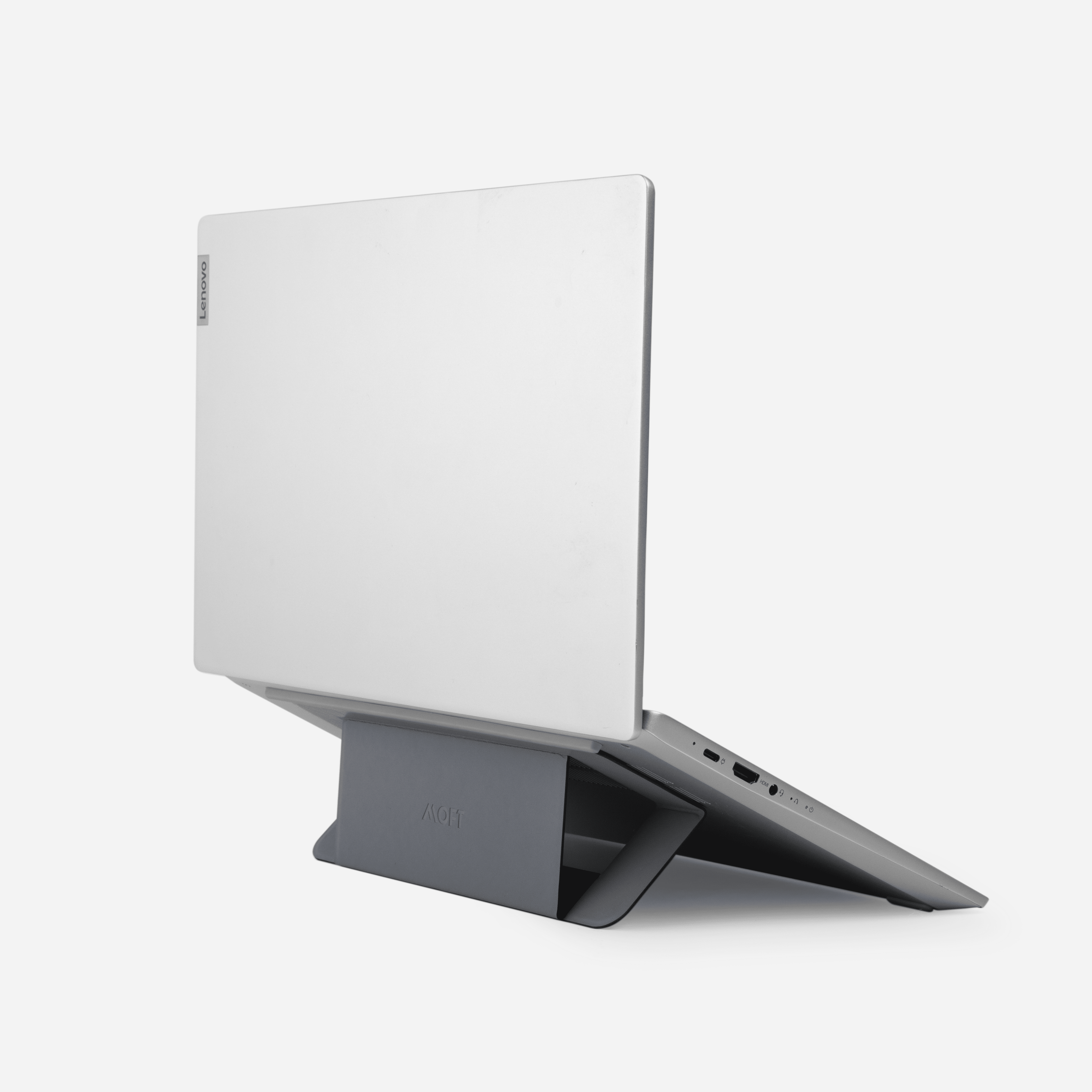
Your needs, this model
Does it fit your priorities?
How does the MOFT Airflow Stand adjust?
The exact MS005 page lists two lift positions, 2 or 3 inches. Those are preset support positions; the manufacturer does not provide a per-laptop screen-height chart. A higher rear support also changes the keyboard angle.
Explore this need in the finder →Does Airflow Stand mean my laptop will run cooler?
The product page names the stand Airflow and specifies compatibility for laptops with vents near the hinge, but it gives no fan, temperature test or cooling comparison. Check the actual underside and ask MOFT about the exact model; the name alone is not a thermal-performance result.
Explore this need in the finder →Is this a separate stand to pack for travel?
No—the manufacturer describes the MS005 as an adhesive version intended to stay attached. It lists a 2.5 mm thickness and 65 g weight, but no separate bag envelope; verify that the installed support is compatible with your laptop and carrying routine.
Explore this need in the finder →MOFT's Airflow Stand (MS005) is a thin adhesive stand for a laptop underside, not a fan-driven cooling pad. Its design stays attached when not in use and opens into one of two elevated positions. MOFT's product page specifically describes a laptop with vents near the hinge, a detail that separates this model from the standard MS006 Adhesive Laptop Stand. The distinction is useful, but it is not a thermal test or a complete laptop compatibility list.
A small attached support for a particular underside layout
The U.S.-facing product page lists the Airflow Stand at 224 by 135 by 2.5 millimeters and 65 grams. It names two lift positions of 2 or 3 inches and describes the stand as adhesive and intended to remain attached to the laptop. MOFT says it fits 11.6–16-inch laptops “with vents near the hinge.” It does not identify every compatible laptop, define how close a vent must be to the hinge, or say that every hinge-area vent pattern will work. The underside must still be checked against the product's support surfaces and adhesive placement.
The size and mass are not interchangeable with the MS006 figures: Airflow is narrower and slightly thinner, and the same page uses a different ventilation-related compatibility phrase. Its fold-down format is suited to a laptop that travels with the stand installed; it is not a portable stand to move freely between multiple computers. MOFT's product page says the adhesive version is always attached. Do not treat “removable” as a promise that repeated repositioning will preserve the adhesive bond or leave every computer finish unchanged.
“Airflow” is not proof of cooler operation
The manufacturer uses the Airflow name and depicts the product around the rear portion of a laptop. The page provides no fan, power connection, measured temperature reduction, airflow test or laptop-specific cooling comparison. The stand is therefore assessed here as a passive support with a vent-related fit note, not as an active cooler and not as evidence that a particular laptop will run cooler. If your computer's vents are at the front, sides, or elsewhere, or if the adhesive zones would cover a cooling opening, ask MOFT about the exact model before ordering.
The listed two positions offer a fixed choice rather than a continuous adjustment mechanism. Raising the back changes both screen height and keyboard angle; the product page does not give the resulting screen lift for different laptop dimensions. It also does not state a laptop weight rating, an exact chassis-footprint chart, or a desk base dimension, since the support is carried on the computer. A product image can clarify the arrangement, but cannot certify that your vents, feet, case or bottom panel align with it.
Travel and installation are linked
At 2.5 millimeters thick and 65 grams, the listed stand adds little separate cargo, but it does so by remaining on the laptop. That makes it a different travel tradeoff from Roost or other freestanding stands: there is no additional stand to pack, but the computer itself must be a suitable attachment surface and the support stays with that one device. The maker's product page describes the stand as portable and always attached. It does not publish an additional bag envelope, a detachment procedure, or repeated-adhesion cycle rating. If you expect to change devices, compare the non-adhesive MOFT version rather than assuming this one can be transferred safely.
MS005 has no documented lap mode or swivel base. The two positions are tilt/lift positions, not rotation for screen sharing. The materials are described as vegan leather and fiberglass, but there is no independent durability or heat-performance evidence in the sources reviewed. We have not installed the adhesive, loaded it, measured its real lift or tested it for airflow. Treat the product-page specifications as the maker's claims, not observed performance.
How to choose between Airflow and MS006
Start with the underside. MOFT lists the standard MS006 for 11.6–16-inch laptops without underside vents and excludes specified Surface Book models. Airflow is separately listed for laptops with vents near the hinge. Those short phrases do not prove universal fit or resolve every possible vent location; they indicate that the products are not interchangeable by name alone. The MS005 is lighter and has the smaller 224-by-135-millimeter listed body, while MS006 is listed at 170 by 224 millimeters; compare the diagrams and the exact adhesive footprint with the computer.
Before ordering, verify model MS005, the chosen color, laptop size, vent location, feet and case. Confirm the maker's current placement instructions and ask about any non-flat or coated underside. If a stand must be detachable, support a laptop on your lap, or rotate on a base, this is not the documented solution. It is a compact desk stand designed to fold down on a compatible laptop, with no broader claim about ergonomics or cooling.
Key specifications
Key details at a glance
| Main material | Vegan leather and fiberglass (manufacturer-listed) |
|---|---|
| Height-adjustable | Yes |
| Folds for storage | Yes |
| Supported placement | desk |
Use the exact model’s instructions for operating limits, supplied equipment and version differences.
Sources for this review
Sources for this assessment
Compare the setup, not just the silhouette
Use the finder to compare reviewed stands against the way you work and the features you actually need.