
Your needs, this model
Does it fit your priorities?
What is included besides the Casa laptop stand?
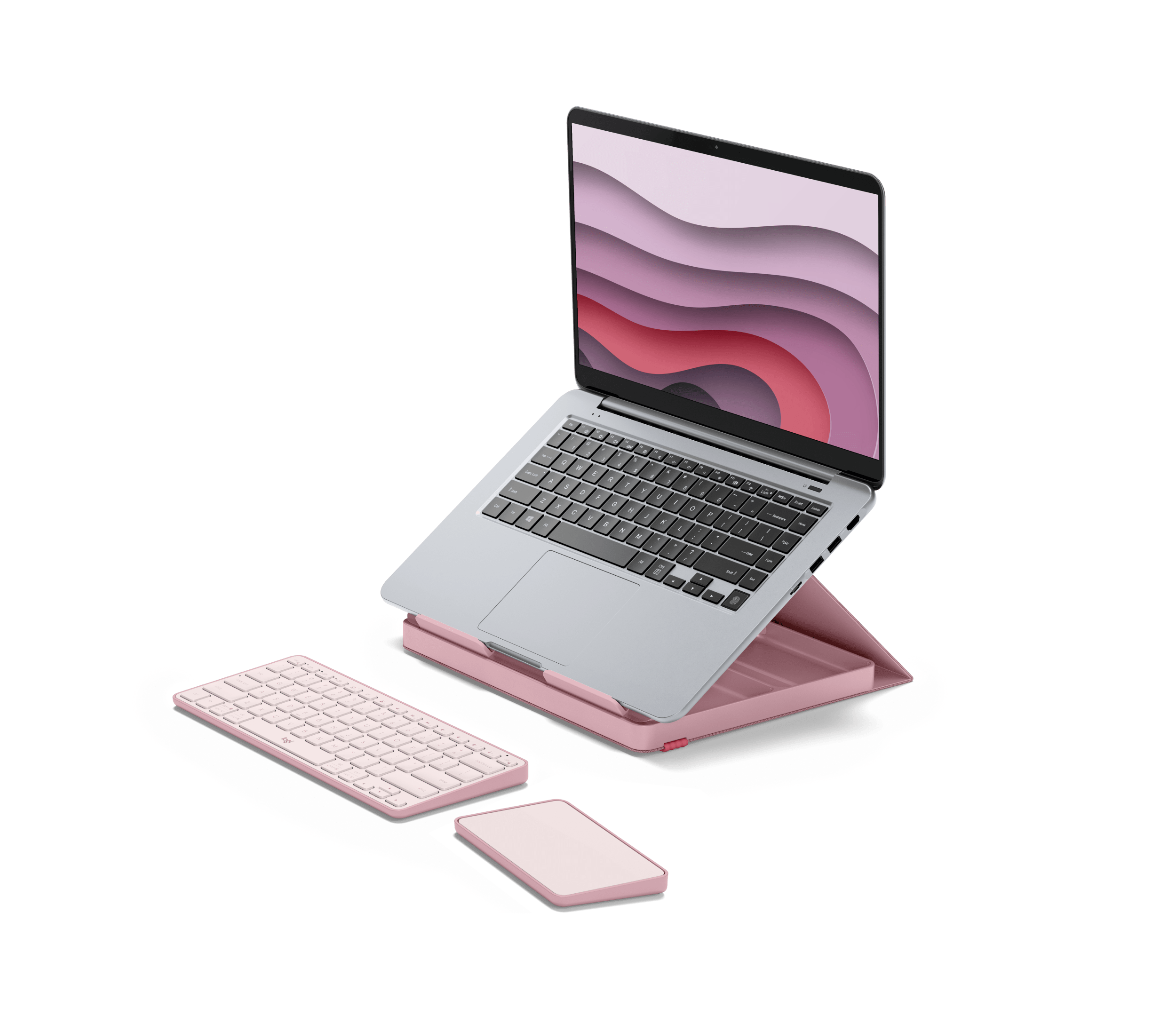
Logitech describes Casa Pop-Up Desk as a bundle of the Casa Book case/stand, Casa Keys wireless keyboard and Casa Touch wireless touchpad. The setup guide shows the keyboard and touchpad being removed and placed in front of the open laptop. If you already have preferred input devices, compare this full kit with a stand-only option before buying.
Explore this need in the finder →Will Casa Book fit a 17-inch laptop?
Logitech claims support for most laptops from 10 to 17 inches and up to 7.5 kg (16.5 lb), while excluding tablet computers, tablet laptops and laptops with non-square edges above 12 mm. The page does not give a laptop-by-laptop footprint chart. Measure your exact base and contact edges, including any case, and do not treat diagonal size alone as proof of fit.
Explore this need in the finder →Can I raise the screen to different stand heights?
No height-adjustment mechanism or selectable range is documented. The specification sheet gives Casa Book as 160 mm high when opened as a laptop stand; the laptop's own screen hinge can change its viewing angle, but that does not raise the stand. If changing height is essential, use a model whose adjustment mechanism is specifically documented.
Explore this need in the finder →Does the kit fold for travel, and how much does the full set weigh?
Logitech describes Casa as folding away and storing its keyboard and touchpad together. The product sheet lists the Casa Book component at 690 g without those devices or the cable, but does not state the complete kit's carry weight or packed envelope. Folding is documented; a luggage fit or lightweight-travel claim is not.
Explore this need in the finder →Research note: This assessment compares Logitech's published product and setup information; it is not a hands-on fit test or a claim of personal use. The pictured notebook is an illustration and does not establish that another laptop fits.
What is actually in this “stand”
Casa Pop-Up Desk is an all-in-one work kit, not simply a laptop shelf. Its Casa Book is a book-like case that folds open to support a laptop, while Casa Keys and Casa Touch are a separate wireless keyboard and touchpad stored inside the kit. Logitech's product page describes the bundle as stand, keyboard and touchpad; the company setup guide describes removing those devices, placing them in front of the stand, clipping the top panel into its groove, and then setting the laptop on it. Logitech tells users to open the laptop for extra security.
That package distinction matters more than a finish choice. Someone who wants a carry-together input set for a shared or temporary desk gets more than a riser. A person who already owns a preferred keyboard and pointing device may instead be paying for duplicate peripherals. I would compare the full kit with a stand-only model before deciding; the two are different purchases even though both lift an open notebook.
Fit is bounded, not universal
Logitech says Casa Book supports “most” laptops from 10 to 17 inches and up to 7.5 kg (16.5 lb). Its compatibility page excludes tablet computers, tablet laptops, and laptops with non-square edges above 12 mm. Those statements are a useful screening range, not a footprint-by-footprint fit chart. Screen diagonal alone cannot tell you whether the base, edge shape, feet, vents, or a protective case will sit correctly on the support ledges. Measure the actual laptop at its contact points and ask Logitech about a borderline chassis rather than reading “most” as a fit guarantee.
The setup information describes an open laptop on the book case. It does not establish lap use or a closed-laptop vertical-display arrangement. The device shown on Logitech's promotional image is not a test fixture, and the manufacturer compatibility limits do not mean that every 10-to-17-inch computer has the same base shape or weight.
A fixed stand height, not a height-adjustable riser
The product specification sheet lists Casa Book at 160 mm high when opened as a laptop stand and gives its case dimensions separately. That is one product geometry, not a range of selectable working heights. The product and setup pages do not describe a height slider, height positions, a user-set stand angle, or a swivel base. The laptop's own hinge can change the display angle, but that is not a stand-height adjustment. If you share a desk across different chairs or need to tune the screen height after setup, treat this as a fixed arrangement and look at a model with a documented adjustment mechanism instead.
Casa's included keyboard and touchpad do create a more separated typing position than using the laptop's built-in keyboard beneath a raised screen. Logitech identifies Bluetooth Low Energy connectivity and support across several operating systems for those input devices; it also says some touchpad gestures on macOS require Logi Options+. These are features of the bundled input devices, not added adjustment or connectivity built into the laptop stand itself.
Folds for storage, but the whole kit has no published carry weight
Logitech presents Casa as a foldaway kit and says the pieces store together. Its product sheet gives Casa Book as 690 g (about 1.5 lb) without the other devices or cable, 29 mm thick closed, and 230 by 290 mm in plan; open, it is listed at 160 mm high. Those numbers describe the case/stand component, not the weight or packed envelope of the complete kit. I did not find a combined kit weight or bag-fit dimensions in the reviewed manufacturer pages. “Folds away” is evidence that it closes for storage, not proof that the full set will be comfortable in every work bag or pass a strict travel-size requirement.
Where it makes sense—and where it does not
The strongest case for Casa is a desk user who wants one coordinated bundle: an open-laptop support plus a separate keyboard and touchpad that can be stored together afterward. Its portfolio form may also suit someone who moves between home and another desk and values putting the kit away as one unit. The limits are equally specific: no documented lap setup, no adjustable stand height, no swivel, and no exact-chassis fit chart. The 7.5 kg ceiling is not a substitute for checking the laptop's shape and contact points.
For comparison, the Roost V3 is a folding stand with seven documented height settings and a maker-listed 6.5–12.5-inch screen-lift range, while the Rain Design mStand is a fixed aluminum stand sold as a stand rather than as a keyboard/touchpad bundle. Those alternatives answer different needs: the Roost documents selectable lift; the mStand avoids buying Casa's bundled input devices. Neither comparison proves which product fits your particular computer.
Check the exact color and package
The current U.S. Logitech product page exposes Bohemian Blush, part 920-011237, and Nordic Calm, part 920-011238. A Logitech-authored 2024 specification sheet also lists Classic Chic, part 920-011236, for North America; that finish did not appear among the current product-page choices I inspected, so its present offer status is not established here. Confirm the exact part number and keyboard layout, what is included in the seller's package, the laptop's contact fit, and the return route before ordering. Do not rely on a photo, a broad diagonal range, or the phrase “all-in-one” to answer those checks for you.
Key specifications
Key details at a glance
| Stand width | 9.06 in |
|---|---|
| Overall stand height | 6.2 in |
| Manufacturer-listed height range | No adjustment range is published; the Casa Book is listed as 160 mm (6.2 in) high when opened as a laptop stand. |
| Stand depth | 11.42 in |
| Stand weight | 1.5 lb |
| Height-adjustable | No |
| Folds for storage | Yes |
| Swivel base | No |
| Designed for a closed-laptop / external-display desk setup | No |
| Supported placement | desk |
Use the exact model’s instructions for operating limits, supplied equipment and version differences.
Sources for this review
Sources for this assessment
Compare the setup, not just the silhouette
Use the finder to compare reviewed stands against the way you work and the features you actually need.