
Your needs, this model
Does it fit your priorities?
Does the Tech Tray raise the laptop screen?
No screen-rise mechanism is documented. Humanscale describes a tray that slides horizontally beneath a work surface to store laptops, including docked devices, and provide access. If you need a raised display while using the laptop keyboard, compare an open-laptop stand such as the L6 instead.
Explore this need in the finder →How do I check whether the Tech Tray fits under my desk?
Measure the underside around the proposed mount, including the desk apron, crossbars, control box, cable tray, power strips and knee space. Humanscale describes the complete unit as sitting 3.5 inches below the desktop/track area and current Shop says it installs under most desks; neither statement guarantees clearance on your workstation. Confirm the exact mounting diagram and required screws for your desk.
Explore this need in the finder →Will it hold my particular notebook and dock?
Humanscale says the platform can hold a laptop with a docking station, but it does not give a laptop footprint chart or a tray load rating. Its product details list a 12-by-14-inch platform, while an older technical-specification block reverses the width/length labels and the current Shop listing confirms 12-inch width without resolving the second axis. Measure the notebook, feet, case, dock and cable bends, and ask Humanscale to confirm dimensions and load limits if your setup is close.
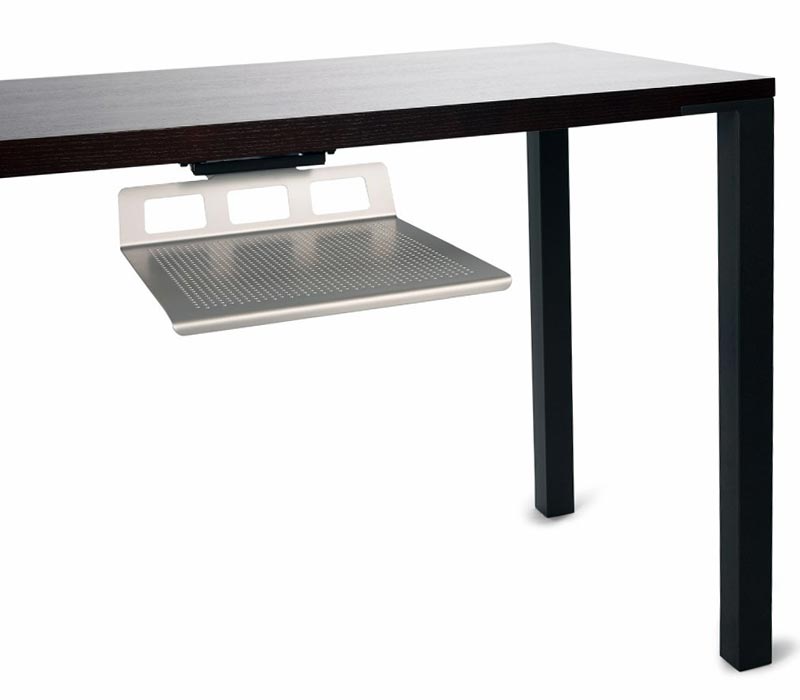
Explore this need in the finder →Humanscale’s Tech Tray (item code TT) is a sliding shelf that mounts below a desk. It supports laptops and other portable electronics while moving them off the desktop; the manufacturer also describes room for a laptop with a docking station. This is a different answer from a screen riser: it does not raise an open laptop to eye level. A useful editorial scenario is a closed or docked laptop stored below the work surface while a separate display and input devices remain above, but Humanscale does not describe that as a tested monitor configuration or guarantee lid-closed compatibility.
A storage tray, not a raised-screen stand
The Tech Tray’s function is to clear surface area without making a laptop disappear into a drawer. Its rail lets the platform slide forward for access and back under the desk for storage. That can suit a workstation where a laptop is docked or used as a secondary device, but it does not change the computer’s screen height. If you routinely type on the built-in keyboard and watch the laptop’s own display, an under-desk tray is not a substitute for an open-laptop riser.
The current Humanscale Shop listing identifies SKU TT, a 559 mm track and a 15-year warranty. The older U.S. product page describes a standard 22-inch track and places the tray 3.5 inches below the track. It also says the unit installs beneath the desk using the supplied screws. The measurement describes the hardware arrangement, not a universal promise that the tray will clear every desktop frame, cable basket, user’s legs or adjustable-desk mechanism.
Resolve the dimension labels before a tight installation
The product details describe a 12-inch-wide by 14-inch-deep platform. The technical-specification block on that same older product page reverses the axes, listing 14 inches as width and 12 inches as length. The current Shop listing again gives a 12-inch width, but does not resolve the depth label in the same detailed way. Keep that mismatch visible rather than treating the 14-inch figure as certain front-to-back clearance. The tray’s pictured profile is not a dimensioned drawing for your exact installation.
There is no published laptop footprint chart, laptop-specific weight limit or tray-load rating in the sources reviewed here. “Fits a laptop with a docking station” is useful intended-use evidence, not a measured compatibility table. Measure the computer’s complete footprint, feet, case, dock, connector and cable bend; then confirm that the tray, desk opening and surrounding hardware leave the device accessible. Do not place equipment on it based only on the product photograph.
Installation is the main fit question
Humanscale’s older product page says the tray can attach under any desk with the screws provided, while its current Shop listing uses the more qualified wording “under most desks.” The sources do not give a universal desk-thickness range, screw-position diagram, required tool list, under-desk obstacle map or weight capacity. Inspect the actual underside for a crossbar, power strip, cable tray, control box or other obstruction before choosing a mounting point. For an adjustable-height desk, check the complete movement path and cable slack as well as the static position.
The product page describes the full unit as sitting within 3.5 inches of the underside of the desk, and the current listing says it maintains leg clearance. Treat these as manufacturer descriptions, not a guarantee that the tray clears your knees. Measure the available vertical space where the user sits, the desk apron and any hardware underneath; then leave enough room to pull the shelf out without trapping a cord or bumping the chair.
Where it fits among other laptop supports
The Tech Tray belongs in a desk-storage comparison, not in a list of adjustable risers. The Humanscale L6 is an open-laptop desktop holder with a 7.3-inch height-adjustment range and a 360-degree swivel base; it keeps the screen above the work surface. The Tech Tray moves horizontally beneath it and has no documented height-adjustment or swivel-base feature. A vertical holder such as the Rain Design mTower or Twelve South BookArc Flex grips a closed computer beside a display; that is a different footprint and mounting arrangement again. Those distinctions help avoid shopping by silhouette alone.
Humanscale says the tray accommodates portable devices and helps organize a workstation; the page also mentions a laptop with a docking station. It does not report independently measured load strength, stability while extended, thermal performance or user experience. The official product image shows the silver tray installed beneath a dark desk, but it does not show a laptop or establish the contents of a particular package.
Who should investigate it—and what remains unknown
The Tech Tray is worth investigating if the goal is to reclaim desktop area while keeping a laptop or docked portable device close at hand. It is not a travel stand, lap support, laptop screen riser or documented swivel arrangement. The installation location, exact desk compatibility, loaded clearance and tray dimensions need checking before purchase. If the laptop’s display must remain open and visible, or the device must sit above the desk, compare a conventional laptop riser instead.
This assessment uses Humanscale’s U.S. Tech Tray product page and current Shop listing. It does not claim installation, device fit, measured capacity, leg clearance in a real desk, slide-cycle testing or observed ownership. Confirm the exact TT package, track, mounting hardware, product dimensions, seller and return terms with the manufacturer or retailer before ordering.
Key specifications
Key details at a glance
| Stand width | 12 in |
|---|---|
| Main material | Aluminum |
| Height-adjustable | No |
| Folds for storage | No |
| Swivel base | No |
| Supported placement | desk |
Use the exact model’s instructions for operating limits, supplied equipment and version differences.
Sources for this review
Sources for this assessment
Compare the setup, not just the silhouette
Use the finder to compare reviewed stands against the way you work and the features you actually need.