
Your needs, this model
Does it fit your priorities?
How much height adjustment does the L6 provide, and what moves?
Humanscale lists 7.3 inches of height adjustment through a clutch hinge. Its brochure gives 2.8 inches as the minimum overall stand height and 10.1 inches when fully extended. This changes the open laptop’s display position; it is not a stated screen-lift guarantee for every laptop. The base rotation is a separate 360-degree movement.
Explore this need in the finder →Does the L6 rotate for screen sharing?
Yes. Humanscale describes a one-touch 360-degree swivel base, separate from the height-adjustment hinge. Check that the desk has enough room for the full base and enough cable slack to turn the notebook without pulling a connector. This is a desk arrangement, not a folding travel stand.
Explore this need in the finder →Will my exact laptop fit on the L6?
Confirm the complete base, feet, case, vents and thickness. Humanscale’s product page says at least 10 inches wide and 6 inches deep, while the brochure instead specifies a minimum length of 8.5 inches; both list a maximum thickness of 1.5 inches. The maker does not publish a model-by-model footprint chart or laptop weight limit, and it does not reconcile those minimum-size statements. Ask for exact-model guidance if your computer is close to either boundary.
Explore this need in the finder →Humanscale’s L6 Laptop Holder is a desk-based riser for an open notebook, with two unusual features in one unit: a clutch-hinge height adjustment and a one-touch 360-degree swiveling base. It is a more substantial permanent-workstation choice than a thin travel stand, and its 8.4-pound listed weight makes that distinction practical. Humanscale calls the device a “Notebook Manager” in its product materials; the exact item code is L6.
Height adjustment and swivel are separate movements
The L6’s hinge lets the user raise or lower the laptop display through a manufacturer-listed 7.3 inches of height adjustment. A separate one-touch base rotates through 360 degrees. The first movement changes screen position; the second turns the whole support for screen sharing. Neither feature should be confused with a folding travel joint. The product page does not publish discrete height stops, a laptop-specific screen-rise measurement, or a stand folded for packing.
That combination can be relevant when a fixed-height riser is too limiting or when the notebook screen needs to turn toward another person. It still does not choose a comfortable viewing height for you: desk height, chair, posture and laptop geometry matter. The maker’s brochure specifically calls for an external keyboard and mouse as part of its recommended long-session arrangement. Those are separate equipment, not included features established by the L6 listing.
Check the footprint and the exact laptop fit claim
Humanscale lists the stand at 13.5 inches wide and 10.9 inches deep, with a maximum displayed height of 10.1 inches in the older dimension set. The brochure adds a 2.8-inch minimum overall height and gives the same 10.1-inch fully extended height. It lists the unit’s weight as 8.4 pounds. The current Shop grid labels 10.9 inches as width, 13.5 as length and 10.9 as depth, so its axis labels do not align cleanly with the product page and brochure; confirm the footprint drawing if direction matters. This is a firm desk footprint and a relatively heavy object to move between rooms; no folded-size or bag-fit claim is published.
Two official sources disagree on the laptop’s minimum footprint. The product-page details say the L6 accommodates notebooks at least 10 inches wide and 6 inches deep, up to 1.5 inches thick. The brochure instead says a notebook must be at least 8.5 inches in length, also up to 1.5 inches thick. Those are not the same dimensions or threshold, and the sources do not explain the difference. Do not treat one statement as a corrected version of the other. If your laptop is near either boundary, confirm the exact support geometry with Humanscale before ordering.
Neither published fit phrase is a chassis-by-chassis chart. Measure the actual base, protruding feet, case and vent positions, then compare them with the L6 platform and raised support. The source pages do not state a laptop-weight capacity or guarantee that every notebook within a screen-size class is stable on the stand.
Useful workstation details, not performance guarantees
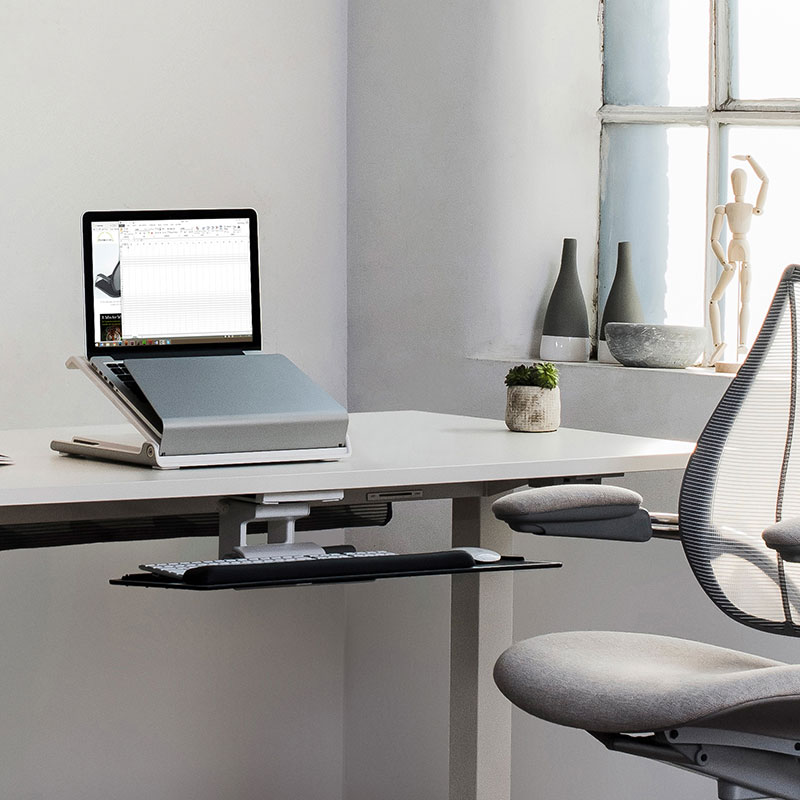
Humanscale describes the L6 as having cable management, heat ventilation and security support. Those features can help keep a desk organized, but the product page does not publish a measured temperature change or a thermal comparison. Its security language should not be read as proof that a cable lock is included in every package; check the exact configuration and accessory list if locking matters. An official product photograph shows a white-and-silver L6 holding an open laptop, but that pictured computer is not a fit test for your machine.
The maker’s current shop listing identifies SKU L6, gives a 15-year warranty and lists the stand at 8.4 pounds. I use those as source-reported specifications, not as an independent quality or durability finding. The current product page and older product materials show slightly different dimension labels and minimum-fit wording, so use the exact current instructions and ask the seller to resolve any point that affects a close fit.
How it differs from simpler stands
A fixed desktop riser such as the Rain Design mStand has a simpler job: it raises the screen to one height and leaves rotation out. Rain Design’s mStand360 adds a rotating base but remains a fixed-height design. The L6 combines a rotating base with a manually adjustable display height, although it takes more desk space and weighs more than many packable stands. The Nulaxy LS18 offers a separate folding option with height, tilt and swivel features, but its manufacturer likewise requires the laptop to be removed before height or tilt changes. Those products are different setups rather than interchangeable versions of the L6.
The distinction also matters for a closed-laptop desk. L6 is presented as a holder for a raised notebook display, with external keyboard and mouse use. It is not a vertical cradle or an under-desk storage tray. If the laptop will stay closed beside an external monitor, compare a product designed around that routine instead of assuming the L6’s support and security features make it a closed-laptop holder.
Who should investigate it—and what remains unknown
The L6 is worth considering for a desk where screen height must be adjusted and the laptop should turn on its base for collaboration. It is a poor shortcut for a commuter who needs a light folded stand, someone seeking a lap platform, or anyone relying on a published maximum laptop load or an exact model fit chart. Measure available desk depth, confirm which minimum-size statement applies to your laptop, and decide whether the height range and external input devices suit the setup.
This assessment is based on Humanscale’s L6 product page, current shop listing, product brochure and installation-resource listing. It does not claim hands-on assembly, ownership, laptop fit, measured stability, temperature testing, ergonomic results or typing performance. Confirm the exact L6 item, finish, included accessories, current seller and return terms before deciding.
Key specifications
Key details at a glance
| Stand width | 13.5 in |
|---|---|
| Overall stand height | 10.1 in |
| Manufacturer-listed height range | 7.3 inches of height adjustment; brochure lists 2.8 inches minimum overall height and 10.1 inches fully extended. |
| Stand depth | 10.9 in |
| Stand weight | 8.4 lb |
| Height-adjustable | Yes |
| Swivel base | Yes |
| Maximum supported laptop thickness | 1.5 in |
| Designed for a closed-laptop / external-display desk setup | No |
| Supported placement | desk |
Use the exact model’s instructions for operating limits, supplied equipment and version differences.
Sources for this review
Sources for this assessment
Compare the setup, not just the silhouette
Use the finder to compare reviewed stands against the way you work and the features you actually need.