
Your needs, this model
Does it fit your priorities?
Can the 50-193-200 tray work as a stand by itself?
No. Ergotron says the Notebook Tray is not a stand-alone product and must be combined with a separately ordered arm, pivot or cart/workstation. It attaches through a VESA MIS-D 75 × 75 mm interface. Confirm that the mount is compatible and supports the combined tray-and-laptop load before buying; the tray listing is not a complete desk setup.
Explore this need in the finder →Does “up to 17.3 inches” mean my notebook will fit?
No exact chassis list is given. The manufacturer publishes a 0–17.3 inch display field and says the open-sided plate accommodates most laptops, but screen diagonal does not determine base width, foot position or attachment clearance. Check the laptop body against the tray rails and fastening arrangement, including any docking station you plan to keep attached.
Explore this need in the finder →Can I use the 12 lb limit with any monitor arm?
No. Ergotron states the 2.5–12 lb (1.1–5.4 kg) notebook load only when this tray is combined with an LX arm. For other arms or pivots, the manufacturer instructs customers to contact Ergotron about load limits. Verify the arm’s VESA pattern and combined capacity; do not transfer arm height or swivel features to the tray itself.
Explore this need in the finder →Does the tray itself adjust height, tilt or swivel?
The tray page does not establish a stand-alone height, tilt or swivel mechanism. Those motions, where available, belong to the separately purchased compatible arm or workstation. Since no arm is included, the tray alone cannot satisfy a required height-adjustment or swivel-base choice.
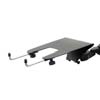
Explore this need in the finder →The Ergotron Notebook Tray (part 50-193-200) is easy to misread as a complete laptop stand because it holds a notebook in a work position. Ergotron is explicit, however: the tray is an accessory, not a stand-alone product. It must attach to a separately ordered arm, pivot or cart/workstation. The relevant interface is a VESA MIS-D 75 × 75 mm mounting pattern. Plan the complete support system, not just the tray, before treating it as a desk solution.
The important purchase is the mount plus the tray
At a desk, the tray can turn a compatible display arm or workstation into a laptop-support arrangement, but the arm itself determines how the screen moves and how the system attaches to the furniture. Ergotron’s LX Pro Desk Laptop Arm page lists 50-193-200 as a separate bundle component. That shows one supported desktop pairing; it does not make the arm part of the tray-only package. The arm, clamp or grommet base, and any other mount hardware must be checked in the exact offer. If you already own an arm, compare its hole pattern and load instructions. If you do not, price and evaluate the whole system as separate parts rather than comparing this accessory with a self-contained riser.
The manual specifies the 75 × 75 mm plate connection and advises contacting the mount maker before installing the tray on a non-Ergotron arm. It also says the support must safely carry the combined tray and laptop mass. These checks are more important than the page’s broad compatibility language: a mount can have the right hole pattern yet still be unsuitable for the load, position or working range you expect.
Fit is more than a screen-diagonal number
Ergotron describes an adjustable, open-sided plate and supplies adjustable rails and several ways to secure a notebook: Velcro, non-slip pads or clips. The kit can be used with or without a docking station, according to the manufacturer. Its specification also shows a 0–17.3-inch display field and says that it can accommodate most notebooks. That does not tell you whether the footprint, feet, rear hinge, ports or underside will sit safely in your particular assembly. Check the laptop’s actual base and the contact points of the tray, then choose a retention method that suits its shape. A dock, cable strain or protruding connector may change the available space.
The installation instructions add a meaningful safety limit: the supplied pads are not guaranteed to retain every notebook in every circumstance, and tilting can cause some devices to slide off. Keep the laptop secured and follow the instructions for the chosen mount; do not assume that rubber or adhesive contact alone prevents a fall at every angle. The open-sided geometry and adjustable rails broaden the setup choices, but they do not eliminate the need for a careful physical fit check.
Load ratings belong to a specific arm
The tray page gives a 2.5–12 lb (1.1–5.4 kg) laptop load range when used with an LX arm. Ergotron specifically tells buyers to ask about load limits when pairing the tray with other arms or pivots. Do not apply the LX figure to every VESA mount: the tray and computer form a combined load, and arm limits can depend on their exact model and configuration. The tray itself weighs 1.0 kg. Its 1.6 kg figure and 9.6 × 9.25 × 3.5 inch dimensions are shipping specifications, not the installed tray’s size. The manufacturer lists a five-year warranty for the component.
What the tray does not establish
There is no independent working-height range, tilt range or swivel-base specification for the tray by itself. An arm may provide height, reach, tilt or rotation, but those capabilities are part of the separately sourced mount and should not be inherited by this item’s fact record. The same distinction applies to desk compatibility: the tray may be used in a desk arrangement only when the correct arm or workstation is installed; it is not a lap support or travel stand. The Lenovo U.S. sitemap and item page also list an “Ergotron Notebook Tray” as retailer part 78001446. Lenovo’s product page exposes that retailer number and title but not Ergotron’s 50-193-200 code, so the review does not claim a formal retailer-to-maker SKU or package crosswalk.
This is a source-based assessment, not a hands-on test. Use the Ergotron U.S. product page, the LX Pro bundle component list and the official installation instructions to verify the exact tray, mount interface, load condition and setup cautions. The Lenovo observation remains separate: item 78001446.
Key specifications
Key details at a glance
| Main material | Metal construction; more detailed alloy not stated in the reviewed sources. |
|---|---|
| Supported placement | desk |
Use the exact model’s instructions for operating limits, supplied equipment and version differences.
Sources for this review
Sources for this assessment
- Ergotron U.S. Notebook Tray product page, part 50-193-200
- Ergotron LX Pro Desk Laptop Arm U.S. bundle page; Notebook Tray component 50-193-200
- Ergotron LX Notebook Arm / Notebook Tray installation instructions, document 888-45-040M
- Lenovo U.S. Ergotron Notebook Tray, retailer part 78001446
- Lenovo U.S. product sitemap, saved cycle64 capture (page reports 2026-09-15)
Compare the setup, not just the silhouette
Use the finder to compare reviewed stands against the way you work and the features you actually need.