
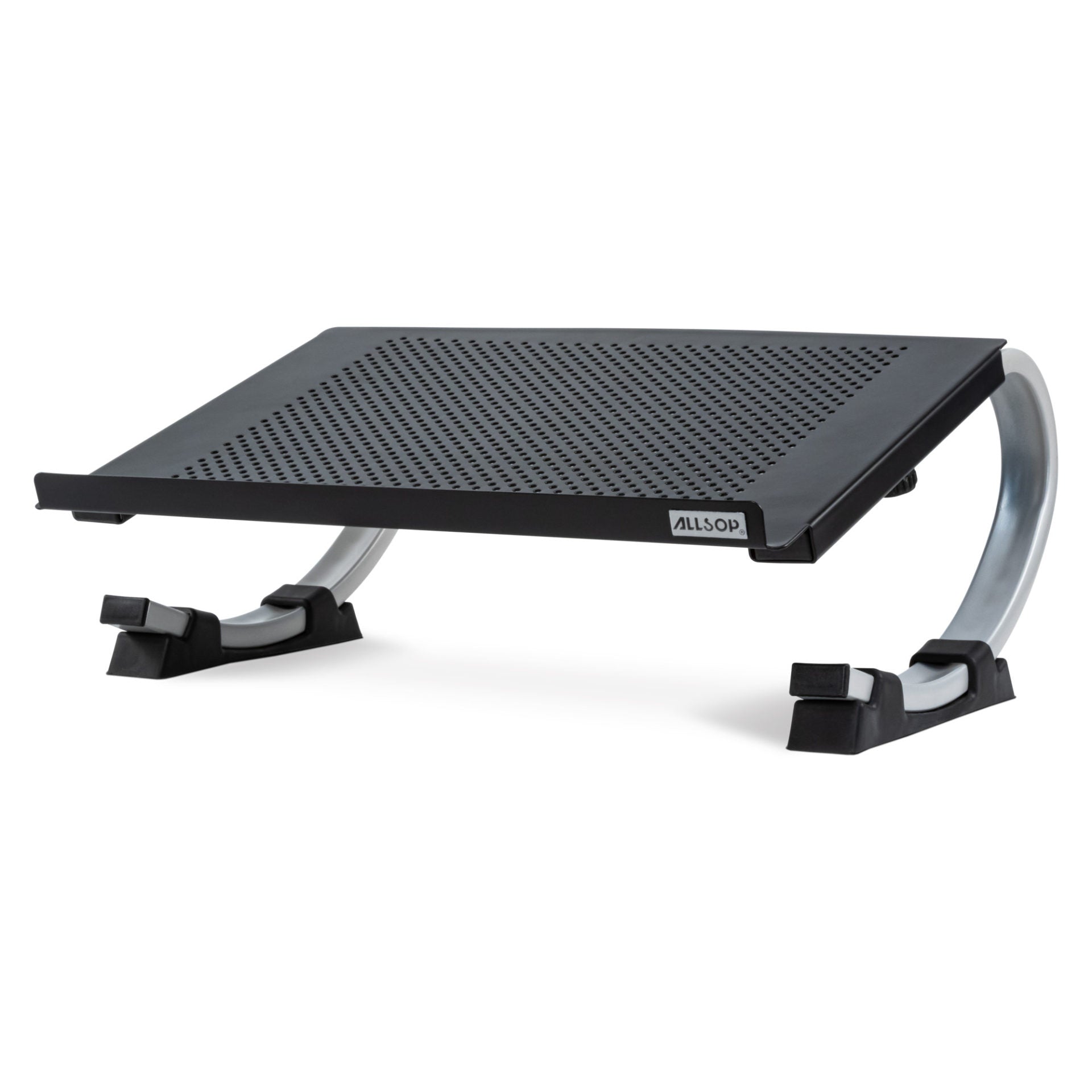
Your needs, this model
Does it fit your priorities?
Does the Redmond change height, or only tilt?
Allsop describes both height and angle adjustment: slide the feet along the curved legs to raise or lower the laptop screen, with a 0–27.5° variable range and a maximum stated 6.75-inch screen rise in the most curved setting. The screen lift is a manufacturer maximum, not the same for every laptop, and the working angle changes with it; this is not an independently sliding vertical column.
Explore this need in the finder →What device fit information is actually published for Redmond?
Allsop names laptops up to 17 inches and lists a 14.6-by-10-inch platform within 14.75-by-11.25-by-5-inch outer dimensions. The product text also uses a 40 lb figure for monitors/equipment on the horizontal surface, so it is not treated here as a laptop-specific capacity. The page does not name compatible chassis or foot layouts; compare the actual underside and ask about close fit.
Explore this need in the finder →Does the Redmond fold for travel?
The reviewed product page and instructions describe assembly and sliding-foot adjustment but do not establish a fold-flat transport mode or packed dimensions. Its 14.75-by-11.25-inch footprint is a desk-planning check, not a folded size. Do not infer travel folding from the moving feet or removable assembly.
Explore this need in the finder →The Allsop Redmond is a large, perforated platform whose viewing angle changes by moving its black feet along curved steel legs. That makes it a different kind of adjustment from a telescoping riser: the laptop tilts as its screen position changes, and the raised edge and track position have to keep the base secure. Allsop's user guide is unusually useful here because it explains the assembly and warns against moving the feet past the most-parallel position.
Angle, screen lift and setup are linked
Allsop lists an adjustable range from horizontal to 27.5 degrees and says the laptop screen can rise as much as 6.75 inches in the most curved position. The number is a maximum, not a promise that every laptop screen will gain exactly that much elevation. A wider or thicker chassis will sit differently, and an incline changes both the display and the attached keyboard. The manual tells the owner to move the feet to set the viewing position, keep the laptop on the angled platform, and use the parallel position for a monitor. It also cautions that moving the feet too far toward parallel could let a laptop slip off the back. That guidance is more important than treating the stand as a free-positioning desktop arm.
Assembly is part of the purchase decision. The guide shows the two curved legs being pressed into slots beneath the platform until their pins lock. The front is the end with the Allsop logo and raised lip. Once assembled, the feet slide along the legs to adjust the position; the instructions recommend inching them toward the desired setting and balancing the legs on a flat surface if the stand wobbles. This isn't a touch-button change or a stand intended to be folded and tossed in a bag. The manual does not describe a travel fold, and the product page publishes no packed dimensions.
A broad steel shelf needs a broad desk
The manufacturer lists a 14-by-10-inch platform and 14.75-by-11.25-inch outer footprint. The perforations leave openings through the steel surface, while the broad support and front lip are aimed at keeping an open laptop in place. The frame also has space underneath for a keyboard or office supplies, but those items are not included. Its size makes it more plausible as a dedicated desk accessory than a small portable riser: measure the desk area around the stand, the laptop's cable exits, and the location where an external keyboard will go before committing to the footprint.
Allsop says the stand supports laptops up to 17 inches and lists a 40-pound load claim on the same page that describes supporting monitors and other equipment in the horizontal position. That broad statement is not a laptop-by-laptop compatibility chart, and it does not tell you how a specific chassis, case, foot pattern, or vent location contacts the angled platform. We have not loaded the stand, checked its balance, tested its assembly, or measured screen position. Use the maker's range as a starting point and ask Allsop about a close fit rather than reading the maximum load as proof that any wide or heavy notebook is secure.
Compare adjustment style before choosing
Redmond's sliding-feet angle mechanism differs from the separate Allsop Metal Art model's discrete seven positions and from TechStyle's fixed slanted shelf. Redmond can move between positions along its curved legs, but it needs the user to rebalance the feet and confirm that the laptop remains caught by the front lip. It is not a vertical notebook holder, a swivel base, or a folding travel stand. If packing matters, compare the exact folded form and bag needs of a model designed to fold rather than assuming this assembled platform will collapse.
For a desk buyer who wants an adjustable laptop incline, has room for a 14-by-10-inch plate, and can work within the maker's stated laptop size range, Redmond offers more positioning flexibility than a fixed shelf. It is a poor match for someone who needs independent screen height without changing keyboard angle, a compact packed stand, or a verified fit for an unusual chassis. Before ordering, confirm that the exact SKU is 30498, make sure the feet and leg hardware are included, check the laptop's support points and weight with Allsop's current guidance, and keep the front lip facing the user during setup.
Key specifications
Key details at a glance
| Main material | Powder-coated steel with perforated platform |
|---|---|
| Height-adjustable | Yes |
| Supported placement | desk |
Use the exact model’s instructions for operating limits, supplied equipment and version differences.
Sources for this review
Sources for this assessment
Compare the setup, not just the silhouette
Use the finder to compare reviewed stands against the way you work and the features you actually need.